Running PostgreSQL in Docker takes ten seconds to start in development — and about ten minutes to lose data in production if you copy a default compose.yaml snippet from a tutorial.
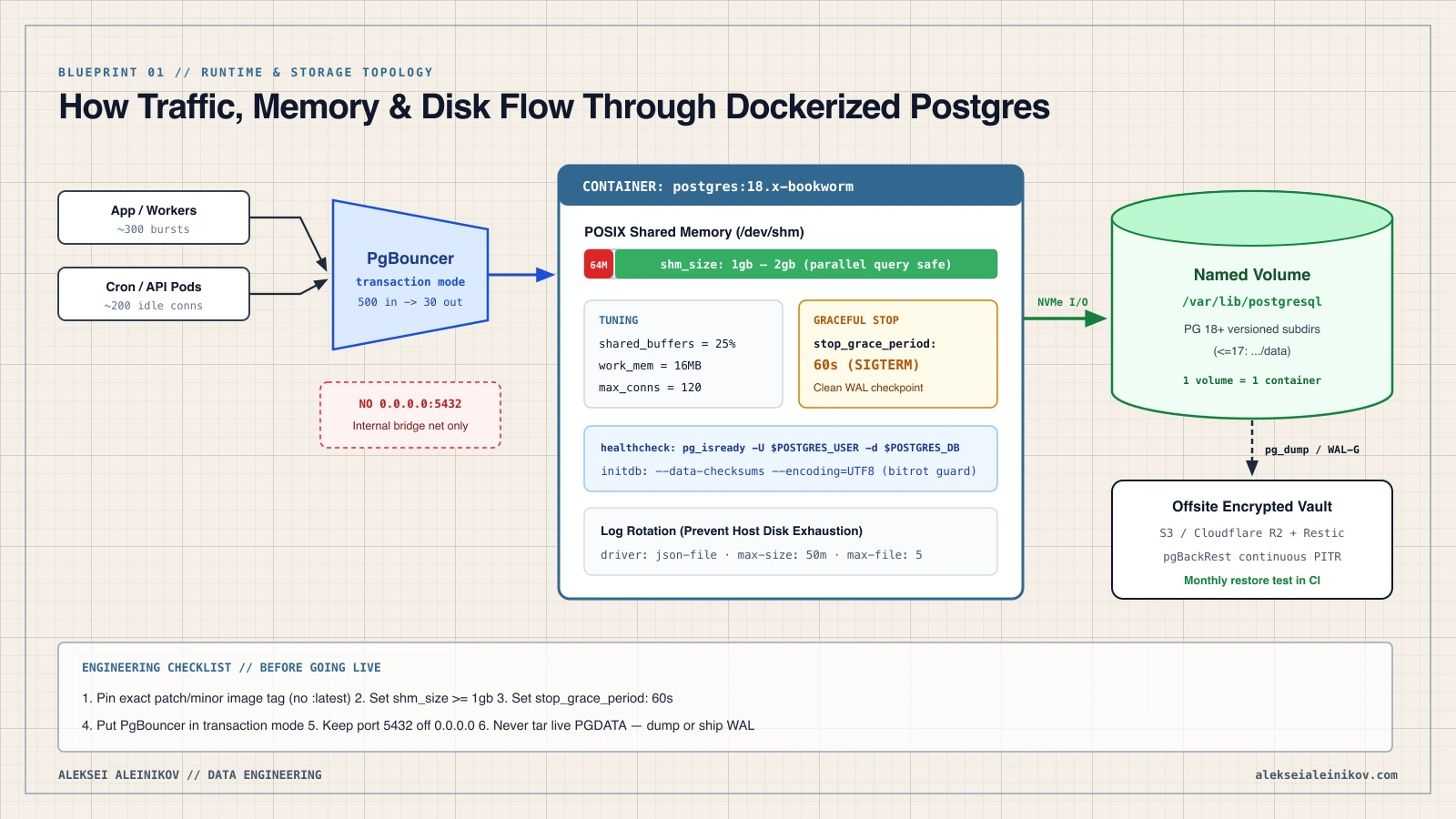
Most outages with containerized Postgres are not caused by Docker itself. They happen because Docker’s defaults (64 MB /dev/shm, a 10-second SIGKILL timeout, unpinned :latest tags, and outdated PGDATA volume paths) collide directly with how PostgreSQL manages memory, checkpoints, and disk files.
The short checklist. Mount PG 18+ volumes at
/var/lib/postgresql(not/data), setshm_size: 1gb+, setstop_grace_period: 60s, enable--data-checksums, put PgBouncer in front of bursts, and never expose port5432on0.0.0.0.
The Breaking Change in PostgreSQL 18+: PGDATA Mount Path
If you upgrade an older Docker Compose stack to PostgreSQL 18 or newer, the very first trap is structural.
Per the official Docker Hub postgres image documentation:
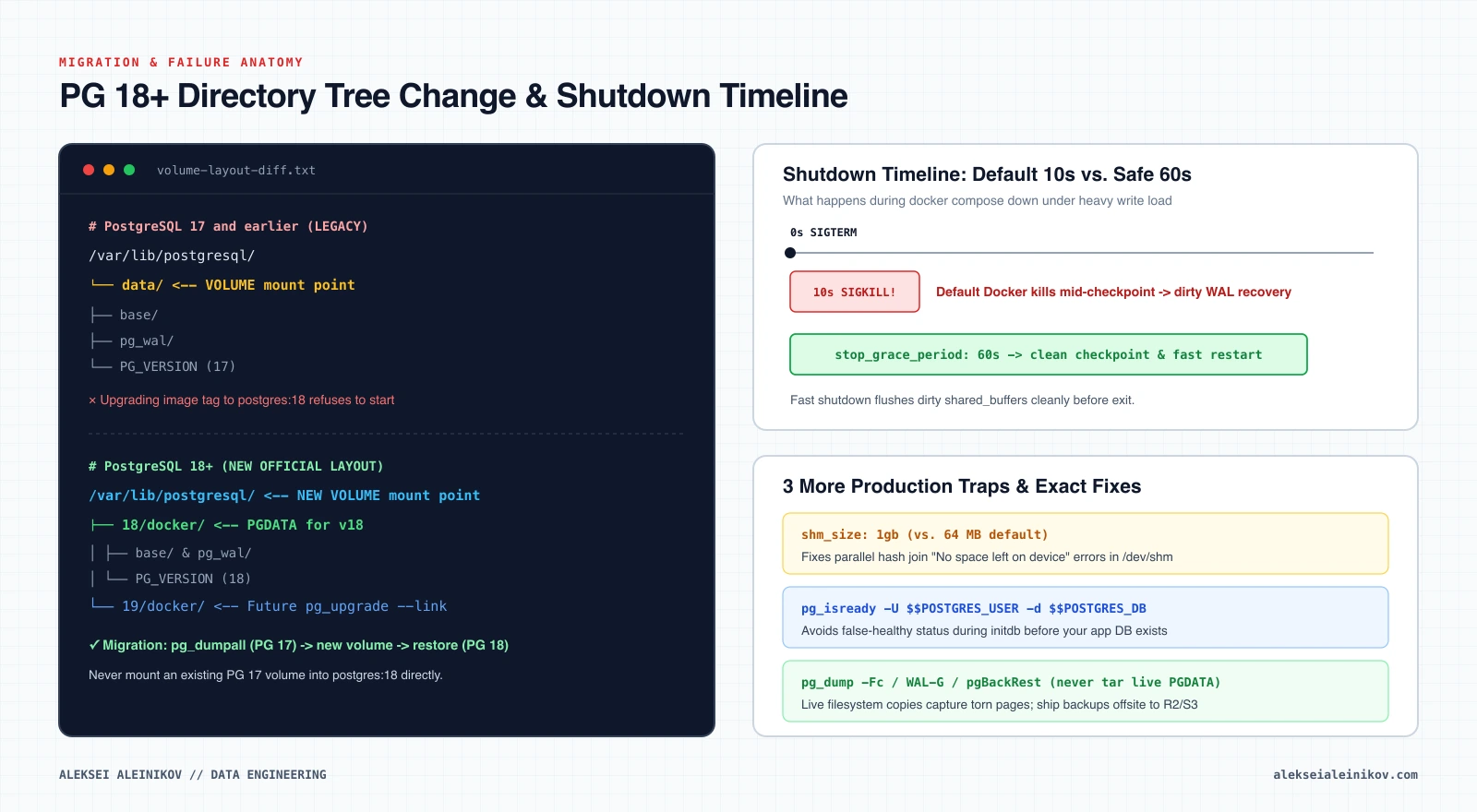
- PostgreSQL 17 and earlier:
PGDATAdefaulted to/var/lib/postgresql/data, and Compose files mounted volumes to/var/lib/postgresql/data. - PostgreSQL 18 and newer:
PGDATAmoved into version-specific subdirectories (/var/lib/postgresql/18/docker, and/19/dockerfor v19), and the officialVOLUMEtarget changed to/var/lib/postgresql.
Why did the maintainers make this breaking change? It aligns the container layout with Debian’s pg_ctlcluster convention so pg_upgrade --link can upgrade major versions cleanly inside the same parent directory in the future.
Safe PG ≤17 to PG 18+ Upgrade in 4 Commands
Keep your old volume untouched as an instant rollback until the new container is verified:
# 1. Dump all databases and roles from the running PG 17 containerdocker exec -t pg-prod pg_dumpall -U app_admin > pg17_full.sql # 2. Stop the stack (do NOT pass -v so the old PG 17 volume stays intact)docker compose down # 3. Update compose.yaml to postgres:18.1-bookworm + a NEW volume at /var/lib/postgresql, then startdocker compose up -d postgres # 4. Restore into the fresh PG 18 containerdocker exec -i pg-prod psql -U app_admin -d postgres < pg17_full.sql5 Silent Production Traps in Default Docker Setups
1. The 64 MB /dev/shm Crash (shm_size)
Docker caps /dev/shm at 64 MB by default. PostgreSQL uses POSIX shared memory for dynamic shared memory (DSM) segments, parallel query workers, and parallel hash joins. Under real load, queries abruptly fail with:
ERROR: could not resize shared memory segment "/PostgreSQL.12345" to 67108864 bytes: No space left on deviceFix: Explicitly allocate shm_size: 1gb (or 2gb–4gb on larger nodes) in your Compose service.
2. The 10-Second SIGKILL Shutdown Trap
When you run docker compose down or docker stop, Docker sends SIGTERM and waits just 10 seconds before sending SIGKILL. If PostgreSQL has gigabytes of dirty buffers to flush during a checkpoint, 10 seconds is not enough — Docker kills the process mid-flush, forcing slow WAL crash recovery on startup.
Fix: Set stop_grace_period: 60s (or 120s for write-heavy instances) so Postgres receives SIGTERM (fast shutdown) and completes its checkpoint cleanly.
3. Broken Healthchecks (pg_isready False Positives)
Writing test: ["CMD-SHELL", "pg_isready"] without flags checks the default user (root) and database, and can pass briefly during initdb restarts before your actual database and role exist.
Fix: Always specify both user and target database:
healthcheck: test: ["CMD-SHELL", "pg_isready -U $${POSTGRES_USER} -d $${POSTGRES_DB}"] interval: 10s timeout: 5s retries: 5 start_period: 20s4. Connection Exhaustion Without a Pooler
Unlike thread-based engines, PostgreSQL forks a dedicated OS backend process for every client connection (~5–10 MB RAM each plus work_mem headroom). A sudden burst of 300 serverless functions or worker containers can easily trigger a Linux OOM kill inside a memory-bounded container.
Fix: Place PgBouncer in front of Postgres in transaction pooling mode, keeping max_connections on Postgres reasonable (e.g., 100–150) while PgBouncer absorbs 500+ client connections. Since PgBouncer 1.21+, protocol-level prepared statements work natively in transaction mode via MAX_PREPARED_STATEMENTS, so ORMs like Prisma, SQLAlchemy, and pgx no longer need special workarounds.
5. Named Volumes vs. Bind Mounts & Permissions
- Linux production hosts: Prefer a Docker named volume on fast local NVMe SSD, or a dedicated host path owned by UID/GID
999:999(Debian-basedpostgresimage). Never placePGDATAon an SMB/CIFS network share. - Home servers (Proxmox / TrueNAS / Mini PC): If you are deciding whether to run Docker directly on Linux, inside a Proxmox KVM VM, or on TrueNAS Scale, check our hardware-to-stack guide on Proxmox VE vs. Docker vs. TrueNAS Scale.
Copy-Paste Production compose.yaml (PostgreSQL 18+ + PgBouncer)
Here is a clean, battle-tested baseline using Docker Compose service controls and PostgreSQL resource settings (example sized for an 8 GB RAM host):
services: postgres: image: postgres:18.1-bookworm # Pin exact version; never use :latest container_name: pg-prod restart: unless-stopped stop_grace_period: 60s shm_size: 1gb environment: POSTGRES_USER: app_admin POSTGRES_PASSWORD: ${POSTGRES_PASSWORD:?set in .env} POSTGRES_DB: app_prod POSTGRES_INITDB_ARGS: "--data-checksums --encoding=UTF8 --locale=C.UTF-8" command: - "postgres" - "-c" - "shared_buffers=2GB" - "-c" - "effective_cache_size=6GB" - "-c" - "work_mem=16MB" - "-c" - "maintenance_work_mem=512MB" - "-c" - "max_connections=120" - "-c" - "wal_level=replica" - "-c" - "random_page_cost=1.1" - "-c" - "effective_io_concurrency=200" volumes: # PG 18+ mounts to /var/lib/postgresql (for PG <=17 use /var/lib/postgresql/data) - pg_data:/var/lib/postgresql networks: - db_internal healthcheck: test: ["CMD-SHELL", "pg_isready -U $${POSTGRES_USER} -d $${POSTGRES_DB}"] interval: 10s timeout: 5s retries: 5 start_period: 20s logging: driver: json-file options: max-size: "50m" max-file: "5" pgbouncer: image: edoburu/pgbouncer:v1.24.1-p1 container_name: pg-pooler restart: unless-stopped depends_on: postgres: condition: service_healthy environment: DB_HOST: postgres DB_PORT: 5432 DB_USER: app_admin DB_PASSWORD: ${POSTGRES_PASSWORD:?set in .env} DB_NAME: app_prod POOL_MODE: transaction MAX_CLIENT_CONN: 500 DEFAULT_POOL_SIZE: 30 MAX_PREPARED_STATEMENTS: 200 AUTH_TYPE: scram-sha-256 ports: # Bind strictly to localhost or private Tailscale/WireGuard IP — never 0.0.0.0 - "127.0.0.1:6432:5432" networks: - db_internal volumes: pg_data: networks: db_internal: driver: bridgeNotice two subtle details that save production teams hours later:
--data-checksumsis enabled atinitdbtime so PostgreSQL catches silent storage bitrot immediately instead of silently replicating corruption into backups.- Port
5432is not published at all, and PgBouncer is bound strictly to127.0.0.1:6432(or an internal bridge network for your app containers).
Memory Sizing Cheat Sheet (2 GB to 32 GB Hosts)
The compose.yaml above targets an 8 GB node. If your server is smaller or larger, scale these five settings proportionally — PostgreSQL relies heavily on the Linux OS page cache, so leaving ~50–75% of RAM outside shared_buffers is intentional:
| Host RAM | shm_size | shared_buffers | effective_cache_size | work_mem | max_connections |
|---|---|---|---|---|---|
| 2 GB | 512mb | 512MB | 1536MB | 4MB | 60 |
| 4 GB | 1gb | 1GB | 3GB | 8MB | 80 |
| 8 GB | 1gb | 2GB | 6GB | 16MB | 120 |
| 16 GB | 2gb | 4GB | 12GB | 32MB | 150 |
| 32 GB | 4gb | 8GB | 24GB | 64MB | 200 |
Backups & Disaster Recovery: Never tar a Live Volume
Even if your Docker host sits on RAID or ZFS, RAID snapshots are not disaster recovery. Copying raw PGDATA files with tar or rsync while PostgreSQL is running captures torn pages and produces an unrecoverable backup.
Pick one of two clean backup patterns:
- Logical compressed dumps (DBs under ~30–50 GB): Run
pg_dump -Fcinside a scheduled container or cron job, verify exit status, and ship encrypted archives to low-cost S3-compatible storage such as Cloudflare R2 viaresticorrclone:Terminal window docker exec pg-prod pg_dump -U app_admin -Fc app_prod > /backups/app_prod_$(date +%F).dump - Continuous WAL archiving + PITR (larger DBs or low RPO): Use pgBackRest or WAL-G inside a custom PostgreSQL image or sidecar sharing the volume so you can restore to any exact second before a bad migration.
Once a month, prove your backups actually restore using a disposable scratch container — an untested backup is just hope:
# Spin up an ephemeral test container, restore the latest dump, and verify row countsdocker run -d --name pg-restore-test -e POSTGRES_PASSWORD=test -e POSTGRES_USER=app_admin -e POSTGRES_DB=app_prod postgres:18.1-bookwormsleep 5docker exec -i pg-restore-test pg_restore -U app_admin -d app_prod --no-owner < /backups/app_prod_$(date +%F).dumpdocker rm -f pg-restore-testIf you are also optimizing indexes or vector workloads inside Postgres, see our PostgreSQL Index Types Benchmark.
Quick Troubleshooting: 3 Errors You Will Actually See
Skipping initializationor immediate exit after upgrading topostgres:18: You mounted a PG ≤17 volume into a PG 18+ image. Roll back the image tag topostgres:17, dump withpg_dumpall, and restore into a new volume mounted at/var/lib/postgresql.could not resize shared memory segment ... No space left on device:/dev/shmhit Docker’s 64 MB ceiling. Increaseshm_sizeto1gb+ and recreate the container (docker compose up -d --force-recreate postgres).chown: changing permissions ... Operation not permitted: Typical when using a host bind mount on macOS/Windows or strict rootless UID mapping. Switch to a Docker named volume (pg_data:/var/lib/postgresql) orchown -R 999:999on Linux host paths.
Sources
- Docker Hub Official Image —
postgresDocumentation & PG 18+PGDATALayout - PostgreSQL Official Documentation — Resource Consumption (
shared_buffers,work_mem, DSM) - PgBouncer Official Documentation — Configuration & Pooling Modes
- Docker Compose Specification — Services (
shm_size,stop_grace_period,healthcheck)
Originally published at alekseialeinikov.com