
Every PostgreSQL team eventually runs a massive DELETE to free up disk space, watches df -h stay completely flat, and wonders if the command even worked. Worse, queries against the smaller table often get slower instead of faster.
This is Part 2 of Postgres in Production (following Part 1 on PostgreSQL index types). Same rule applies here: measure first, then explain. All numbers below were measured on PostgreSQL 18.6 using pgstattuple and EXPLAIN (ANALYZE, BUFFERS) on a 1,000,000-row dataset.
Why DELETE and VACUUM did not shrink the file
In PostgreSQL’s Multi-Version Concurrency Control (MVCC), UPDATE and DELETE never overwrite or erase row bytes in place. DELETE stamps a transaction ID (xmax) onto the tuple header so older snapshots can still see it, and UPDATE marks the old version dead while writing a brand-new tuple version.
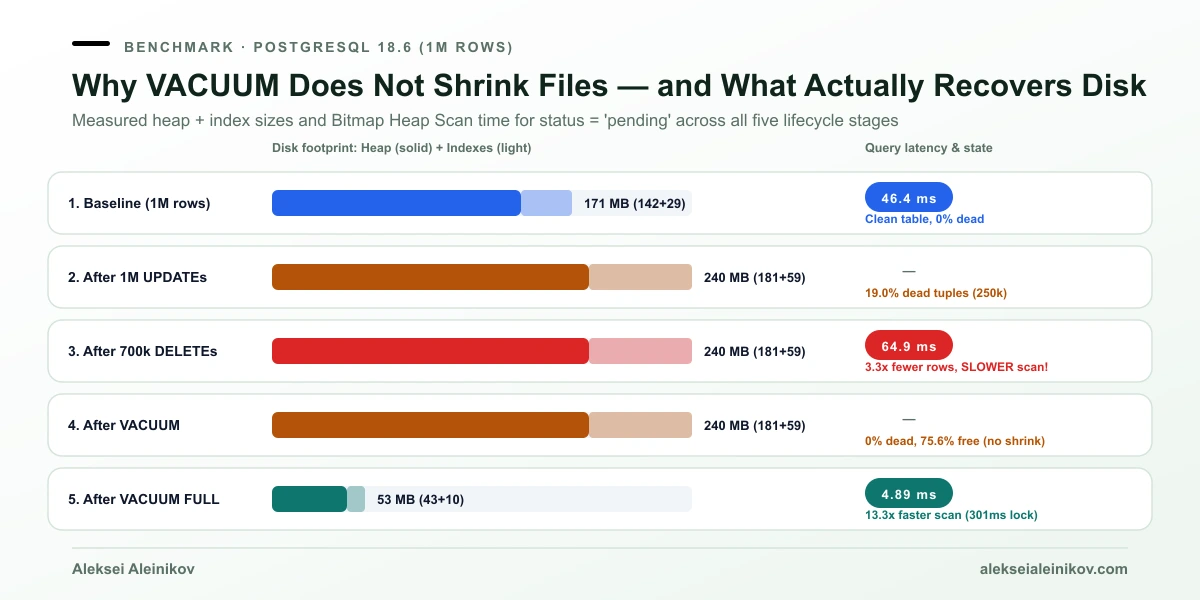
I ran a five-stage lifecycle test on a 1,000,000-row orders table (id, user_id, status, amount, payload, updated_at) with a primary key and a composite index on (status, user_id):
| Stage | Heap size | Index size | Dead tuples (pgstattuple) | Free space (pgstattuple) | status = 'pending' query |
|---|---|---|---|---|---|
| 1. Baseline (1,000,000 rows) | 142 MB | 29 MB | 0.00% | ~0% | 46.4 ms (18,284 buffers) |
2. After 1,000,000 UPDATEs | 181 MB | 59 MB | 18.99% (250k) | 0.54% | — |
3. After 700,000 DELETEs | 181 MB | 59 MB | ~75% | — | 64.9 ms (22,971 buffers) |
4. After VACUUM ANALYZE | 181 MB | 59 MB | 0.00% | 75.62% | — |
5. After VACUUM FULL (301 ms lock) | 43 MB | 10 MB | 0.00% | ~0% | 4.89 ms (5,380 buffers) |
Two results here surprise almost everyone who sees them for the first time:
- Deleting 70% of the table made the query 40% slower. Returning 30,000 rows (
status = 'pending') after deleting 700,000 rows took 64.9 ms instead of 46.4 ms for 100,000 rows, because PostgreSQL still had to inspect 22,728 heap blocks packed with dead tuples. VACUUMcleaned 100% of the dead tuples, yet returned 0 bytes to the OS.pgstattupleconfirmeddead_tuple_count = 0andfree_percent = 75.62%, meaning futureINSERTs can reuse that 138 MB internally via the Free Space Map (FSM). However, because the remaining 300,000 live rows sat near the end of the file (id > 700000),VACUUMcould not truncate the tail pages.
How fillfactor = 70 stopped index bloat completely
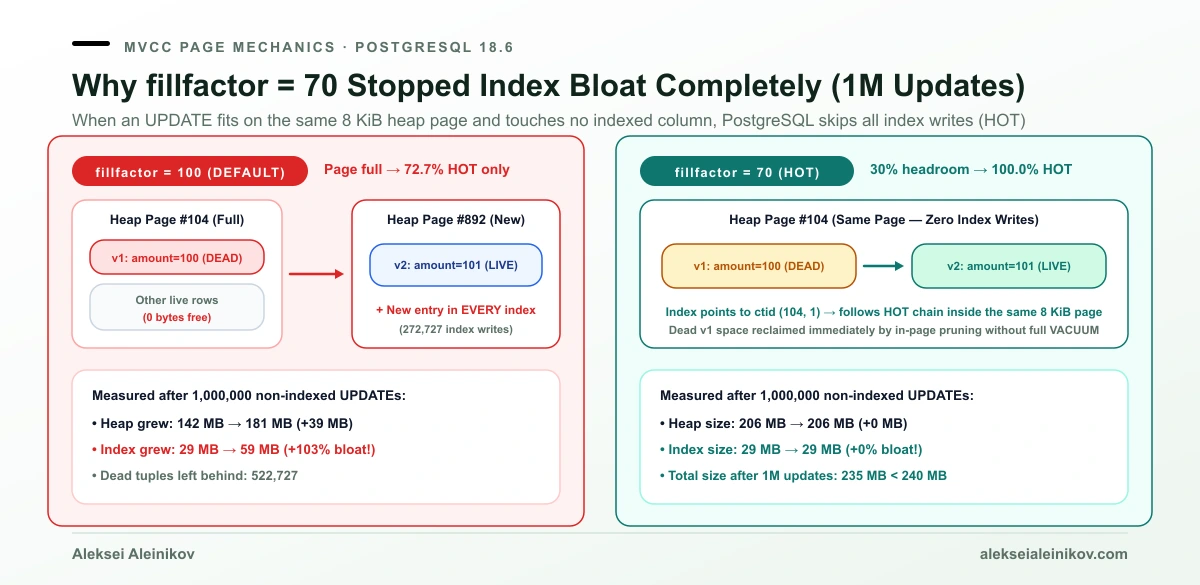
Notice Stage 2 in the table above: updating a non-indexed column (amount = amount + 1) 1,000,000 times caused the index on (status, user_id) to double from 29 MB to 59 MB (+103%). Why did an index double when none of its columns changed?
PostgreSQL has an optimization called HOT (Heap-Only Tuple) updates. If an UPDATE modifies no indexed columns and the new row version fits on the same 8 KiB heap page, PostgreSQL chains the new version inside that page and writes zero index entries. If the page is full (the default fillfactor = 100), the new row overflows to another page and PostgreSQL must insert a new pointer into every index on the table.
I ran the exact same 1,000,000 UPDATEs side-by-side on orders_default (fillfactor = 100) and orders_ff70 (fillfactor = 70):
Metric after 1,000,000 non-indexed UPDATEs | fillfactor = 100 (default) | fillfactor = 70 (30% headroom) |
|---|---|---|
| Initial heap + index size | 142 MB + 29 MB = 171 MB | 206 MB + 29 MB = 235 MB |
| Heap size after 1M updates | 181 MB (+39 MB) | 206 MB (+0 MB) |
| Index size after 1M updates | 59 MB (+103%) | 29 MB (+0%) |
| Total size after 1M updates | 240 MB | 235 MB (smaller than default!) |
HOT update ratio (n_tup_hot_upd / n_tup_upd) | 72.7% (727,273 / 1,000,000) | 100.0% (1,000,000 / 1,000,000) |
Leaving 30% free space per page upfront feels counterintuitive, yet after a single round of updates the fillfactor = 70 table was already smaller overall than the default table — with zero index bloat and faster index scans.
Diagnosing bloat and HOT efficiency in production
Before tuning anything, measure what is actually happening on your tables using pg_stat_user_tables:
SELECT relname, n_live_tup, n_dead_tup, round(100.0 * n_dead_tup / NULLIF(n_live_tup + n_dead_tup, 0), 1) AS dead_pct, n_tup_upd, n_tup_hot_upd, round(100.0 * n_tup_hot_upd / NULLIF(n_tup_upd, 0), 1) AS hot_pct, last_autovacuumFROM pg_stat_user_tablesORDER BY n_dead_tup DESCLIMIT 15;To check true internal free space without taking a heavy lock, use pgstattuple_approx() from the pgstattuple extension:
CREATE EXTENSION IF NOT EXISTS pgstattuple; SELECT table_len / (1024 * 1024) AS total_mb, approx_free_percent, dead_tuple_percentFROM pgstattuple_approx('orders');- If
hot_pctis below 80% on an update-heavy table and most updates skip indexed columns, lowerfillfactorto75or80(ALTER TABLE orders SET (fillfactor = 80);). Note that existing pages only repack after apg_repack/REPACKor as new rows are inserted. - If
approx_free_percentexceeds 40–50% on a multi-gigabyte table that will not grow back into that space, plan an online compaction.
Why autovacuum stalls: the xmin horizon trap
Sometimes n_dead_tup climbs into the millions even though autovacuum is running. When you run VACUUM (VERBOSE) orders; manually and see dead row versions cannot be removed yet, something is holding back PostgreSQL’s global xmin horizon — the oldest transaction ID that might still need to read old row versions.
Check the three usual culprits in one query:
-- 1. Long-running or "idle in transaction" backends holding xminSELECT pid, state, now() - xact_start AS xact_age, backend_xmin, left(query, 80) AS queryFROM pg_stat_activityWHERE backend_xmin IS NOT NULLORDER BY age(backend_xmin) DESC; -- 2. Abandoned replication slots pinning catalog_xmin / xminSELECT slot_name, active, xmin, catalog_xmin, pg_size_pretty(pg_wal_lsn_diff(pg_current_wal_lsn(), restart_lsn)) AS retained_walFROM pg_replication_slots; -- 3. Unresolved prepared transactionsSELECT gid, prepared, owner, database FROM pg_prepared_xacts;Set idle_in_transaction_session_timeout = '5min' in postgresql.conf so forgotten application connections never poison VACUUM across the whole cluster.
Per-table autovacuum tuning for large tables
By default, PostgreSQL triggers autovacuum when:
dead_tuples > autovacuum_vacuum_threshold (50) + autovacuum_vacuum_scale_factor (0.2) * reltuplesOn a 10,000-row table, autovacuum wakes up at 2,050 dead rows. On a 100,000,000-row table, 0.2 waits for 20,000,000 dead tuples before starting a single cleanup pass — by which time the table is already severely bloated and the vacuum itself takes hours.
Override scale_factor per table on large, churn-heavy tables so VACUUM runs frequently in small, cheap bursts:
ALTER TABLE orders SET ( autovacuum_vacuum_scale_factor = 0.01, autovacuum_vacuum_threshold = 1000, autovacuum_analyze_scale_factor = 0.005);Why VACUUM crawls: cost limits, maintenance_work_mem, and TOAST
Even when autovacuum is not blocked by an xmin horizon, three mechanics quietly throttle it in production:
- Multiple index passes from low
maintenance_work_mem:VACUUMcollects dead tuple pointers in memory before scanning indexes to remove them. Ifmaintenance_work_mem(orautovacuum_work_mem) fills up mid-table, PostgreSQL must pause, scan every index on the table, and repeat. On a 100 GB table with 5 indexes, raisingautovacuum_work_mem(for example to512MB–1GB) can cut vacuum time from hours to minutes. Watch live phases withSELECT pid, phase, heap_blks_scanned, heap_blks_total, index_vacuum_count FROM pg_stat_progress_vacuum;. - I/O throttling (
autovacuum_vacuum_cost_limit): By default, autovacuum sleeps forautovacuum_vacuum_cost_delay(2msin modern PostgreSQL) every time it hitsautovacuum_vacuum_cost_limit(200). On fast NVMe disks, a single large table can fall behind write throughput unless you raiseautovacuum_vacuum_cost_limitper table (e.g.1000–2000). For emergency manual runs,VACUUM (PARALLEL 4) orders;cleans multiple indexes concurrently. - TOAST table bloat: Values wider than ~2 KB (large
jsonbpayloads ortextblobs) are stored out-of-line in a separatepg_toast.pg_toast_<oid>table. Updating a row without touching its TOAST column reuses the existing TOAST pointer, whereas updating a largejsonbdocument creates dead tuples inside the TOAST table as well.
The silent outage risk: Transaction ID wraparound
VACUUM does more than reclaim space — it freezes old transaction IDs (xmin) so PostgreSQL can safely reuse 32-bit transaction counters (which wrap around after ~2 billion transactions). If a table’s oldest unfrozen transaction approaches autovacuum_freeze_max_age (default 200,000,000), PostgreSQL launches an aggressive anti-wraparound autovacuum that ignores cost delays — and if it reaches the hard limit, the cluster refuses all writes to prevent data corruption.
Check your cluster’s wraparound headroom before it becomes an incident:
SELECT c.relname, age(c.relfrozenxid) AS xid_age, round(100.0 * age(c.relfrozenxid) / 2000000000.0, 1) AS pct_to_wraparoundFROM pg_class cJOIN pg_namespace n ON n.oid = c.relnamespaceWHERE c.relkind IN ('r', 'm') AND n.nspname = 'public'ORDER BY age(c.relfrozenxid) DESCLIMIT 10;Shrinking bloated tables safely: pg_repack, REINDEX, and PostgreSQL 19 REPACK
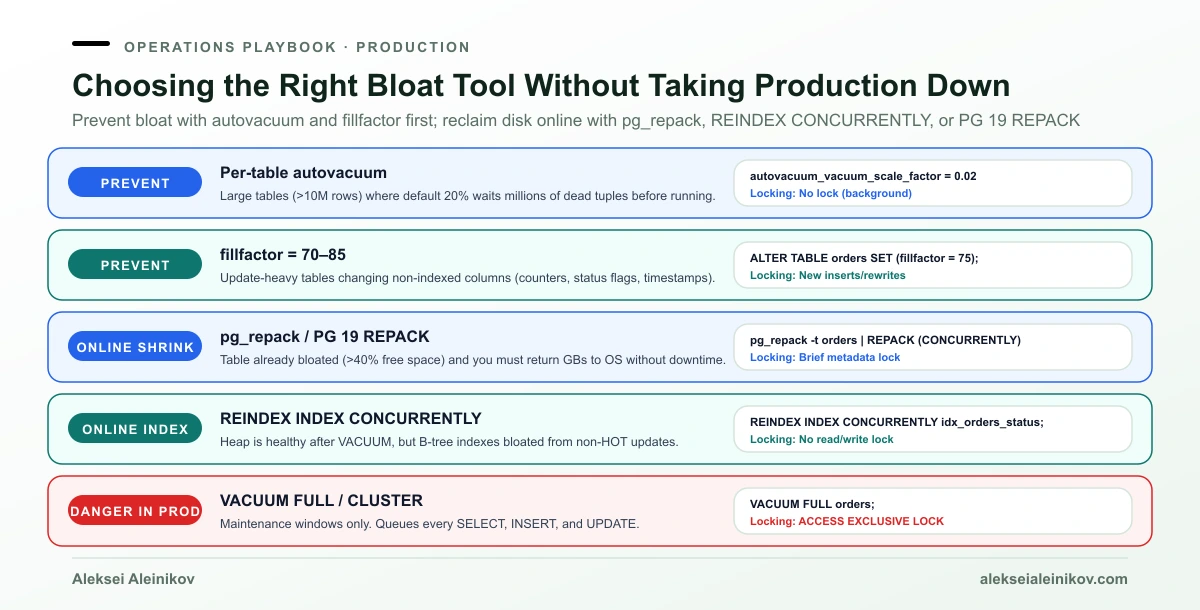
When a table is already bloated and you must reclaim disk space in production, pick the tool by lock impact:
- Do not run
VACUUM FULLon a live production table. In our benchmark it took 301 ms on 300k rows; on a 200 GB table it can hold anACCESS EXCLUSIVElock for an hour, blocking everySELECTandINSERT. - If only indexes are bloated: run
REINDEX INDEX CONCURRENTLY idx_orders_status;. Reads and writes continue without interruption. - If the heap is bloated (PostgreSQL 14–18): use
pg_repack, which builds a shadow table, replays changes via triggers, and swaps files with only a brief metadata lock. - On PostgreSQL 19: native
REPACK (CONCURRENTLY) orders;replaces the externalpg_repackextension directly inside core SQL (covered in detail in our PostgreSQL 19 vs 18 upgrade guide).
Production checklist
- Monitor
n_dead_tupandn_tup_hot_upd / n_tup_updinpg_stat_user_tables. - Set
autovacuum_vacuum_scale_factor = 0.01–0.02on tables above 5–10 million rows. - Set
fillfactor = 70–85on tables with heavy non-indexedUPDATEtraffic. - Enforce
idle_in_transaction_session_timeoutand alert on inactivepg_replication_slots. - Use
REINDEX INDEX CONCURRENTLY,pg_repack, or PostgreSQL 19REPACK (CONCURRENTLY)instead ofVACUUM FULL.
Originally published at alekseialeinikov.com


