Connecting external gRPC clients to internal services accessible through Amazon VPC Lattice requires bridging two identity models. External clients carry JSON Web Tokens (JWTs), and the service network trusts AWS Signature Version 4 (SigV4) signatures. Amazon VPC Lattice authenticates every service-to-service request with SigV4, resolving each caller to an AWS Identity and Access Management (AWS IAM) principal and enforcing authorization through IAM auth policies. However, giving external clients AWS credentials would break the separation between external and internal identity. You need an ingress layer that validates JWTs at the edge, translates that verified identity into a SigV4 signature that Amazon VPC Lattice trusts, and maintains gRPC over HTTP/2 framing end-to-end.
In this post, you build that ingress layer. An Application Load Balancer (ALB) validates JWTs, an Amazon Elastic Container Service (Amazon ECS) proxy tier on AWS Fargate translates identity and signs requests with SigV4, and Amazon VPC Lattice IAM auth policies enforce per-service authorization. Building on Modern web application authentication and authorization with Amazon VPC Lattice, this post focuses on gRPC workloads and machine-to-machine authentication using the client_credentials grant. It also explores two SigV4 signing approaches: native AWS SDK signing and an Envoy signing filter.
Prerequisites
To deploy and test the solution described here, you need:
- Familiarity with AWS services, including Amazon Virtual Private Cloud (Amazon VPC), ALB, Amazon ECS on Fargate, Amazon VPC Lattice, and Amazon Cognito
- Working knowledge of gRPC and the HTTP/2 protocol, JWT-based authentication, and the OAuth 2.0
client_credentialsgrant. - An AWS account with permissions to deploy the AWS CloudFormation stack and to create Amazon Elastic Container Registry (Amazon ECR) repositories, an Amazon ECR pull through cache rule, and an AWS Secrets Manager secret.
- An AWS Certificate Manager (ACM) certificate in the Region where you deploy, for the ALB HTTPS listener (refer to Requesting a public certificate). Note the certificate ARN for later use.
- A Docker Hub account with a read-only access token, for the Envoy base image.
- AWS Command Line Interface (AWS CLI) version 2 installed and configured with valid credentials, and the Session Manager plugin for the AWS CLI.
- Finch or Docker,
grpcurl(refer to grpcurl installation), and jq.
Solution overview
Figure 1 shows the end-to-end architecture with two VPCs connected through an Amazon VPC Lattice service network.
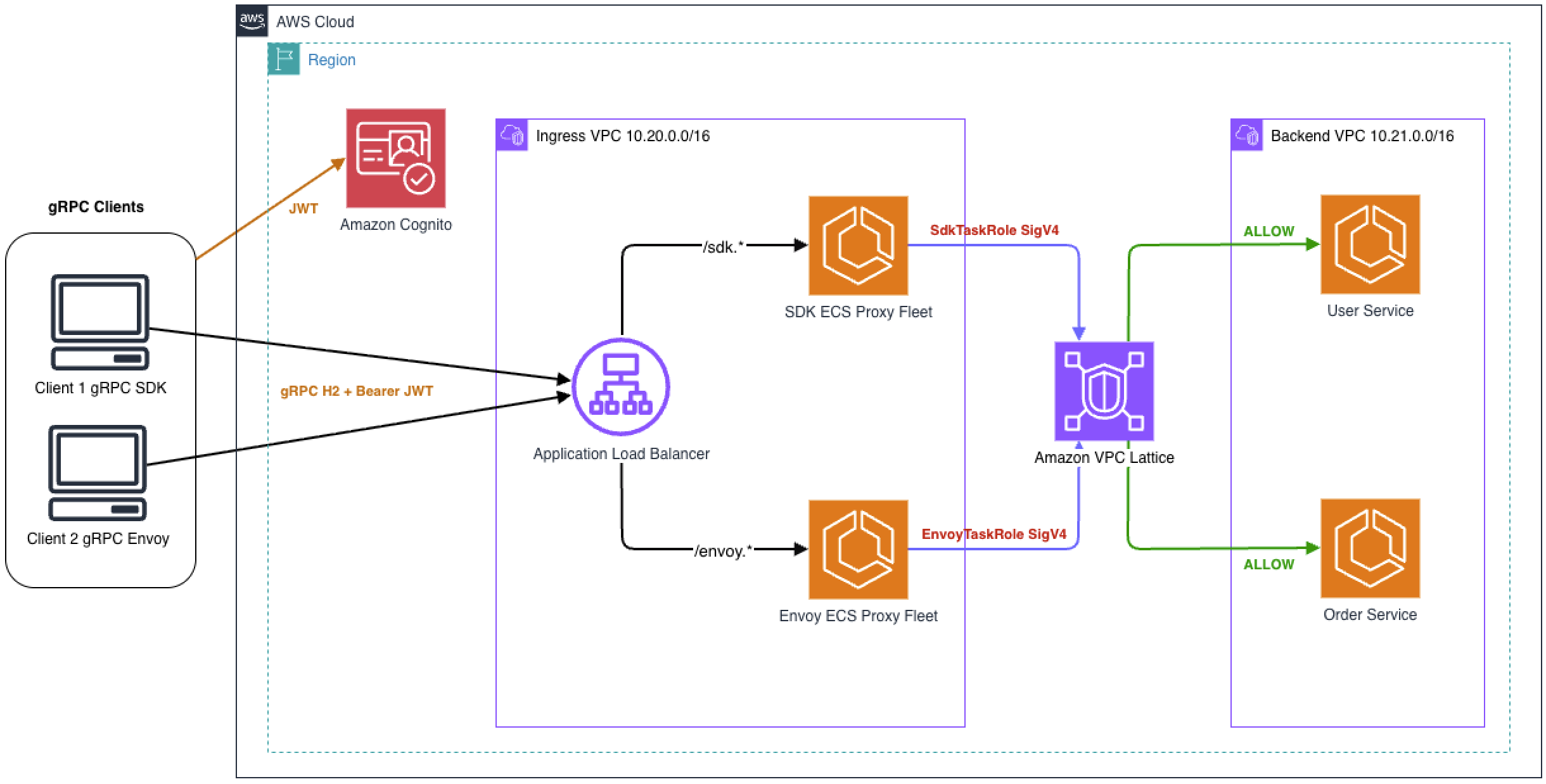
Figure 1: End-to-end architecture for external gRPC clients
An ingress VPC hosts the ALB and the Amazon ECS proxy tier. The ALB validates access tokens using the jwt-validation action and routes requests to the proxy based on gRPC path. The proxy decodes JWT claims, translates them into stable HTTP headers, and signs outbound requests with SigV4 using its Amazon ECS task role credentials. Amazon VPC Lattice evaluates the task role as the workload identity, not the individual external client. Auth policies therefore control which proxy path can reach which service.
A backend VPC hosts two sample gRPC services: a User Service for identity lookups and an Order Service for order management. Each service runs on Amazon ECS with AWS Fargate across two Availability Zones and is registered as an Amazon VPC Lattice service with its own IAM auth policy. The proxy tasks reach these services by resolving the service DNS name, which returns link-local addresses from the VPC Lattice managed prefix list (for example, 169.254.171.x). This architecture uses Amazon Cognito as the identity provider. You can use another OpenID Connect (OIDC)-compliant provider if it signs tokens with RS256 and publishes a publicly accessible JSON Web Key Set (JWKS) endpoint, as described in Step 2.
gRPC target groups use the IP target type. If you configure target groups with HTTPS, VPC Lattice does not validate the certificate authority on the target, so self-signed certificates are acceptable. For protocol version considerations, refer to Target groups in VPC Lattice under Protocol version.
Each signing approach maps to one task role, one ALB path, and one backend service:
| Signing approach | Amazon ECS task role | ALB path | Amazon VPC Lattice service | Auth policy allows | |
| 1 | Native AWS SDK | SdkTaskRole | /sdk.* | User Service | SdkTaskRole only |
| 2 | Envoy signing filter | EnvoyTaskRole | /envoy.* | Order Service | EnvoyTaskRole only |
This 1:1 mapping demonstrates that each signing method produces a valid SigV4 signature that Amazon VPC Lattice resolves to the correct IAM principal. It also shows that per-service auth policies can distinguish between workload identities. In production, standardize a single signing approach to reduce operational complexity. Per-service auth policies remain useful for restricting which workloads can reach which services.
Deploy the solution
To follow along, use the companion GitHub repository. Start with the Prerequisites, which include an ACM certificate in your target Region for the ALB HTTPS listener and a Docker Hub read-only access token for the Envoy base image. Then follow the Deploy steps. You build the three container images and push them to Amazon ECR repositories in your own account. Then you deploy the AWS CloudFormation template with the URIs of those images and run a test script that confirms each layer allows valid requests and rejects invalid ones. Deployment takes approximately 20 to 30 minutes.
This sample is intended for non-production use. To simplify testing, it turns on settings such as gRPC server reflection, ECS Exec, and self-signed certificates on the proxy and backend tasks. The repository lists these settings under Before using this in production. Work with your security team before you adapt it for production.
The resources in this solution incur charges while they run. The main costs are the ALB, the AWS PrivateLink interface VPC endpoints, Amazon ECS on AWS Fargate, and Amazon VPC Lattice. Delete the resources when you finish testing, as described in the Clean up section of this post.
Let’s walk through a gRPC request flow from an external client through each layer of the architecture.
Step 1: Client obtains a JWT and sends a gRPC request over HTTP/2
The gRPC client obtains a JWT from Amazon Cognito using the OAuth 2.0 client_credentials grant. This is a machine-to-machine flow with no user interaction. The client sends its client ID and secret to the token endpoint and receives a JWT containing scopes that define what it is authorized to do.
The resulting JWT contains:
The client sends a gRPC request to the ALB over port 443, including the JWT as gRPC metadata:
Because gRPC transmits metadata as HTTP/2 headers, the authorization header is carried natively in the HTTP/2 HEADERS frame without special encoding.
Step 2: ALB validates the access token and forwards the request
The ALB HTTPS listener is configured with jwt-validation action on each listener rule. This action validates the access token by verifying its signature and evaluating claims. It is purpose-built for machine-to-machine flows, unlike the authenticate-oidc action, which handles interactive browser-based OAuth flows. The tokens must be signed using the RS256 algorithm. The JWKS endpoint must be publicly accessible. If your identity provider uses a different algorithm or a private JWKS endpoint, either reconfigure it to meet both requirements or move JWT validation into the proxy tier. For a complete list of prerequisites, refer to Prepare to use JWT verification.
When the request arrives, the ALB performs the following steps:
- Matches the path against the listener rule pattern (for example,
/sdk.*). - Retrieves the public key that matches the token’s
kidfrom your configured JWKS endpoint. - Validates the JWT signature using the RS256 public key matching the token’s
kid. - Validates mandatory claims:
exp(expiration) andiss(issuer). - Validates any additional claims configured on the rule, such as
audor custom claims. - Validates optional claims if present:
nbf(not before) andiat(issued at).
If validation fails, the ALB returns HTTP 401 before the request reaches the proxy tier. The gRPC client receives this as UNAUTHENTICATED (per the gRPC HTTP-to-gRPC status mapping when no grpc-status trailer is present), and invalid requests never consume backend compute. For failure details, check ALB access logs. After successful verification, the ALB forwards the request with the original authorization: Bearer header intact. It does not modify or consume the token, and it does not inject any identity headers of its own.
After ALB processing, the request looks like the following:
The ALB target groups are configured with Protocol HTTPS and ProtocolVersion HTTP/2, so the ALB opens a new TLS connection to each proxy task after it validates the JWT. This keeps the JWT in the authorization header encrypted from the client all the way to the proxy tier, and it preserves HTTP/2 framing for gRPC. Each proxy task generates its own self-signed ECDSA P-256 certificate when the container starts. The private key never leaves the running task and is not stored in the image, the repository, or AWS Secrets Manager. Self-signed certificates work here because the ALB does not validate target certificates (target groups), so there is no certificate authority to manage and no rotation to schedule.
Health checks also run over HTTPS with HTTP/2. They are HTTP GET requests, so they confirm that the listener is up and completes TLS and HTTP/2, but they do not call the gRPC health service. The SDK proxy’s target group sends its probe to /grpc.health.v1.Health/Check, the Envoy proxy’s target group sends its probe to /, and both accept any 200-499 response.
Step 3: Amazon ECS proxy extracts claims and signs with SigV4
The Amazon ECS proxy receives the gRPC request over HTTP/2 with the original access token in the authorization header. Because the ALB has already validated the token, the proxy does not re-verify. It performs three tasks:
- Decode: Reads the access token payload (second base64url-encoded segment of the JWT) to extract
client_id,scope, andsubclaims. - Translate: Maps those claims into HTTP headers that Amazon VPC Lattice auth policies can evaluate:
x-client-id,x-client-scope,x-client-sub. These headers are preserved through the SigV4 signing process and remain available for Amazon VPC Lattice auth policy evaluation. - Sign: Removes the original
authorization: Bearer <access token>header and signs the outbound request with SigV4 using the Amazon ECS task role credentials.
Amazon VPC Lattice auth policies evaluate conditions using StringEquals and StringLike operators on headers. Mapping JWT claims into flat headers keeps auth policies simple and auditable, because Amazon VPC Lattice does not parse JWT structures natively.
After the proxy, the request sent to Amazon VPC Lattice looks like the following:
The request sets x-amz-content-sha256: UNSIGNED-PAYLOAD because VPC Lattice does not support payload signing. TLS protects the body in transit, and the signature covers the headers. The JWT and the SigV4 signature cannot coexist in the same header. The proxy replaces the Bearer token with the SigV4 signature. The Host changed from the ALB DNS to the Amazon VPC Lattice service DNS. The proxy also rewrites the gRPC package in the path from sdk to demo, because the backend serves the demo package.
Identity headers (x-client-id, x-client-scope, x-client-sub) are included in SignedHeaders, so they are covered by the SigV4 signature and cannot be tampered with in transit.
The proxy is the trust boundary between external identity (JWT) and internal identity (SigV4). The Amazon ECS proxy task security group must accept inbound traffic exclusively from the ALB security group. Any path that bypasses the ALB reaches the proxy without JWT validation, because the proxy does not re-verify tokens. Restrict task role permissions to only the necessary Amazon VPC Lattice services using IAM policies, and monitor for anomalous patterns in Amazon VPC Lattice access logs.
SigV4 signing approaches
The following two approaches sign outbound requests with SigV4. Each uses a separate IAM task role, allowing Amazon VPC Lattice auth policies to distinguish callers by workload identity.
Option 1: Native AWS SDK signing
Native SDK signing keeps the entire signing path in application code. The AWS SDK builds the SigV4 canonical request and signs it, and the proxy sends the result over an HTTP/2 client. You get full visibility into the signing process, and you can inspect the request before and after signing. However, your code takes on more responsibility: credential retrieval, canonical request construction, and 5-byte length prefix gRPC framing, because the outbound call bypasses the gRPC client library. This approach supports unary RPCs only. It fits better when you own the proxy code, want direct control, and your workload uses only unary RPCs. For SDK-based SigV4 signing examples, refer to SigV4 authenticated requests for Amazon VPC Lattice.
Option 2: Envoy signing filter
With Envoy, signing moves out of your code and into the proxy pipeline. The aws_request_signing filter computes the SigV4 signature, and a Lua filter decodes the JWT, extracts claims, and rewrites headers before the signing filter runs. Because HTTP/2 is preserved end to end, this approach supports all gRPC streaming models (client, server, and bidirectional), provided that the VPC Lattice target group is configured with ProtocolVersion: GRPC. With the HTTP2 protocol version, VPC Lattice supports streaming from clients but not streaming to targets. The sample’s RPCs are unary, so add a streaming RPC and test it before you rely on this path for streaming. Streaming bodies cannot be pre-hashed, so the filter sets x-amz-content-sha256: UNSIGNED-PAYLOAD. A single container then covers signing, header translation, retries, circuit breaking, and observability.
Important: Filter chain order is a security requirement. The Lua filter must execute before aws_request_signing. If the signing filter runs first, identity headers added by Lua will not be in SignedHeaders and will not be covered by the signature.
Step 4: Amazon VPC Lattice authenticates and authorizes
When the Amazon VPC Lattice service network receives the request, it validates the SigV4 signature and resolves the caller to an IAM principal. In this architecture, the principal is the Amazon ECS task role that signed the request. An unsigned request carries no AWS credentials, so VPC Lattice evaluates it as an anonymous principal, which the auth policies in this sample do not allow. How VPC Lattice reports a denial depends on the request. For gRPC requests (content-type: application/grpc), it returns HTTP 200 with grpc-status: 7 (PERMISSION_DENIED) and an AccessDeniedException message. For other requests, it returns HTTP 403. When you test a gRPC service, check grpc-status, not the HTTP status code.
Amazon VPC Lattice provides two layers of auth policies: at the service network and on individual services. You can set guardrails at the service network level while service owners independently manage access to their own services. Refer to How authorization works.
After SigV4 validation succeeds, Amazon VPC Lattice evaluates the service network auth policy. Amazon VPC Lattice evaluates auth policies in order: service network first, then service-level. A DENY at either layer is final, and a permissive service-level policy cannot override a restrictive service-network policy.
Note: VPC Lattice requires both this auth policy and the caller’s identity-based policy to include vpc-lattice-svcs:Invoke. The service network policy permits access only from the two proxy task roles and requires x-client-id to be present, indicating that the request passed through the proxy tier.
This policy permits requests from the two proxy task roles that include the x-client-id header and originate from the ingress VPC. All other requests are implicitly denied.
Each backend service has its own auth policy that restricts access to a single task role. The following example shows the User Service policy, which accepts requests only from the SDK signing path.
This policy permits only the SDK task role to invoke the User Service. The Order Service follows the same pattern with the Envoy task role. All other principals are implicitly denied.
After authorization succeeds, Amazon VPC Lattice routes the request to the backend target group. The backend service receives the request with trusted identity context:
Amazon VPC Lattice added x-amzn-lattice-* headers with the resolved principal, source VPC, and target metadata. VPC Lattice removes any x-amzn-lattice-* headers that the caller sends, so a caller cannot spoof them. The backend can trust these identity headers because they arrived through a verified path. The ALB validated the token, the proxy translated claims, and SigV4 proved the request came from a trusted task role. That trust holds only if backend service security groups restrict inbound traffic to the VPC Lattice managed prefix list. Without that restriction, any caller inside the VPC can send requests directly to the backend with forged x-amzn-lattice-* headers.
Verifying the security model
Each boundary in this architecture rejects unauthorized requests independently. The following tests confirm that the security model works as expected.
A request sent directly to Amazon VPC Lattice with forged x-client-id headers and no SigV4 signature is denied. VPC Lattice evaluates an unsigned request as an anonymous principal, and the service network auth policy admits only the two proxy task roles. The forged headers do not change the outcome, because VPC Lattice takes the caller’s identity from the SigV4 signature, not from request headers. This is the runtime counterpart to signing identity headers.
Run this test from inside a VPC that is associated with the service network, for example from an Amazon ECS Exec session on an Envoy proxy task. The Envoy image includes curl, and the SDK proxy image does not. ECS Exec requires the Session Manager plugin for the AWS CLI. The VPC Lattice service DNS name resolves to link-local addresses from the VPC Lattice managed prefix list (for example, 169.254.171.x), which are not reachable from outside the VPC. The same command run from a workstation fails to connect.
A request signed with the SDK task role (SdkTaskRole) and sent to the Order Service is denied with gRPC status 7 (PERMISSION_DENIED). The service network policy admits SdkTaskRole, but VPC Lattice also requires an allow from the role’s IAM policy and from the Order Service auth policy. SdkTaskRole’s IAM policy allows invoking only the User Service, and the Order Service auth policy admits only EnvoyTaskRole, so either one is enough to deny the request.
To force the wrong workload identity onto a service, run the companion repository test script with the --test-cross-role option. The script temporarily points the SDK proxy at the Order Service by changing the LATTICE_USER_SVC environment variable in the proxy’s Amazon ECS task definition. It calls the SDK path and then restores the original task definition. The SDK proxy still signs as SdkTaskRole, so VPC Lattice denies the request:
These tests confirm that SigV4 authentication and per-service authorization work independently. A valid SigV4 signature from the wrong role is denied, and an unsigned request is denied as an anonymous principal, whatever identity headers it carries.
Clean up
To avoid ongoing charges, follow the steps in the Clean up section of the companion GitHub repository. They delete the AWS CloudFormation stack and the resources that the build script creates outside the stack. These resources are the Amazon ECR repositories, the pull through cache rule and its cached repository, and the AWS Secrets Manager secret that holds your Docker Hub token.
Considerations
Consider the following design choices when you adapt this pattern:
- The JWKS endpoint configured for ALB JWT validation has response size and key count limits. If your identity provider’s JWKS response exceeds these limits, the ALB does not forward requests.
- gRPC streaming support varies by signing approach. The SDK approach supports unary RPCs only, because it uses a raw HTTP/2 client for the outbound call. For streaming, use the Envoy signing filter. For protocol considerations, refer to Target Groups in VPC Lattice under Protocol version.
- Amazon VPC Lattice does not support native gRPC health checks directly on gRPC target groups. Configure HTTP/2 health checks with a valid URI path instead. For health check configuration options, refer to Health checks for target groups.
- If your external clients already have X.509 certificates (for example, from SPIFFE/SPIRE), you can use AWS IAM Roles Anywhere to obtain temporary AWS credentials and sign requests directly to Amazon VPC Lattice without a proxy tier. Refer to Using SPIFFE and X.509-SVID with Amazon VPC Lattice for authentication and authorization.
- If you observe uneven load distribution across proxy tasks, this might be because of HTTP/2 connection multiplexing. Use the
least_outstanding_requestsrouting algorithm on the ALB target group rather than downgrading to HTTP/1.1, which would break gRPC framing and disable streaming. - The
client_credentialsgrant returns tokens with a configurable time to live (TTL). Cache tokens and refresh before expiration rather than requesting a new token per call, which adds latency and identity provider load. Refer to Managing user pool token expiration and caching. - ALB JWT validation checks only the token signature and claims. It cannot check revocation status. A token with a valid signature is accepted until its
expclaim passes, regardless of whether it has been revoked at the identity provider since it was issued. Limit the exposure by issuing short-lived access tokens (Amazon Cognito supports a minimum access token TTL of 5 minutes). If your use case requires immediate revocation, for example when a machine client is decommissioned partway through a token’s lifetime, use an identity provider that supports RFC 7662 token introspection and call its introspection endpoint from the proxy tier on each request. Amazon Cognito does not provide an introspection endpoint. With Cognito, rely on short access token lifetimes, and disable or delete the app client to stop new tokens from being issued. Introspection adds per-request latency and makes the proxy depend on the introspection endpoint’s availability. - If your backend needs the original JWT for audit logging, forward it in a signed header (for example,
x-original-token) included inSignedHeaders. The SigV4-resolved IAM identity remains the authority for authorization. Do not re-derive trust from the forwarded token. - For production deployments, attach an AWS WAF web ACL to the ALB. JWT validation confirms the caller is authenticated, it does not limit request volume or payload shape. AWS WAF adds rate limiting per source IP, maximum request size controls, and IP reputation rules to protect against abuse of valid tokens.
- For multi-Region deployments, the proxy can sign with SigV4A (the asymmetric variant), which VPC Lattice also accepts. A SigV4A signature is valid in every Region in its Region set (use * for all Regions), so one signing configuration works in every Region. SigV4A covers signing only. Cross-Region routing and failover need a separate design.
Conclusion
In this post, you learned how to authenticate external gRPC clients with JWTs at the ALB edge, translate identity into SigV4 credentials through an Amazon ECS proxy tier, and enforce per-service authorization through Amazon VPC Lattice auth policies while preserving gRPC over HTTP/2 end-to-end. This post explores two signing approaches, native AWS SDK signing and an Envoy signing filter, that you can select based on your operational model. With ALB handling JWT validation and Amazon VPC Lattice enforcing authorization, you define security policies declaratively rather than maintaining authentication logic in application code. To deploy the solution and explore the source code, visit the companion GitHub repository. For more information about Amazon VPC Lattice, refer to the Amazon VPC Lattice User Guide. If you have questions about this post, start a new thread on AWS re:Post or contact AWS Support.


