Oracle Data Guard is Oracle Database’s built-in high availability and disaster recovery (DR) feature, which keeps standby databases in sync with a primary so a standby can take over when needed. Customers running Oracle on Amazon Elastic Compute Cloud (Amazon EC2) use it for planned switchovers during patching and DR drills and for emergency failovers. Doing either by hand involves many ordered steps and checks, which makes it slow, error-prone, and a risk for longer downtime. AWS Step Functions is a serverless orchestration service for coordinating multiple AWS services into visual, state-driven workflows. We used it to orchestrate this long-running, multi-step workflow because it keeps state durably and provides built-in retries, error handling, branching, and a full audit trail. AWS Lambda runs each task. The same pattern works for any complex operational runbook on EC2.
This post walks through an automated solution that uses AWS Step Functions to orchestrate the end-to-end workflow and AWS Lambda to execute each operation. The solution performs prerequisite checks, manages the role transition, and delivers notifications and audit logs throughout. It replaces a manual process with a repeatable, validated workflow.
Solution overview
This automation provides two separate workflows:
Switchover (planned, zero-downtime): For planned maintenance windows, patching, or testing DR readiness. The automation performs 13 pre-checks before initiating the role transition using DGMGRL. After the transition, it runs eight post-checks and sends detailed email notifications at every stage.
Failover (emergency, primary down): For unplanned outages where the primary database is unreachable. The automation validates standby readiness and captures System Change Number (SCN) data for recovery point objective (RPO) reporting. It then executes the failover and provides reinstate instructions for the former primary database.
The solution uses the following AWS services to orchestrate, execute, and monitor the Data Guard operations:
- AWS Step Functions: Orchestrates the end-to-end Switchover and Failover workflows with built-in retry logic and error handling.
- AWS Lambda: Executes validation checks, DGMGRL commands, and notification logic.
- AWS Systems Manager (SSM) Run Command: Securely executes OS-level commands on EC2 instances.
- AWS Secrets Manager: Stores and retrieves Oracle SYS passwords securely.
- Amazon Simple Notification Service (Amazon SNS): Sends formatted email notifications with operation details and results at every stage.
- Amazon DynamoDB: Records switchover/failover events for downstream DR orchestration.
- Amazon CloudWatch: Captures execution logs for troubleshooting and audit.
We built this solution on a serverless architecture that requires no persistent infrastructure beyond the Oracle database on Amazon EC2 instances themselves. AWS Step Functions acts as the central orchestrator, invoking AWS Lambda functions in sequence, evaluating their results, and branching based on success or failure. The following diagram shows the high-level architecture of the solution.
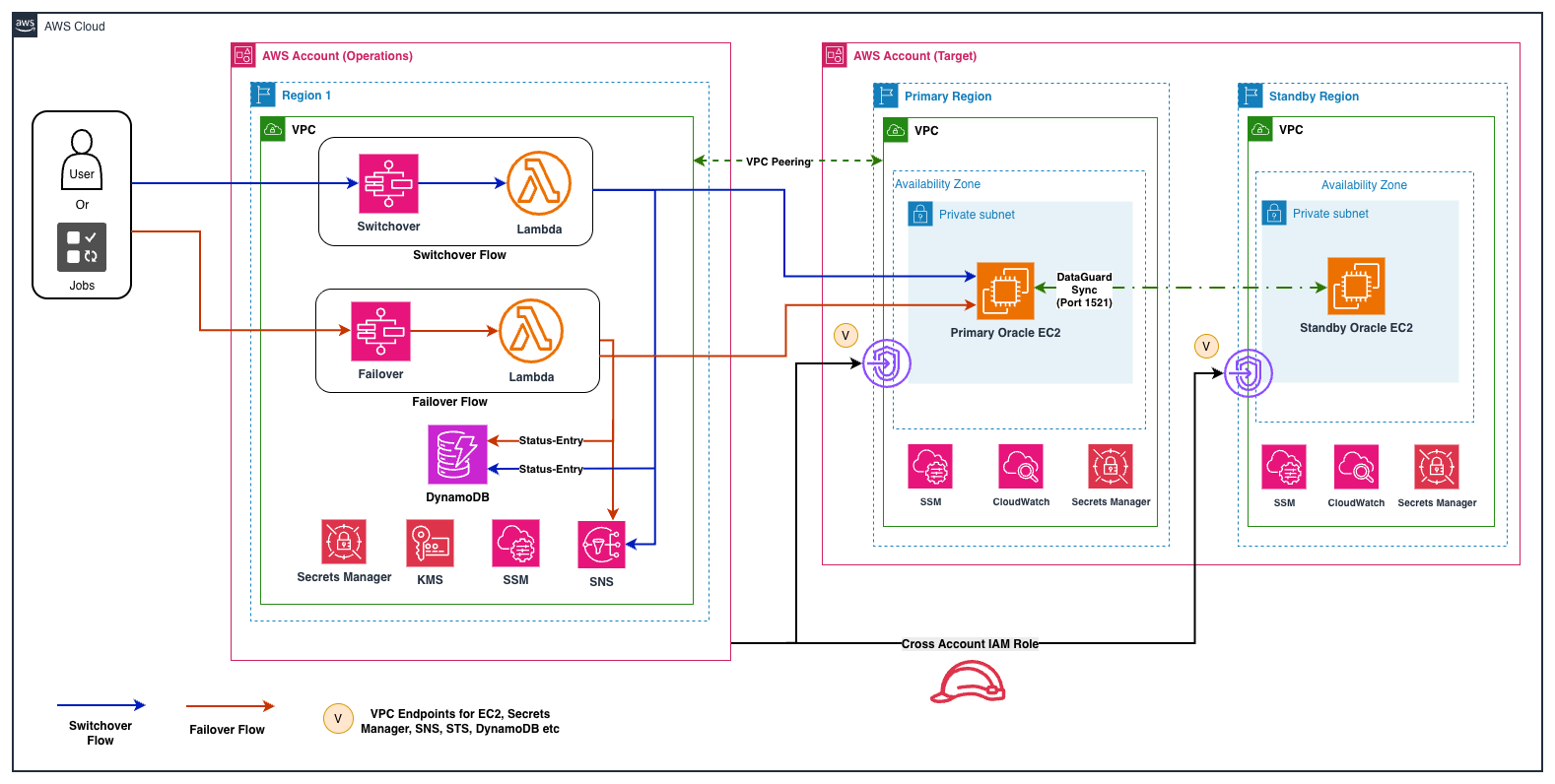
Figure 1: Architecture diagram
Component interaction flow
The following diagram illustrates how the key components interact during a switchover or failover operation:
Figure 2: Component interaction flow
The following steps describe the end-to-end execution flow when the automation is triggered:
How it works
- Trigger: A Database Administrator (DBA), Amazon EventBridge, or any other automation workflow that uses this solution initiates the AWS Step Functions execution by providing a JSON input that includes the database connection details and the desired operation type.
- Pre-checks: AWS Lambda retrieves the SYS password from AWS Secrets Manager, then uses Systems Manager Run Command to execute SQL*Plus and DGMGRL queries on both primary and standby servers.
- Evaluation: AWS Step Functions evaluates the pre-check results. If any blocking check fails, the workflow halts and sends a failure notification. Non-blocking warnings are noted but don’t stop execution.
- Execution: The switchover/failover Lambda issues the DGMGRL command and verifies the role change completed successfully.
- Post-validation: After execution, eight post-checks verify the new database roles, replication status, and MRP processes.
- Notification: A comprehensive email is sent through Amazon SNS with hostnames, IPs, instance IDs, check results, and next actions.
Switchover workflow
The switchover workflow is designed for planned maintenance scenarios where both primary and standby databases are accessible. It performs a graceful role transition from primary to standby database with zero data loss.
Workflow stages
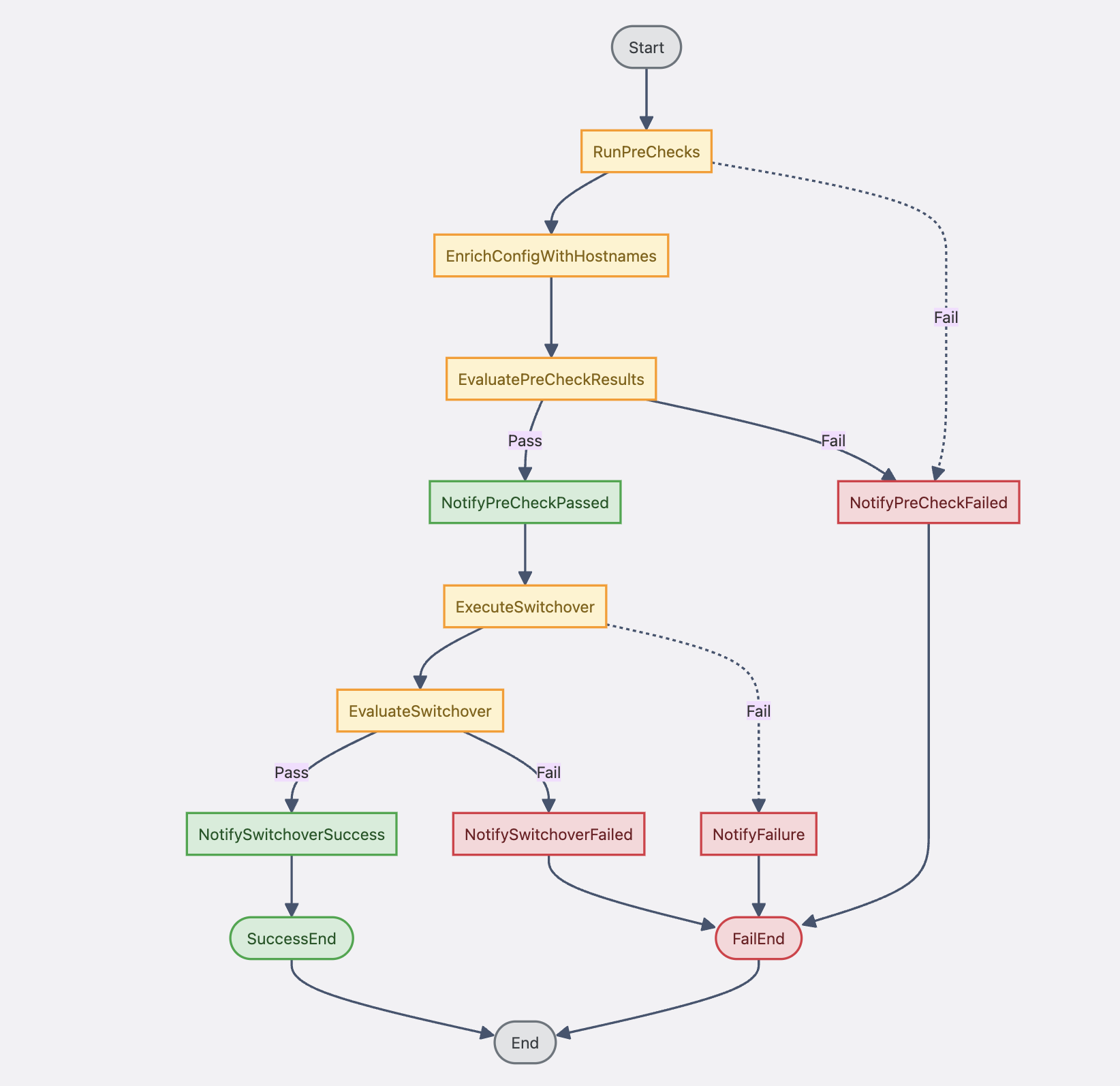
Figure 3: Switchover workflow
Pre-check validations (13 checks)
The switchover pre-checks validate the complete Data Guard environment before allowing execution:
| # | Check | What it validates | Blocks? |
| 1 | Transport & Apply Lag | Both lags = 0 seconds | Yes |
| 2 | Protection Mode | Validates that DG protection mode is set correctly (Maximum Performance, Availability, or Protection). A misconfigured protection mode could cause the switchover to fail or behave unexpectedly. | Yes |
| 3 | Active Sessions | No blocking locks on primary | No (warning) |
| 4 | Static Listener (_DGMGRL) | Listener configured correctly | Yes |
| 5 | FRA Space | Flash Recovery Area not full | No (warning) |
| 6 | Flashback Status | Flashback ON – both databases | Yes |
| 7 | Standby DB Status | READ ONLY WITH APPLY mode | Yes |
| 8 | PDB Status | All PDBs open | No (warning) |
| 9 | Archive Log Gap | Gap = 0 between primary/standby | Yes |
| 10 | DB Names Validation | DB_UNIQUE_NAME matches config | Yes |
| 11 | DG Configuration | DGMGRL show configuration = SUCCESS | Yes |
| 12 | Validate Primary | DGMGRL validate database (primary) | Yes |
| 13 | Validate Standby | DGMGRL validate database (standby) | Yes |
Note: For checks marked as blocking (Yes), the state machine halts execution and sends a failure notification. For example, if Transport or Apply Lag is greater than 0, it indicates the standby isn’t synchronized with the primary. In this case, the automation stops to prevent data loss during switchover. Before initiating the automation, verify that application workloads on the primary database are quiesced (or stopped) so that redo shipping can complete and lag reaches zero.
Post-switchover validation (8 checks)
After a successful switchover, the post-checks confirm the role transition completed correctly:
- New primary role verified (database_role = PRIMARY).
- New standby role verified (database_role = PHYSICAL STANDBY).
- MRP (Managed Recovery Process) running on new standby.
- Transport lag = 0 on new configuration.
- Apply lag = 0 on new standby.
- Flashback still enabled on both databases.
- DG Broker configuration shows SUCCESS.
- All PDBs open on new primary.
Failover workflow
The failover workflow is designed for emergency scenarios where the primary database is unreachable. Unlike switchover, failover might involve some data loss: the automation captures the last SCN data to quantify the RPO impact.
Automated workflow stages
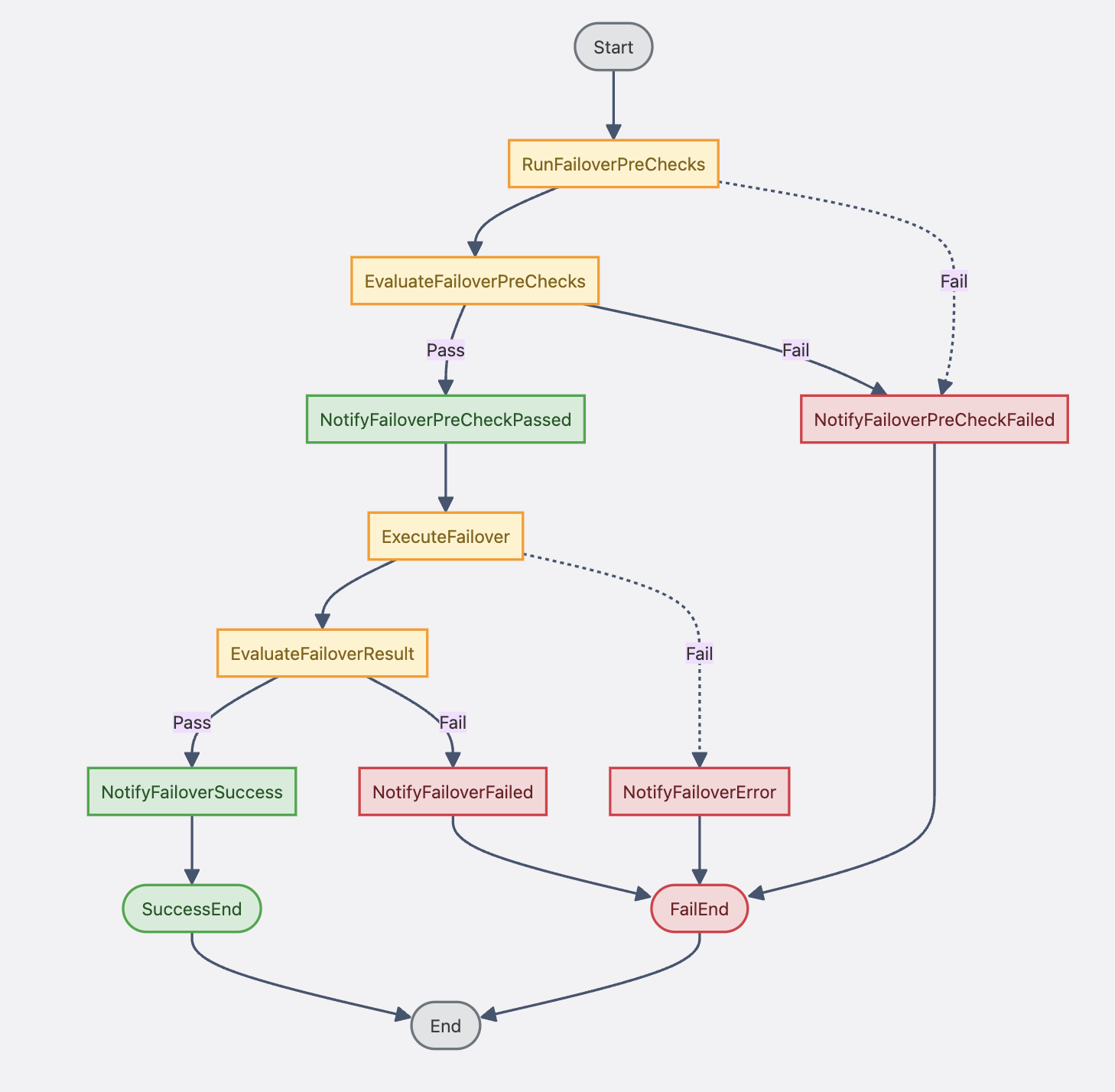
Figure 4: Failover workflow
Failover pre-checks (10 checks)
The failover pre-checks focus on standby readiness since the primary is assumed unreachable:
- Standby database status: Must be in mounted or read-only mode.
- Primary unreachable confirmation: Confirms that the primary database is genuinely unavailable. If the primary is found to be reachable, the automation halts the failover process and advises performing a switchover instead, preventing unnecessary data loss.
- Flashback status: Required for potential reinstatement of old primary.
- Archive log gap assessment: Quantifies potential data loss.
- MRP (Managed Recovery Process) status.
- SCN and RPO capture: Records last applied SCN and timestamp.
- DGMGRL validate database: Validates standby readiness.
- FRA space availability.
- Standby redo log configuration.
- Static listener verification.
RPO data capture
During failover pre-checks, the automation captures critical RPO metrics:
- Last applied SCN on standby.
- Last applied timestamp: Shows the exact point-in-time of the standby.
- Estimated data loss window: Difference between current time and last applied time.
- Archive log sequence gap: Number of redo logs not yet shipped/applied.
These metrics are included in the SNS notification email, giving stakeholders immediate visibility into the RPO impact of the failover event.
Key components
The solution is composed of six Lambda functions, a shared helper layer, and two Step Functions state machines:
| File | Lambda | Description |
Pre-checks.py | Switchover Pre-checks | Runs 13 DG validations against both primary and standby |
Switchover.py | Switchover Execution | Executes DGMGRL switchover with role verification |
Post-checks.py | Post-checks | Validates Database state after switchover (roles, lag, MRP) |
prechecks-failover.py | Failover Pre-checks | Standby-only checks, SCN capture, and failover execution |
Failover.py | Failover (standalone) | Standalone emergency failover Lambda |
Notification.py | Notification | Formatted SNS email with hostnames, RPO/RTO, check results |
| ssm_helper_layer/ | Lambda Layer | Shared module: SSM, SQLPlus, DGMGRL, Secrets Manager, SNS |
Shared helper layer (ssm_helper)
The ssm_helper Lambda Layer provides reusable functions used by all Lambda functions:
- SSM Run Command execution with timeout and retry handling.
- SQL*Plus command wrapper (connects as SYS, runs queries, parses output).
- DGMGRL command wrapper (connects to Data Guard Broker, executes commands).
- Secrets Manager integration (retrieves and caches SYS password).
- SNS publishing with formatted HTML email templates.
- EC2 instance metadata resolution (hostname, IP from instance ID).
Design decisions and architecture rationale
Step Functions provides visual workflow management, built-in retry logic, and state tracking. These capabilities help manage long-running database operations that exceed the 15-minute execution limit of AWS Lambda.
- AWS Lambda: Handles discrete tasks like database checks, DGMGRL commands, and notifications. Because Lambda is serverless, you only pay for actual execution time during DR events.
- Amazon SNS: Chosen over email services because it provides multiple notification channels (email, SMS, Slack) and integrates natively with AWS services for reliable delivery.
- Amazon DynamoDB: Selected for audit logging because of its high availability and its ability to capture detailed execution history even during regional failures that might affect other AWS services.
- AWS Systems Manager (SSM): Provides secure, authenticated command execution on EC2 instances without requiring SSH access or managing additional credentials.
Deployment guide
The complete solution is available in the AWS Samples GitHub repository. Follow the README.md for detailed deployment steps using AWS CloudFormation and CLI commands.
The repository includes CloudFormation templates, Lambda function code, Step Functions state machine definitions, and a shared helper layer. Before execution verify the following key prerequisites and the execution input format.
Prerequisites and environment considerations
Before deployment, verify your environment meets these requirements on both primary and standby databases.
- Oracle Data Guard Broker already configured and enabled.
- Flashback Database option “ON” on both servers.
- Network connectivity allows communication between primary and standby databases.
- Oracle database users have appropriate SYSDBA privileges for DGMGRL operations.
- Static listener entry with _DGMGRL suffix configured.
- SSM Agent installed and running on both EC2 instances.
- EC2 Instance Profile with “AmazonSSMManagedInstanceCore” policy.
- AWS Secrets Manager secret with SYS password.
- SNS topic created and subscribed.
Execution input (switchover)
Monitoring and notifications
The automation provides comprehensive observability through multiple channels:
Email notifications (SNS)
The automation sends a formatted HTML email at every major stage of the workflow:
- Pre-Check Results: Lists all checks with PASS/FAIL/WARNING status.
- Switchover/Failover Success: Confirms role transition with new primary/standby details.
- Switchover/Failover Failure: Includes error details and recommended next actions.
Each notification includes:
- Customer name and environment ID.
- Primary and standby hostnames, IPs, and EC2 instance IDs.
- AWS Region information.
- DB unique names and Oracle SIDs.
- Detailed check results (for pre-check/post-check notifications).
- RPO data including SCN and last applied timestamp (failover only).
- Reinstate instructions for old primary (failover only).
CloudWatch logs
All Lambda executions are logged to CloudWatch with structured output including SSM command results, SQL*Plus output, and DGMGRL responses. The Step Functions execution history provides a visual timeline of each state transition.
DynamoDB audit trail
Every switchover/failover event is recorded in DynamoDB with the following schema:
- Partition Key: db_unique_name.
- Sort Key: timestamp (ISO 8601 UTC).
- Attributes: operation, status, customer_name, server details, hostnames, IPs.
- Details (JSON): Operation-specific data including check results and RPO metrics.
Troubleshooting
Common issues and their resolutions:
| Issue | Cause | Resolution |
| Pre-check: Transport Lag > 0 | Network latency or redo shipping paused | Check network, verify LOG_ARCHIVE_DEST_2 status |
| Pre-check: Static Listener not found | _DGMGRL entry missing from listener.ora | Add SID_DESC with _DGMGRL suffix, reload listener |
| SSM Command timeout | SSM Agent not running or instance unreachable | Verify SSM Agent status, check instance profile |
| Secrets Manager access denied | Lambda role missing GetSecretValue permission | Update IAM policy with correct secret ARN |
| Switchover hangs | Active sessions blocking on primary | Terminate blocking sessions or wait for pre-check warning |
| Failover: ORA-16795 | Standby not synchronized before failover | Accept potential data loss or investigate recovery options |
| Post-check: MRP not running | Standby redo logs misconfigured | Verify standby redo log groups (N+1 rule) |
| Lambda timeout (15 min) | Large database with slow switchover | Increase SSM command timeout, check network throughput |
Conclusion
In this post, we demonstrated how to automate Oracle Data Guard switchover and failover operations on Amazon EC2 using AWS Step Functions and Lambda. This solution transforms a complex, error-prone manual process into a reliable, repeatable, and fully auditable workflow. It removes the need for manual runbooks. The automation currently supports single-database switchover and failover within the same AWS account and Region. For multi-database orchestration (multiple Oracle databases switching over simultaneously), you can trigger separate state machine executions with different JSON payloads. Cross-account operation is possible by configuring cross-account IAM roles for SSM and Lambda access. This solution has been tested with Oracle Database 19c and requires Python 3.9+ for the Lambda runtime.
Future enhancements
Planned improvements to the automation framework include:
- Amazon EventBridge integration: Trigger failover automatically based on CloudWatch alarms.
- Multi-database orchestration: Coordinate switchover/failover across multiple Oracle databases simultaneously.
- Integration with AWS Elastic Disaster Recovery (AWS DRS): Combine database DR with application-layer DR.
- Self-healing capabilities: Automatic reinstatement of old primary after failover.
- Slack/Teams notifications: Real-time alerts through chat platforms in addition to email.
We encourage you to try this solution in your environment. Clone the repository, deploy the automation to a non-production Oracle Data Guard setup, and test both switchover and failover workflows. If you have feedback or would like to contribute enhancements, open issues or submit pull requests on the GitHub repository.


