If you run PostgreSQL on Amazon Relational Database Service (Amazon RDS), every new AWS Graviton generation poses the same question. Is the gain in throughput and price-performance worth upgrading for? AWS Graviton5 is the latest generation, available on Amazon RDS through the new M9g instance family. In this post, we benchmark M9g against the three previous generations (M6g, M7g, and M8g) for Amazon RDS for PostgreSQL, measuring throughput, latency, and price-performance so you can decide.
The Graviton evolution on Amazon RDS
AWS has released four generations of Graviton processors for Amazon RDS since 2020. Each generation brings architectural improvements that translate into higher throughput and lower latency for database workloads.
All four generations support Amazon RDS for PostgreSQL, Amazon RDS for MySQL, and Amazon RDS for MariaDB.
Benchmark environment and deployment
We benchmarked Amazon RDS for PostgreSQL using Sysbench, a multi-threaded benchmarking tool, to compare the performance of four Graviton generations under an online transaction processing (OLTP) read/write workload.
The following diagram illustrates the test architecture.
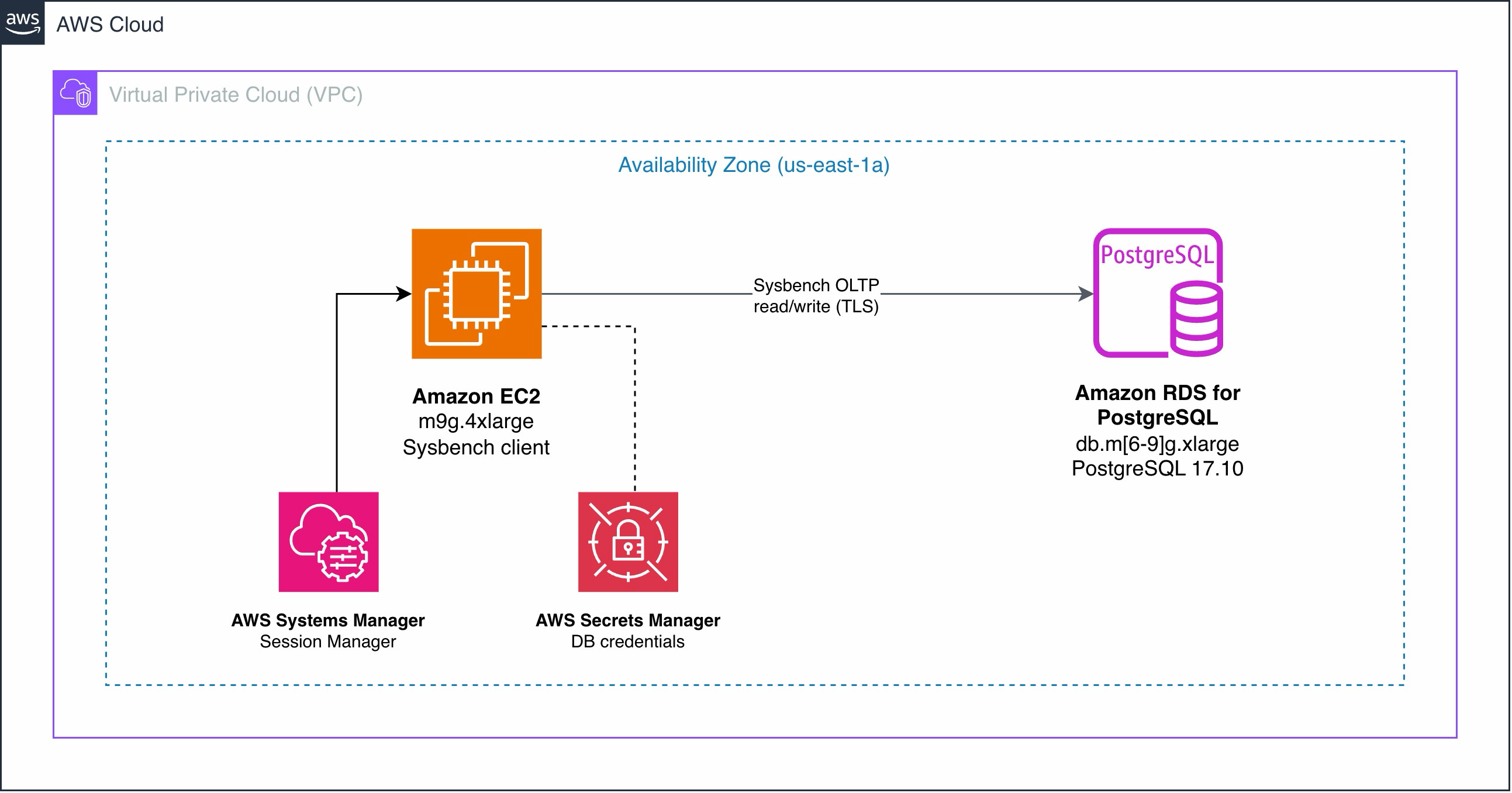
Figure 1: Benchmark test architecture with an EC2 client running Sysbench against an Amazon RDS instance in a Single-AZ deployment
The test environment consists of the following.
-
Client instance. Amazon Elastic Compute Cloud (Amazon EC2) m9g.4xlarge (16 vCPUs, 64 GiB memory) running Sysbench, deployed in the same Availability Zone as the database to minimize network latency.
-
Database instances. Amazon RDS for PostgreSQL 17.10, deployed as Single-AZ to isolate compute performance from replication overhead.
-
Database parameters. Default RDS parameter group with no tuning other than enforced TLS (
rds.force_ssl=1). -
Storage. Amazon Elastic Block Store (Amazon EBS) io2 volumes with 10,000 provisioned IOPS and 200 GiB, providing a consistent I/O baseline across all tests.
We tested four instance classes, keeping all other variables constant.
| Instance Class | Processor | vCPUs | Memory (GiB) | Network (Gbps) |
| db.m6g.xlarge | Graviton2 | 4 | 16 | Up to 10 |
| db.m7g.xlarge | Graviton3 | 4 | 16 | Up to 12.5 |
| db.m8g.xlarge | Graviton4 | 4 | 16 | Up to 12.5 |
| db.m9g.xlarge | Graviton5 | 4 | 16 | Up to 15 |
CloudFormation template
To simplify deployment, we created an AWS CloudFormation template that automates the creation of the entire test environment. The template is available in our GitHub repository.
The CloudFormation stack creates the following resources.
-
A virtual private cloud (VPC) with a private subnet and routing configuration.
-
An Amazon RDS DB instance running the selected engine and instance class.
-
An Amazon EC2 instance pre-configured with Sysbench and the automated benchmark script.
-
VPC endpoints for AWS Systems Manager Session Manager (private connectivity, no public IPs).
-
An AWS Secrets Manager secret storing the database credentials.
-
IAM roles for Session Manager access.
-
A parameter group enforcing TLS connections.
The template is parameterized. You select the database engine (postgres, mysql, or mariadb) and the instance class (db.m6g.xlarge through db.m9g.xlarge in xlarge, 2xlarge, or 4xlarge sizes). To compare all four Graviton generations, deploy four stacks, one for each instance class.
While this post focuses on PostgreSQL, the template also supports MySQL and MariaDB. Select mysql or mariadb as the DatabaseEngine parameter to run benchmarks on those engines.
Running the benchmark
After the stack completes, connect to the EC2 instance using Session Manager and run the benchmark script.
The /opt/run-benchmark.sh script automates the full Sysbench workflow.
-
Prepare. Creates 2 tables (
sbtest1,sbtest2) with 2,000,000 rows each. -
Run. Executes the
oltp_read_writeworkload with 100 threads for 1,800 seconds (30 minutes). -
Cleanup. Drops the test tables after the run completes.
-
Save results. Writes output to
/opt/results/with a timestamped filename.
The script retrieves database credentials from Secrets Manager automatically and connects over TLS. No manual Sysbench commands are needed.
Benchmark methodology
Using the test environment described in the previous section, we ran the following Sysbench configuration against each of the four instance classes.
| Parameter | Value |
| Sysbench workload | OLTP read/write (oltp_read_write.lua) |
| Tables | 2 |
| Rows per table | 2,000,000 |
| Threads | 100 |
| Duration | 1,800 seconds (30 minutes) |
| Report interval | 10 seconds |
| TLS | Enforced |
The only variable was the DB instance class. Because the Sysbench client was identical across all four tests and has four times the vCPUs of the database instances, the throughput differences reflect the database instance, not the client. By keeping the working set in memory and running at full CPU saturation, this setup isolates the effect of the processor generation itself. Workloads with a different balance of CPU, memory, and I/O will see different gains. We ran each benchmark five times per instance class and report the median of the five runs.
Performance results across four generations
The following sections compare throughput, latency, and price-performance across the four instance classes.
Queries per second (QPS)
In our tests, the Graviton5-powered M9g instances delivered the highest throughput.
| Instance | QPS | Uplift compared to M6g | Uplift compared to predecessor |
| db.m6g.xlarge | 27,816 | — | — |
| db.m7g.xlarge | 32,529 | +17% | +17% |
| db.m8g.xlarge | 47,177 | +70% | +45% |
| db.m9g.xlarge | 61,495 | +121% | +30% |
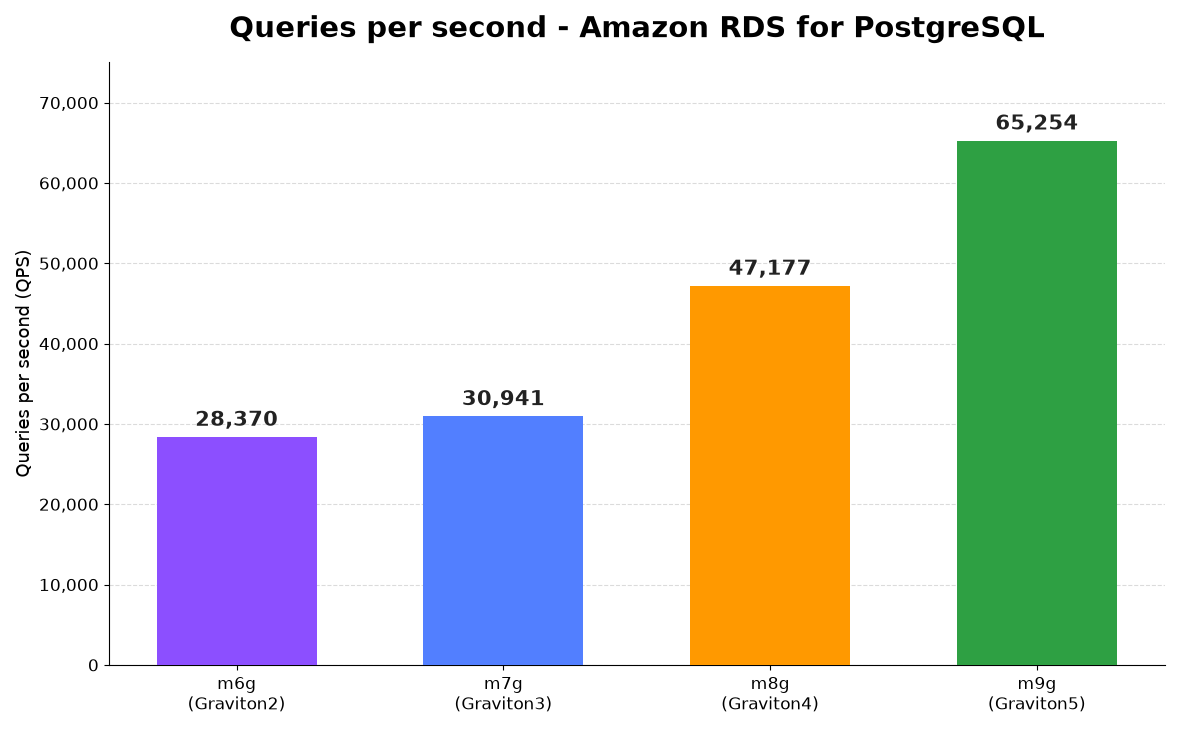
Figure 2: Queries per second across four Graviton generations for Amazon RDS for PostgreSQL
Latency
Lower latency means faster transaction processing. In our tests, M9g reduced p95 latency by 55% compared to M6g for PostgreSQL workloads. Sysbench reports p95 latency as the 95th-percentile response time per transaction in milliseconds (the value 95% of transactions stay under), measured end-to-end from the client.
| Instance | p95 Latency (ms) | p95 reduction compared to M6g | p95 reduction compared to predecessor |
| db.m6g.xlarge | 89.16 | — | — |
| db.m7g.xlarge | 78.60 | -12% | -12% |
| db.m8g.xlarge | 52.89 | -41% | -33% |
| db.m9g.xlarge | 40.37 | -55% | -24% |
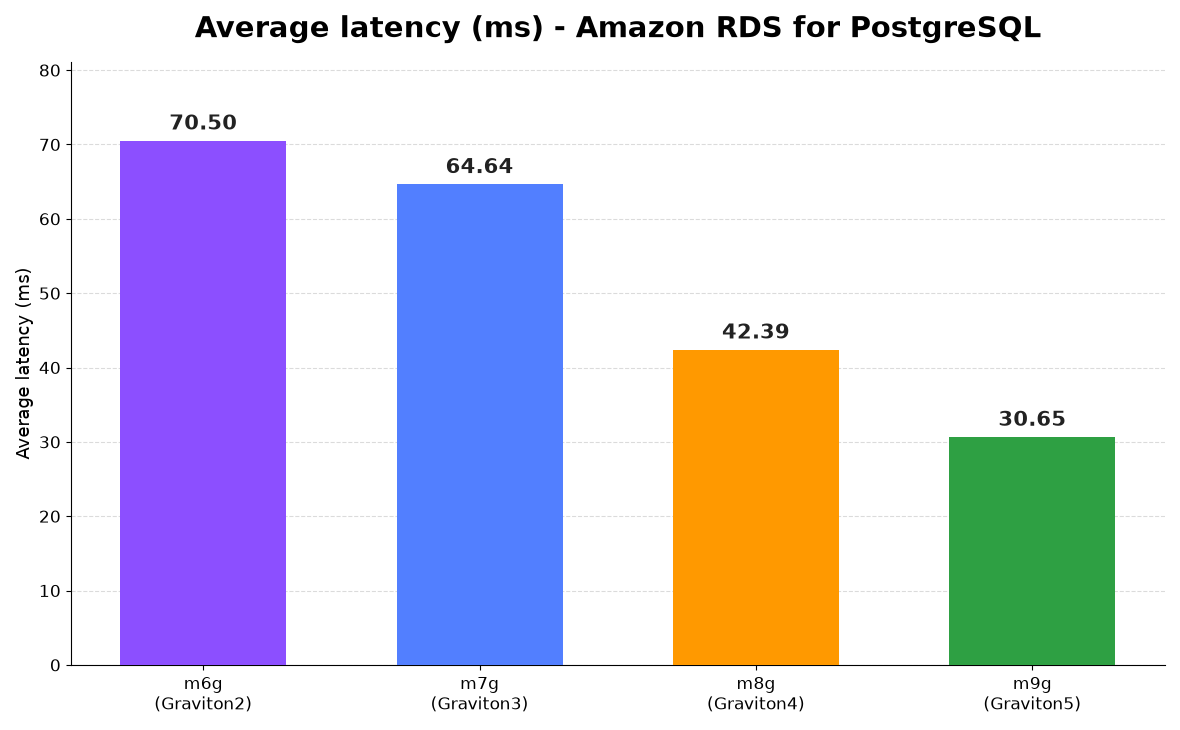
Figure 3: p95 latency (ms) across four Graviton generations for Amazon RDS for PostgreSQL
These results may vary depending on your workload and database configuration.
Price-performance in queries per dollar
The following table shows the On-Demand hourly pricing for each instance class in us-east-1 (as of this writing) and the resulting price-performance for PostgreSQL workloads. For current pricing, see the Amazon RDS pricing page.
| Instance | Hourly Cost | Monthly Cost | QPS | Queries/Dollar (M) | Price-performance compared to M6g | Price-performance compared to predecessor |
| db.m6g.xlarge | $0.318 | $232.14 | 27,816 | 314.9 | — | — |
| db.m7g.xlarge | $0.337 | $246.01 | 32,529 | 347.5 | +10% | +10% |
| db.m8g.xlarge | $0.336 | $245.28 | 47,177 | 505.5 | +61% | +45% |
| db.m9g.xlarge | $0.366 | $267.18 | 61,495 | 604.9 | +92% | +20% |
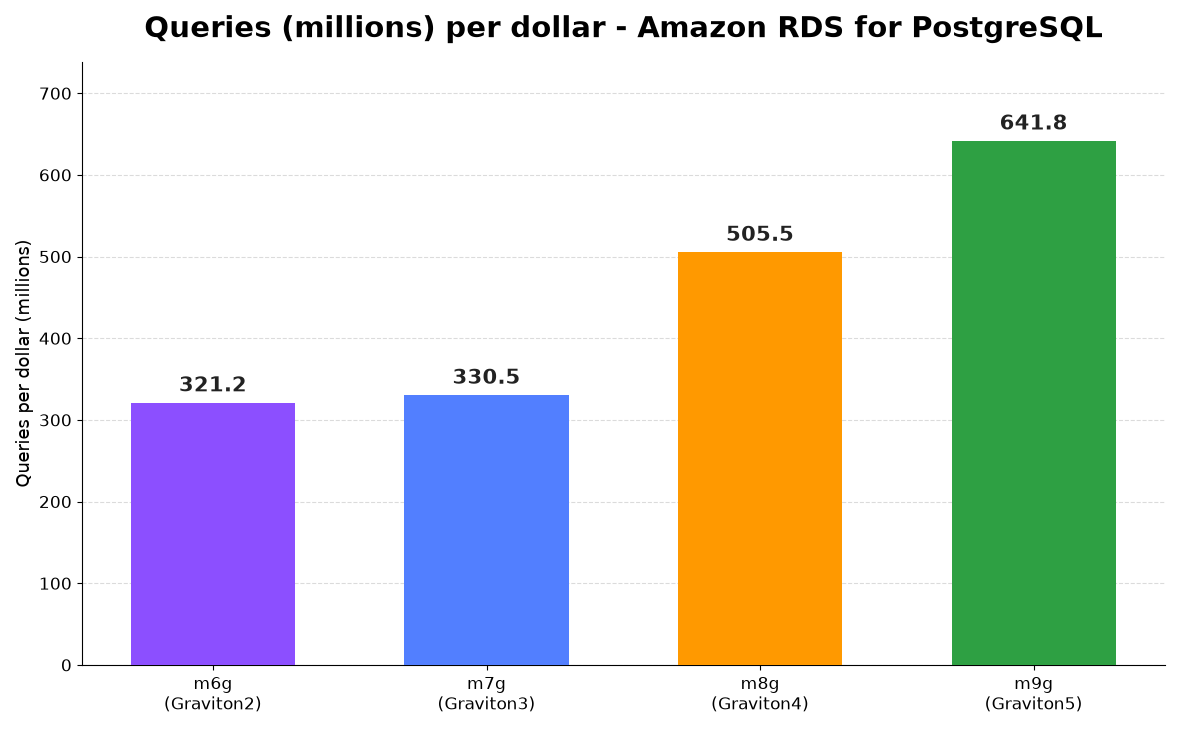
Figure 4: Queries (millions) per dollar across four Graviton generations for PostgreSQL
In our tests, M9g delivered 92% more queries per dollar compared to M6g, and 20% more queries per dollar compared to M8g.
Cleanup
Delete all benchmark stacks to avoid ongoing charges. Navigate to AWS CloudFormation in the AWS Management Console, select each benchmark stack, and choose Delete. This removes all resources created for testing, including the RDS DB instances, EC2 instances, VPC, and associated configurations.
Conclusion
In this post, we benchmarked four generations of AWS Graviton processors on Amazon RDS for PostgreSQL using Sysbench OLTP read/write workloads. Each generation improved on its predecessor, with M9g delivering the highest throughput and lowest latency of the four.
As of this writing, M9g instances are available in US East (N. Virginia), US East (Ohio), US West (Oregon), and Europe (Frankfurt). On Amazon RDS for PostgreSQL, M9g supports versions 13.18, 14.17, 15.10, 16.6, 17.2, and 18.1 (and higher). MySQL and MariaDB are also supported on recent minor versions. See Supported DB engines for DB instance classes for the current list.
To upgrade an existing RDS instance, modify your DB instance class to an M9g instance type. With Multi-AZ deployments, this completes with minimal downtime through automatic failover. On a Single-AZ instance, as used in this benchmark, the change requires a brief reboot. Before upgrading production, test your own workload on the new instance to confirm the throughput and price-performance gains carry over to your application.
To get started with Graviton5, see the Amazon RDS pricing page for instance costs and Region support for DB instance classes to confirm where M9g is available for supported engine versions and regional availability. Deploy the CloudFormation template from our GitHub repository to reproduce these benchmarks in your own account. It also supports Amazon RDS for MySQL and MariaDB.


