With AI coding agents and Amazon Aurora DSQL, you can turn data from existing business systems into applications that support a wide range of use cases across industries. Turning that data into an application can require coordination across application, database, security, and platform teams, which slows prototypes and internal tools.
AI coding agents can shorten that path, but only if they understand the database they build on. Although Amazon Aurora DSQL works with familiar PostgreSQL tools, its distributed architecture requires specific approaches to schema design, data loading, authentication, and transaction handling. An agent relying only on general knowledge or information that doesn’t reflect the latest service capabilities might create an implementation that appears valid but doesn’t follow current Aurora DSQL guidance. This makes it difficult to assess whether the generated architecture and design are appropriate for the service.
Aurora DSQL helps close that gap through steering guidance for plugins, skills, and powers. This guidance gives AI coding agents service-specific context for schema design, data loading, authentication, and transaction handling. Depending on the AI coding agent, the guidance is delivered through a plugin, skill, or power. It can include configuration for the Aurora DSQL Model Context Protocol (MCP) server, which allows the agent to inspect and check its work against a live Aurora DSQL database.
In this post, we use Kiro, an agentic integrated development environment (IDE) and the Aurora DSQL Kiro power which brings Aurora DSQL steering guidance and MCP server configuration into Kiro. We demonstrate a general solution pattern for turning source-system data and business requirements into a working data-driven application on Aurora DSQL, using synthetic manufacturing data as an example. Across four prompts, Kiro recommends a database, creates a development cluster, designs and applies a schema, loads the data with the Aurora DSQL Loader, and builds a local web application. We also demonstrate how the application handles concurrent business actions that update the same data, explain what the power contributed, and discuss what you need to consider before taking a similar application to production.
Aurora DSQL and the agent tooling
Amazon Aurora DSQL is the fastest serverless distributed SQL database for always available applications. There are no instances to size, patch, or upgrade, and you only pay for what you use. Aurora DSQL replicates data across Availability Zones in an AWS Region and supports active-active multi-Region clusters. It uses optimistic concurrency control: when two transactions write the same rows, the one that commits second fails with SQLSTATE 40001, the standard PostgreSQL serialization failure code, and the application retries the whole transaction. For details, see Concurrency control in Aurora DSQL.
Several tools help an AI coding agent build on Aurora DSQL. They solve different problems, and this post uses most of them.
| Component | What it provides | Where it runs | Used in this post |
| Aurora DSQL Kiro power | Aurora DSQL guidance for Kiro, loaded on demand, plus configuration for the Aurora DSQL MCP server | Kiro IDE | Yes |
Aurora DSQL agent skill (dsql) | The same kind of guidance for other agents, installed with the Skills CLI | Claude Code, Codex, Cursor, Kiro CLI, and others | Mentioned |
databases-on-aws plugin | The skill, MCP server configuration, and a verification hook in one install | Claude Code, Codex, Cursor | Mentioned |
| Aurora DSQL MCP server | Tools to query the live cluster, read its schema, search Aurora DSQL documentation, get recommendations, and lint SQL for compatibility. Read-only unless started with --allow-writes | Locally, as a process the IDE starts | Yes, read-only |
| Aurora DSQL Loader | A command line tool that loads CSV, TSV, and Parquet files into Aurora DSQL in parallel, with retries and resumable jobs | Locally or on another host of your choice | Yes |
For setup paths for each agent, see Aurora DSQL steering: Plugins, skills, and powers. For a closer look at the MCP server tools, see MCP tools for Amazon Aurora DSQL: Query execution and schema management.
Solution overview
The following diagram shows the two paths in this solution. During development, Kiro uses the Aurora DSQL power for service-specific guidance and a read-only MCP connection to inspect the schema, run read-only checks, and validate SQL for Aurora DSQL compatibility. Kiro applies schema and setup changes through generated scripts and loads the extracts with the Aurora DSQL Loader. These tools connect directly to Aurora DSQL using AWS Identity and Access Management (IAM) authentication. At runtime, the generated application connects directly to Aurora DSQL. Neither Kiro nor the MCP server is in the end-user request path.
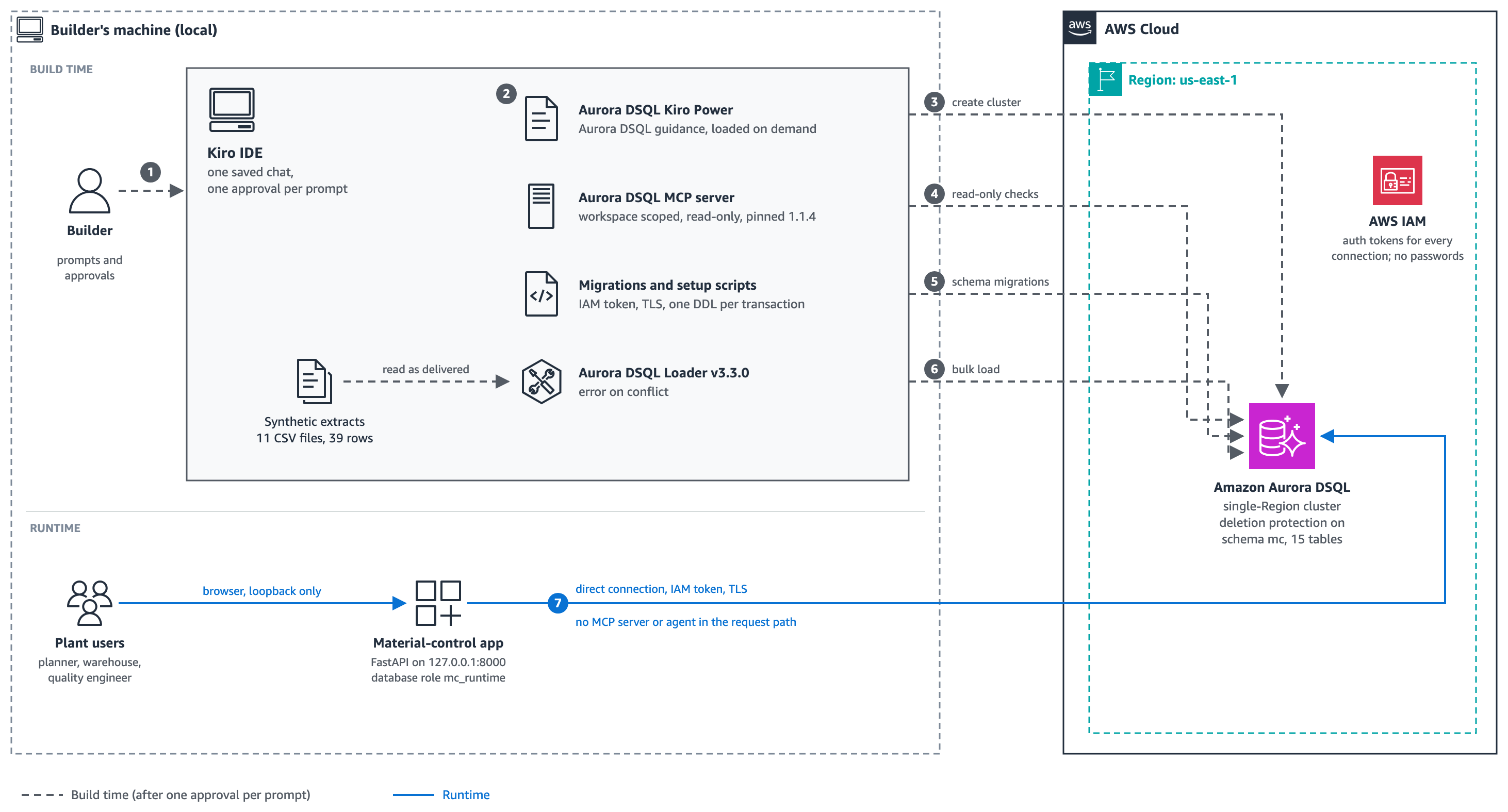
Figure 1: Kiro and the Aurora DSQL power build the data layer and application, which connects directly to Aurora DSQL at runtime
The numbers in the diagram follow the walkthrough:
- The builder sends four prompts, approves one plan for building the data layer and another for building the application, and confirms deletion of the demo cluster by entering its recorded cluster ID.
- Kiro loads Aurora DSQL guidance from the power as it plans and builds.
- Kiro creates the development cluster with the AWS Command Line Interface (AWS CLI).
- Kiro checks the database through the read-only MCP server and lints SQL before running it.
- Kiro’s setup scripts apply the schema migrations, one DDL statement per transaction.
- The Aurora DSQL Loader loads the data.
- At runtime, users access the generated application, which connects directly to Aurora DSQL using IAM authentication and TLS. Neither Kiro nor the MCP server is in the application request path.
The solution includes the following components:
- Kiro IDE with the Aurora DSQL Kiro power – Kiro loads Aurora DSQL guidance from the power and presents one consolidated plan before each build phase. You approve the data-layer and application plans separately.
- Aurora DSQL MCP server – A workspace-scoped, read-only connection that Kiro uses to query the cluster, check the schema, and lint SQL.
- Aurora DSQL cluster – A single-Region development cluster in
us-east-1with deletion protection enabled. - Aurora DSQL Loader – Loads the canonical extract files into the schema.
- Local FastAPI application – A server-rendered web app that listens only on
127.0.0.1and connects to Aurora DSQL as a restricted database role.
Walkthrough use case: Manufacturing material control
To demonstrate this solution pattern, we use a manufacturing material-control scenario involving two assembly plants, one in the United States and one in Mexico, and a central planning team. Both plants build an industrial drive controller whose bill of materials requires a control module, two vibration sensors, and an enclosure. The sample extracts represent data from four source systems: work orders from an enterprise resource planning (ERP) system, inventory lots from a warehouse system, quality holds from a quality system, and material-issue and finished-output records from a manufacturing execution system.
The application supports three tasks:
- Determine whether a work order has eligible material.
- Trace component lots to finished lots.
- Identify work orders and finished lots affected by a quality hold.
The dataset is small (11 CSV files, 39 rows) and fully synthetic, but it includes cases that test the design: a component lot with exactly enough stock for one reservation, a lot that is already on hold, a historical suspect lot with a complete genealogy chain, and negative-test files with a duplicate key and invalid values.
Prerequisites
Before you start, make sure you have the following:
- An AWS account where you can create an Aurora DSQL cluster in
us-east-1. Use a development or sandbox account. - An AWS CLI profile that uses temporary credentials from an assumed role, for example through AWS IAM Identity Center. Confirm that
aws sts get-caller-identity --profile <your-profile>succeeds. Don’t paste credentials, account IDs, or ARNs into prompts. - An IAM policy for that role that allows only what this walkthrough needs. Ask your IAM administrator to grant the following Aurora DSQL actions in a development or sandbox account. Scope resource-level actions to Aurora DSQL clusters in
us-east-1. For Aurora DSQL actions that support tag-based conditions, allow cluster creation only when the request includes the tagPurpose=material-control-demo, and allow actions on an existing cluster only when it has the same tag. The walkthrough uses this tag to distinguish the demo cluster from other clusters, and the cleanup script verifies it before deleting the cluster. Becausedsql:ListClustersdoes not support resource-level permissions, specify"Resource": "*"for that action. Validate the final policy against the Aurora DSQL IAM documentation and review it with your security team:
| Aurora DSQL actions | Purpose |
dsql:CreateCluster, dsql:GetCluster, dsql:TagResource, dsql:ListTagsForResource | Create and verify the demo cluster |
dsql:ListClusters | Confirm that no existing cluster has the demo tag |
dsql:DbConnectAdmin on the demo cluster | Apply schema changes and database role mappings |
dsql:DbConnect on the demo cluster | Connect using the application database role |
dsql:UpdateCluster, dsql:DeleteCluster on the demo cluster | Clean up the demo cluster |
- Kiro installed, with no project-specific
.kiro/configuration in the folder you will use. - Python 3.12 or later, and AWS CLI version 2.
- Network access to the AWS endpoints used by the walkthrough, PyPI, and GitHub for the Aurora DSQL Loader release.
Aurora DSQL charges for the database work your cluster performs and for storage. The sample is small, and the cleanup step deletes the cluster. For details, see Aurora DSQL pricing.
Prepare the workspace
Download the sample from our GitHub repository. Clone the repository and go to the sample folder:
The folder contains the walkthrough prompts and a workspace template:
Keep the prompt files outside the workspace that you open in Kiro, so that Kiro starts only from the supplied data and scripts. Create a working copy outside the cloned repository and validate it:
Both validation commands must pass. Then open only reader-run-01 as the Kiro workspace. Keep reader-prompts.html open separately in your browser for copying prompts.
The validator checks that the sample files are complete and internally consistent, including the expected inventory, genealogy, and invalid-data test cases. Kiro validates the database schema, data load, and application in later steps.
Prompt 1 performs analysis only and makes no changes. Prompts 2 and 3 each present one plan for review and continue after a single Approved response. Kiro asks for confirmation again only if the AWS identity or target changes, the work expands beyond the approved plan, or an unplanned change could remove resources or data. Kiro’s standard tool-permission dialogs may still appear and are separate from the plan approval.
Step 1: Ask Kiro to recommend a database
Start with the business problem, not the database. Paste the following prompt:
Kiro reads the extracts and compares the three options against each requirement. In our runs, Kiro recommended a single-Region Aurora DSQL cluster, citing writes that continue through an Availability Zone failure without a failover step, no maintenance windows or capacity settings, and IAM authentication for every user. It also noted the trade-offs you should plan for, including retrying transactions that conflict at commit and testing reporting tools that depend on PostgreSQL features Aurora DSQL doesn’t support.
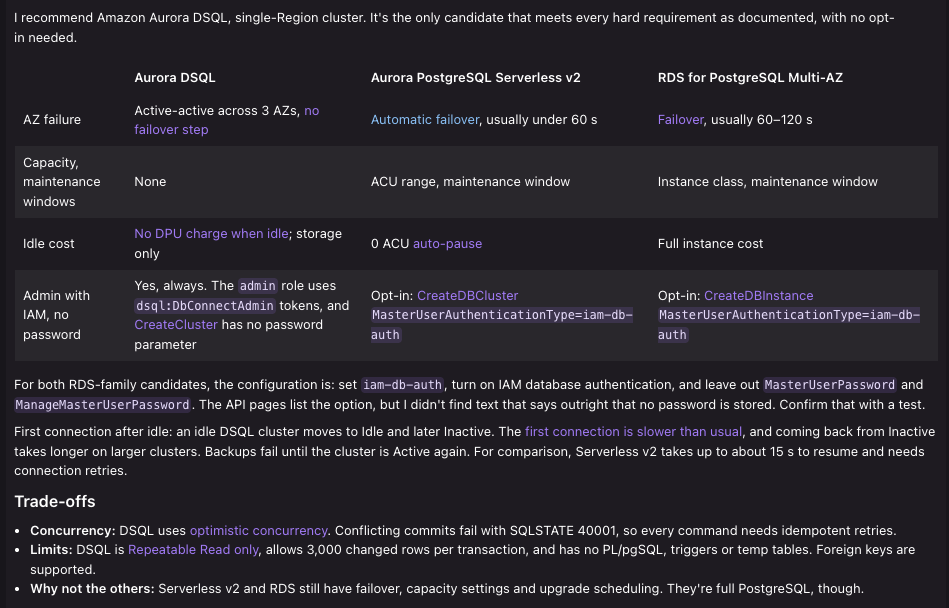
Figure 2: Kiro compares Aurora DSQL with Amazon Aurora PostgreSQL Serverless v2 and RDS for PostgreSQL Multi-AZ against the stated requirements
The requirements in this prompt describe a workload that fits Aurora DSQL. With different requirements, for example a need for PostgreSQL extensions that Aurora DSQL doesn’t support, a different database can be the right answer. Check the recommendation against current documentation before you rely on it.
Step 2: Install the Aurora DSQL power
In Kiro, open the powers pane, search for Build applications with Aurora DSQL, and install it. Kiro activates the installed power automatically when a relevant prompt requires it. You can also open it from the Kiro powers registry. This is the only tool you install by hand. You don’t need to install the MCP server separately. The next prompt creates a workspace-scoped connection that runs a pinned version of the same server package.
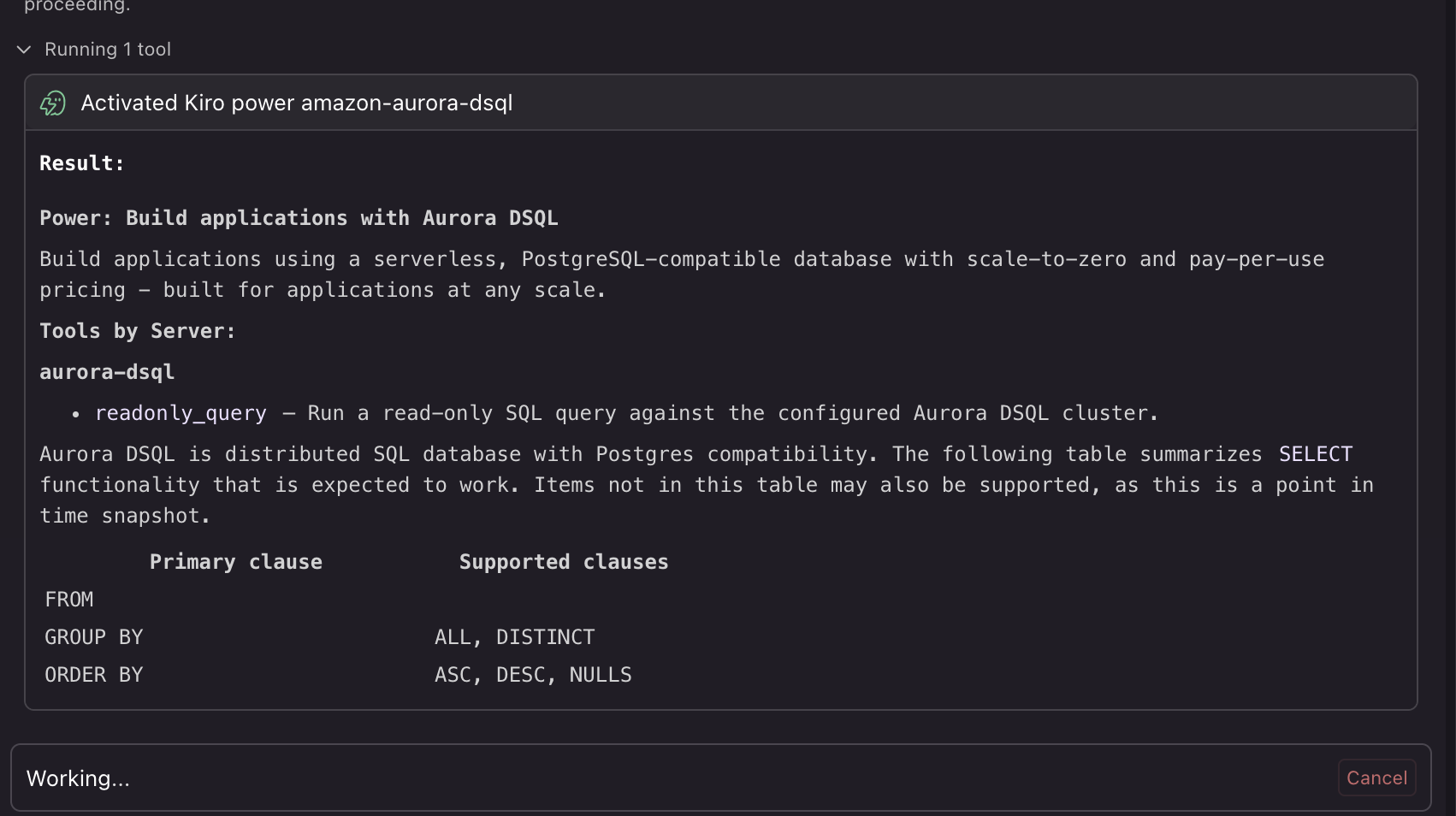
Figure 3: Kiro confirms the Build applications with Aurora DSQL power and lists the MCP tools it provides before designing the data layer
Step 3: Build the data layer
Paste the following prompt. It asks Kiro to plan the whole data layer, wait for one approval, and then build it.
What Kiro does before you approve
Kiro validates the sample data, confirms the active AWS identity without displaying its identifiers, checks that no existing cluster has the demo tag, and verifies that the Aurora DSQL power is active. It then presents one consolidated plan. Before replying Approved, confirm that the plan:
- Creates one cluster in
us-east-1with the specified tags and deletion protection enabled. - Leaves existing clusters unchanged.
- Configures the MCP server only for the current workspace and keeps its write capability disabled by omitting
--allow-writes. - Creates separate database roles for loading data, running the application, and read-only access, with each role limited to the operations it needs.
- Lists the dependencies Kiro will install, including the Aurora DSQL Loader release downloaded from GitHub.
What Kiro builds
After your approval, Kiro creates the cluster and verifies its status, deletion protection, encryption, and tags. It writes the workspace MCP configuration and confirms a read query through the MCP server.
In our reader run, Kiro creates the workspace MCP configuration and confirms the connection by running a read-only query. For connection issues, see the Troubleshooting section.
Kiro then creates a concise requirements and design record, generates the migration files, and applies them using a generated setup script. With guidance from the Aurora DSQL power, the data layer follows these Aurora DSQL practices:
- Data modeling and integrity – The schema uses UUID primary keys, foreign keys, and CHECK constraints to maintain relationships and enforce data rules.
- Schema migrations – Secondary indexes are created asynchronously, and migrations apply one DDL statement per transaction and wait for each index to become valid.
- Transaction handling – Commands that modify the same data use shared control rows so that overlapping changes conflict under the optimistic concurrency control of Aurora DSQL. The application retries the complete transaction and uses idempotency records to help prevent duplicate results.
- Least-privilege access – Separate database roles are used for loading data, running the application, and read-only access. The application role can perform only the database operations required by the application.
Kiro checks the generated SQL for Aurora DSQL compatibility before applying the migrations. After applying them, it verifies the live schema and confirms that the asynchronous indexes were created successfully.
To load the extracts, Kiro downloads the Aurora DSQL Loader and verifies the downloaded release’s checksum. Because the loader maps file fields to table columns by position, Kiro creates loader-compatible copies in the build/ folder without changing the original files. It configures the loader to stop if it encounters a conflicting row rather than silently skipping it.
After loading the data, Kiro runs a guarded finalization step to create the values derived from the source data. It then verifies the loaded data, relationships, indexes, and database permissions. In the final reader run, all 39 source rows loaded and matched the extracts, nine material-requirement rows were created, and all 25 asynchronous indexes were valid. The run ends with DATA LAYER READY.
Figure 4 shows the successful MCP read check that completes the data-layer build.
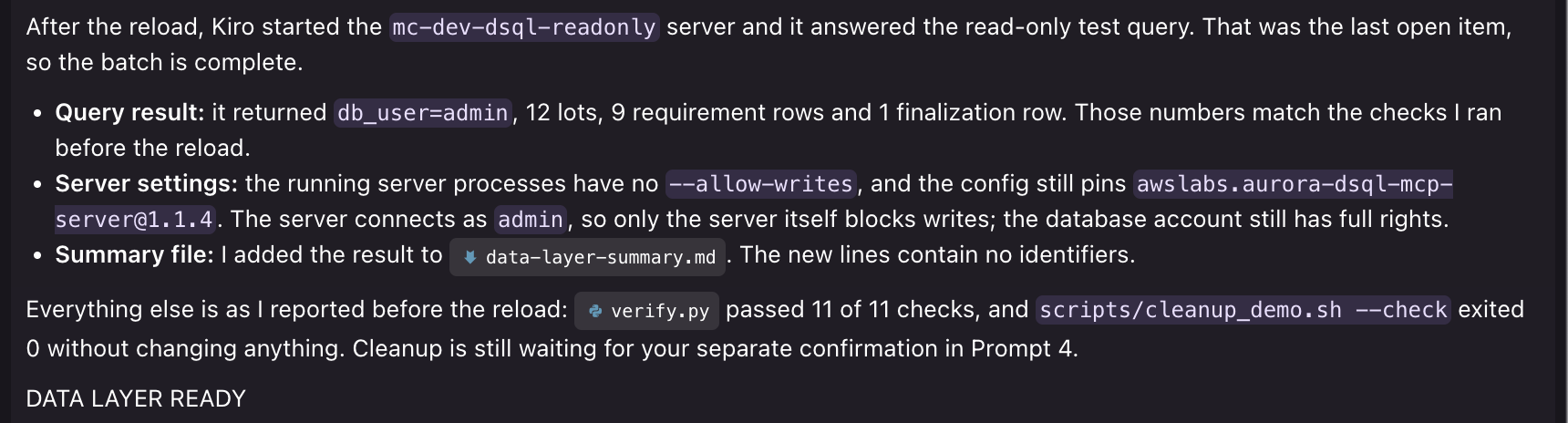
Figure 4: Kiro verifies the live cluster through the read-only Aurora DSQL MCP server and reports DATA LAYER READY
Step 4: Build and demonstrate the application
Paste the following prompt:
After your approval, Kiro builds and tests a local web application and starts it at http://127.0.0.1:8000, where it is accessible only from your computer. At runtime, the application connects directly to Aurora DSQL using IAM authentication, TLS, and a database role limited to the operations the application requires. It doesn’t use the MCP server or administrator access.
Explore the application
After Kiro builds and starts the application, open http://127.0.0.1:8000 and use the following screens to explore how the generated solution turns source data and business rules into application workflows. The schema, queries, and transaction flows use the Aurora DSQL guidance supplied by the Build applications with Aurora DSQL power. Figure 5 shows how the Work orders page combines source-system orders with calculated material requirements so users can see what each order still needs.
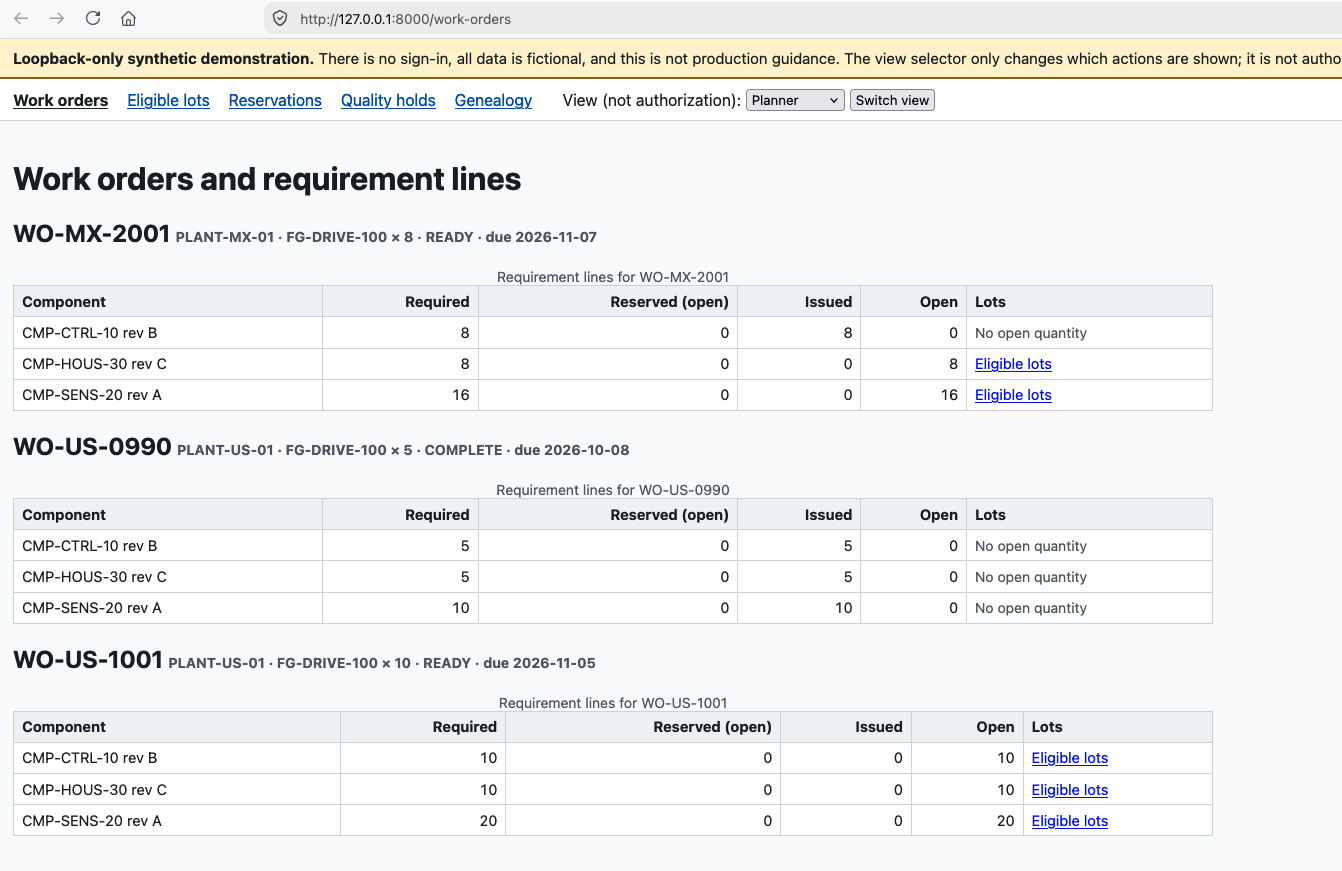
Figure 5: Work orders with the material quantity each one still needs, with a yellow notice marking the app as a loopback-only synthetic demonstration
Figure 6 shows the eligible material for a selected requirement. The application applies plant, component, quality, expiration, and availability rules to present only material that can be used, showing how business rules become focused data queries.
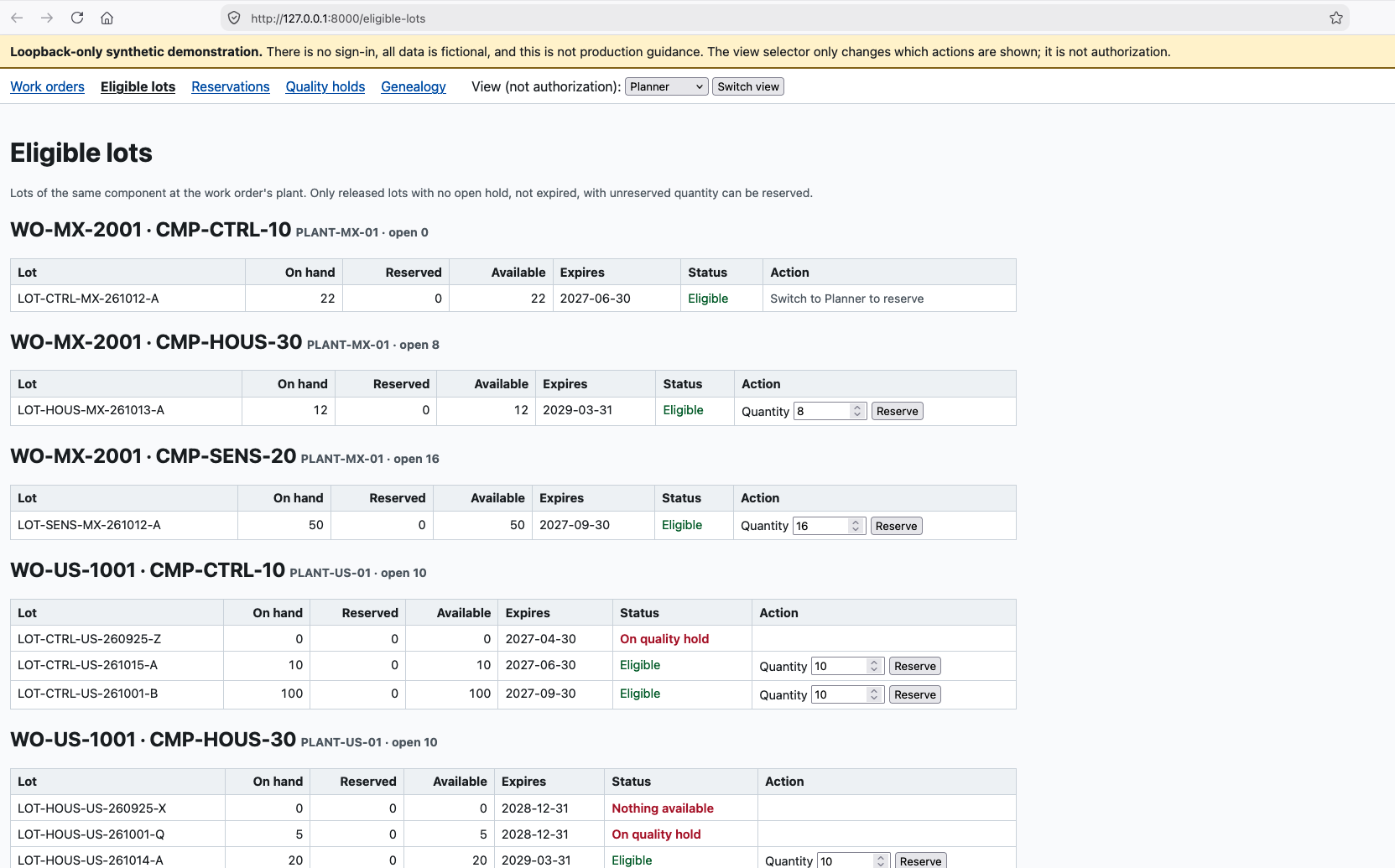
Figure 6: The planner sees only lots that meet the plant, component, disposition, hold, expiry, and available-quantity rules
Figure 7 shows reservation status and material-issue history. The Reservations page records reservations, cancellations, and issues as traceable business events, while the transaction design keeps related inventory and requirement changes together.
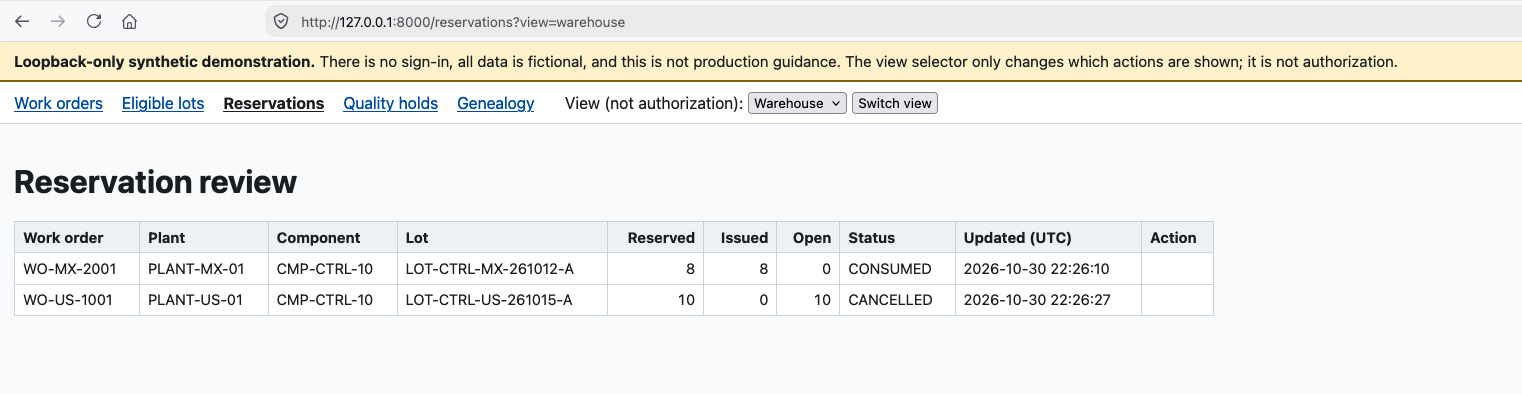
Figure 7: Reservations and their status, with the warehouse view showing the material-issue history
Figure 8 shows open holds received from the source system and holds created through the application. The released inspection hold comes from the standard application demonstration, while the two released supplier holds come from the concurrent reservation-and-hold demonstration described in the next section.
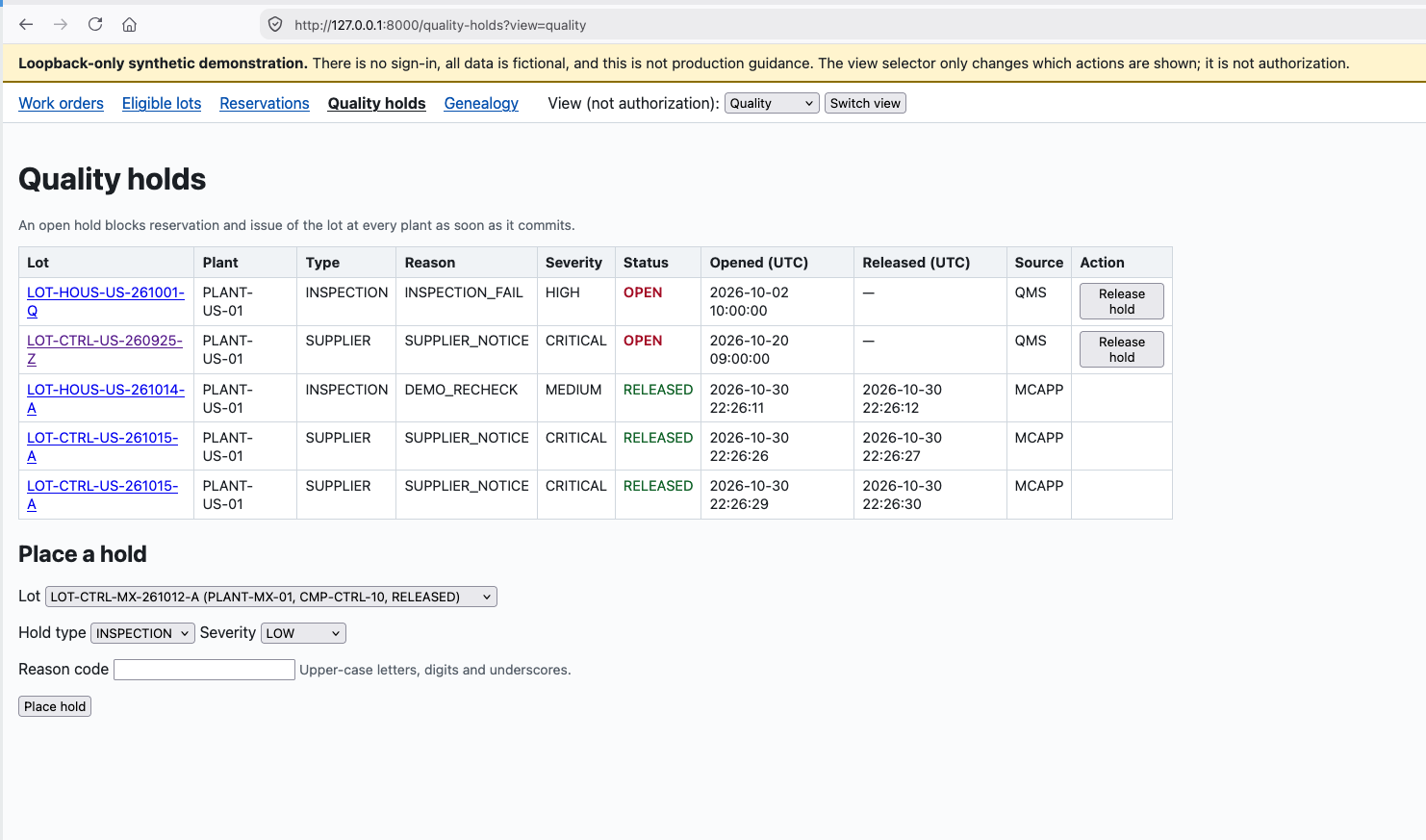
Figure 8: Open source-system holds and released application-generated holds, including one inspection hold from the standard demonstration and two supplier holds from the concurrency demonstration
Figure 9 shows how the Genealogy page follows relationships from component material through work orders to finished lots, helping quality teams assess downstream impact. This demonstrates a reusable pattern for linking records from source systems into a traceable application view.
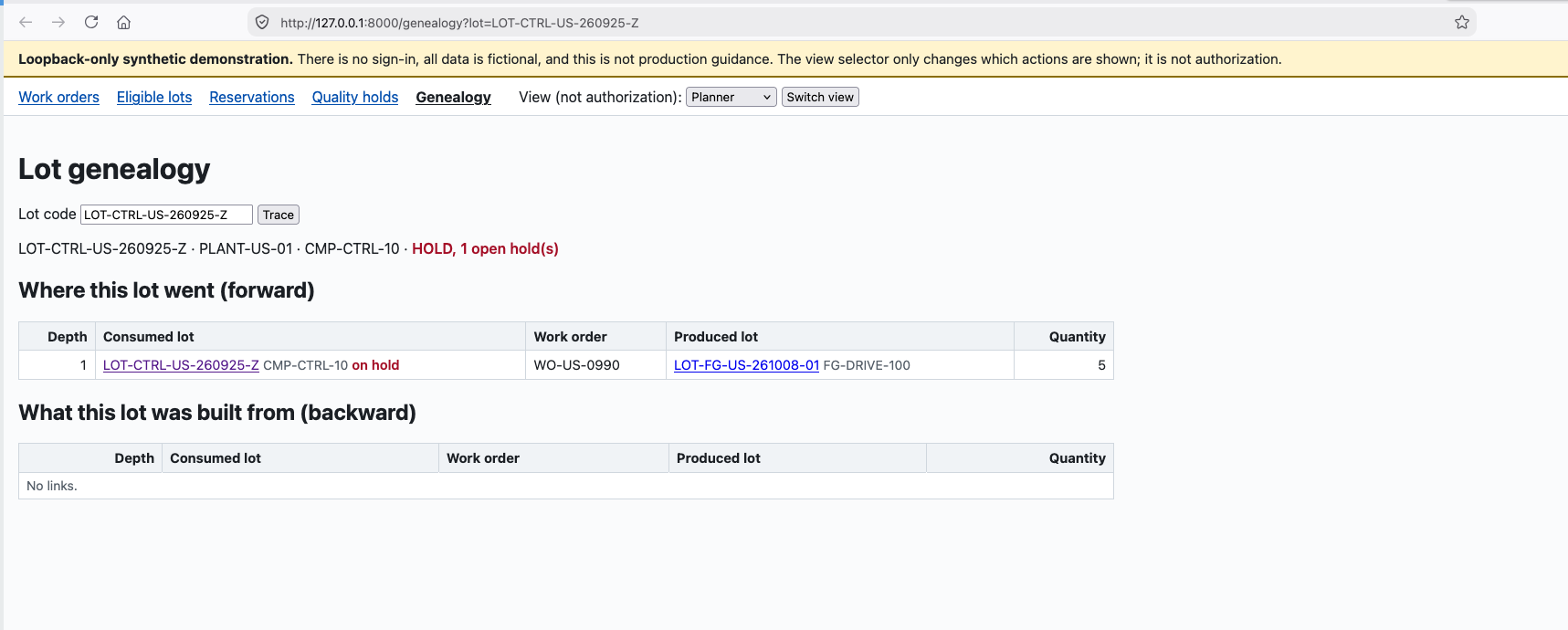
Figure 9: Forward trace of a held component lot to the work order and finished lot it went into
Use the View selector to explore the planner, warehouse, and quality perspectives. The selector changes which actions the demonstration shows. It is not authentication or authorization.
What happens behind each screen
Every screen is served by the local application, which connects directly to Aurora DSQL using IAM authentication, TLS, and a database role with limited permissions. The MCP connection used by Kiro during development is read-only, but the generated application has limited write access. Neither Kiro nor the MCP server is part of the application request path.
The application displays work orders, eligible material, reservations, quality holds, and lot genealogy. From the application interface, users can reserve, cancel, and issue material and place or release quality holds. These actions update Aurora DSQL, while the genealogy view is read-only.
Each write is completed in a short transaction. If two actions update the same data at the same time, Aurora DSQL detects the conflict at commit. The application then reads the latest data and retries the complete transaction. Idempotency keys help prevent repeated requests from creating duplicate records. These patterns reflect the service-specific guidance provided by the Aurora DSQL power.
Handling concurrent changes to the same data
To demonstrate how the application handles two users changing the same data at the same time, Kiro runs a controlled scenario in which a planner reserves 10 units while a quality engineer places a SUPPLIER quality hold with reason SUPPLIER_NOTICE on the same inventory lot. A script makes the two transactions overlap and runs the scenario once in each commit order.
Aurora DSQL detects the conflict when the transactions attempt to commit. The first transaction commits, and the second receives SQLSTATE 40001. The application then reads the latest data and retries the complete transaction. If the reservation commits first, the hold succeeds on retry and the reservation is flagged for review. If the hold commits first, the retried reservation returns LOT_ON_HOLD, and no reservation is created.
After each run, the application resets the demonstration data and verifies that it remains consistent. This demonstrates the transaction pattern Kiro generated using Aurora DSQL guidance.
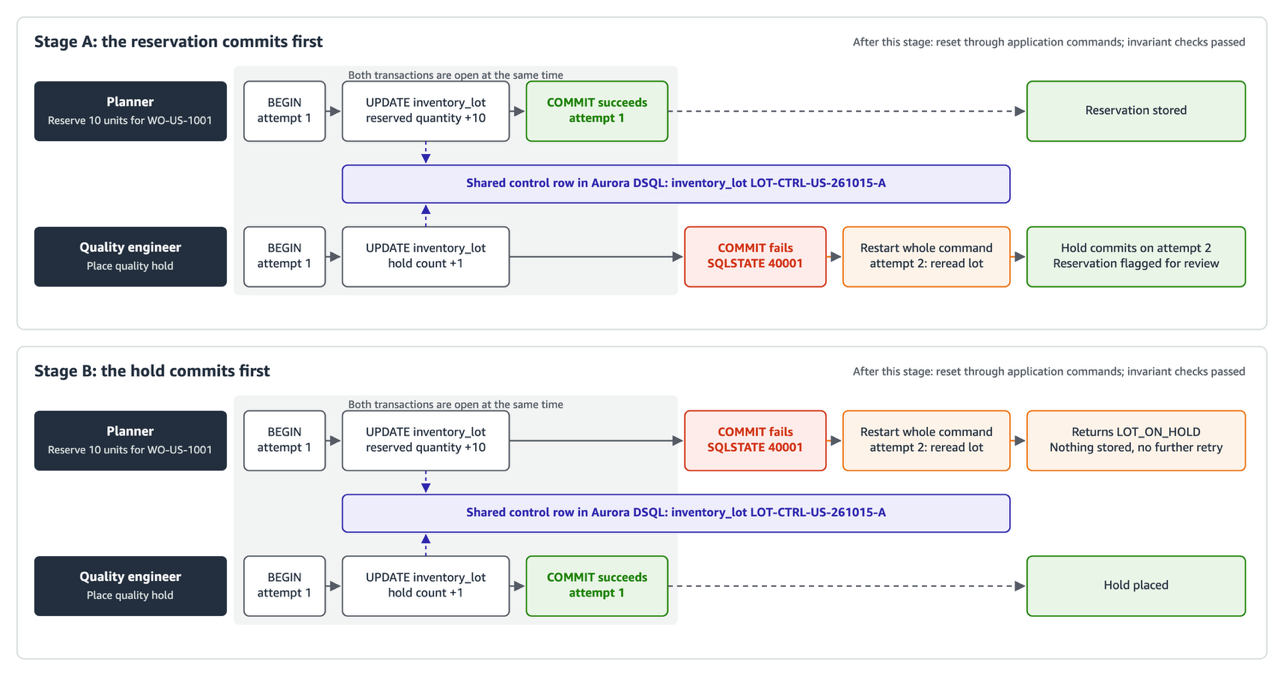
Figure 10: A 10-unit reservation and a SUPPLIER quality hold update the same inventory lot concurrently. The later commit receives SQLSTATE 40001, and the application retries the complete transaction once
What the Aurora DSQL power contributed
The Aurora DSQL power provided Kiro with service-specific guidance for designing and building the application. It also provided configuration for the Aurora DSQL MCP server, allowing Kiro to inspect the live database and check its work through a read-only connection.
Using this guidance, Kiro generated an implementation that accounted for the distributed architecture of Aurora DSQL:
- Data model and schema – Kiro used UUID primary keys, supported database constraints, asynchronous secondary indexes, and the appropriate transaction boundaries for schema changes.
- Data loading – Kiro used the Aurora DSQL Loader, accounted for its positional column mapping, and configured the load to stop when it encountered conflicting data.
- Authentication and access – Kiro generated connections that use IAM authentication and TLS, along with separate database roles limited to the operations required for loading, application access, and read-only access.
- Transaction handling – Kiro generated short transactions, shared control data for concurrent changes, complete-transaction retries for SQLSTATE
40001, and idempotency protection to help prevent duplicate results. - Database checks – Through the read-only MCP connection, Kiro inspected the schema, ran queries, and checked generated SQL for Aurora DSQL compatibility.
The power supplied guidance and MCP configuration. It did not make application changes directly. Kiro applied the schema and setup changes through generated scripts and loaded the source data through the Aurora DSQL Loader. The resulting implementation should still go through the application, database, security, and operational reviews required for its intended environment.
Troubleshooting
The following table lists common issues that can occur during the walkthrough and how to resolve them.
| Symptom | Cause | Resolution |
| Kiro doesn’t use the power’s guidance | The power isn’t installed or active | Confirm the power is installed and active in the powers pane |
| The workspace MCP server doesn’t appear | The active Kiro session hasn’t discovered the newly written workspace configuration | Reconnect MCP servers. If it is still absent, reload Kiro, reopen the saved chat, and continue the already approved batch |
| MCP queries fail after AWS credentials are refreshed | The MCP process still has the temporary credentials it read at startup | Reconnect the workspace MCP server |
AWS calls return ExpiredToken | The temporary CLI profile credentials expired | Refresh the profile outside Kiro, then confirm aws sts get-caller-identity --profile <your-profile> succeeds |
| A TLS certificate error occurs on macOS | The PostgreSQL client isn’t using a trusted CA bundle | Point it to the verified Amazon Root CA 1 bundle and keep full hostname verification |
| A migration stops after losing its connection | The DDL commit result is unknown | Rerun the migration runner. It reconciles the migration ledger and live catalog before deciding whether a statement is absent |
| A read page fails after an idle connection dies | A stale pooled connection was reused | Remove unusable or over-age connections and retry a read once on a fresh connection |
Clean up
To avoid ongoing charges, delete the resources you created. When you have finished exploring the application, paste the following prompt:
Kiro checks the cleanup script and runs it in check mode, which changes nothing. Then run the script yourself:
Related posts

Respaldo NoSQL en Firestore: cifrar, verificar y recuperar documentos

The BIGINT Problem Explained

Stop Learning Programming Like You're Collecting Certificates. Start Building Things.

I spent a week with Claude Code trying to squeeze more out of my memory tool's LongMemEval score. Almost nothing worked. Is it my code or the benchmark?

Nightly Reconciliation for Node.js Email and Webhook Failures: Idempotent Queue Recovery
