Note (November 2026): This post covers both MCP servers because the Redshift MCP Server has Redshift-specific settings, such as read-only by default and a cap on result rows, that the AWS MCP Server doesn’t have yet. We’ll update this post when the AWS MCP Server reaches parity.
Guardrails and cost control matter more as AI agents handle an increasing share of the queries in your analytics environments. Asked “Why did revenue drop in the West region last weekend?”, an agent finds the tables, writes and runs the SQL on Amazon Redshift, and follows up. This is agentic analytics, on your data warehouse and lakehouse.
Two risks decide whether these agentic workloads reach production. The OWASP Top 10 for LLM Applications names both:
- Excessive agency: The agent can do too much. An agent acts on what a model decides. With more tools or permissions than its task needs, a misread request or an instruction hidden in a support ticket can become a real action, such as exporting customer records.
- Unbounded consumption: The agent can spend too much. A retry loop can rerun a heavy query all night. A query can return millions of rows that the agent then sends to the model as input tokens. Finally, one SQL query that runs Amazon Bedrock model inference through Redshift ML invokes the model once for every row it processes.
Redshift includes the controls for both at no additional charge: per-agent roles, row-level and column-level security, dynamic data masking, read-only tools, workload management, and usage limits. You pay for queries from agents as you do for queries from any other client: for the compute and storage they use (Amazon Redshift pricing). Your agent’s model provider bills its model tokens, for example at Amazon Bedrock pricing when the agent uses a model in Amazon Bedrock. You pay for the Amazon Bedrock, Amazon Bedrock AgentCore, and monitoring controls in this post at their own rates.
In this post, we show you how to add guardrails and cost controls to agentic analytics on Redshift, using one model: six guardrails, three enforcement layers, and one cost envelope.
The layered guardrail model
Each request passes through the agent layer, the access layer, and the data layer before it reaches your data warehouse or lakehouse, and the cost envelope limits spend across them.
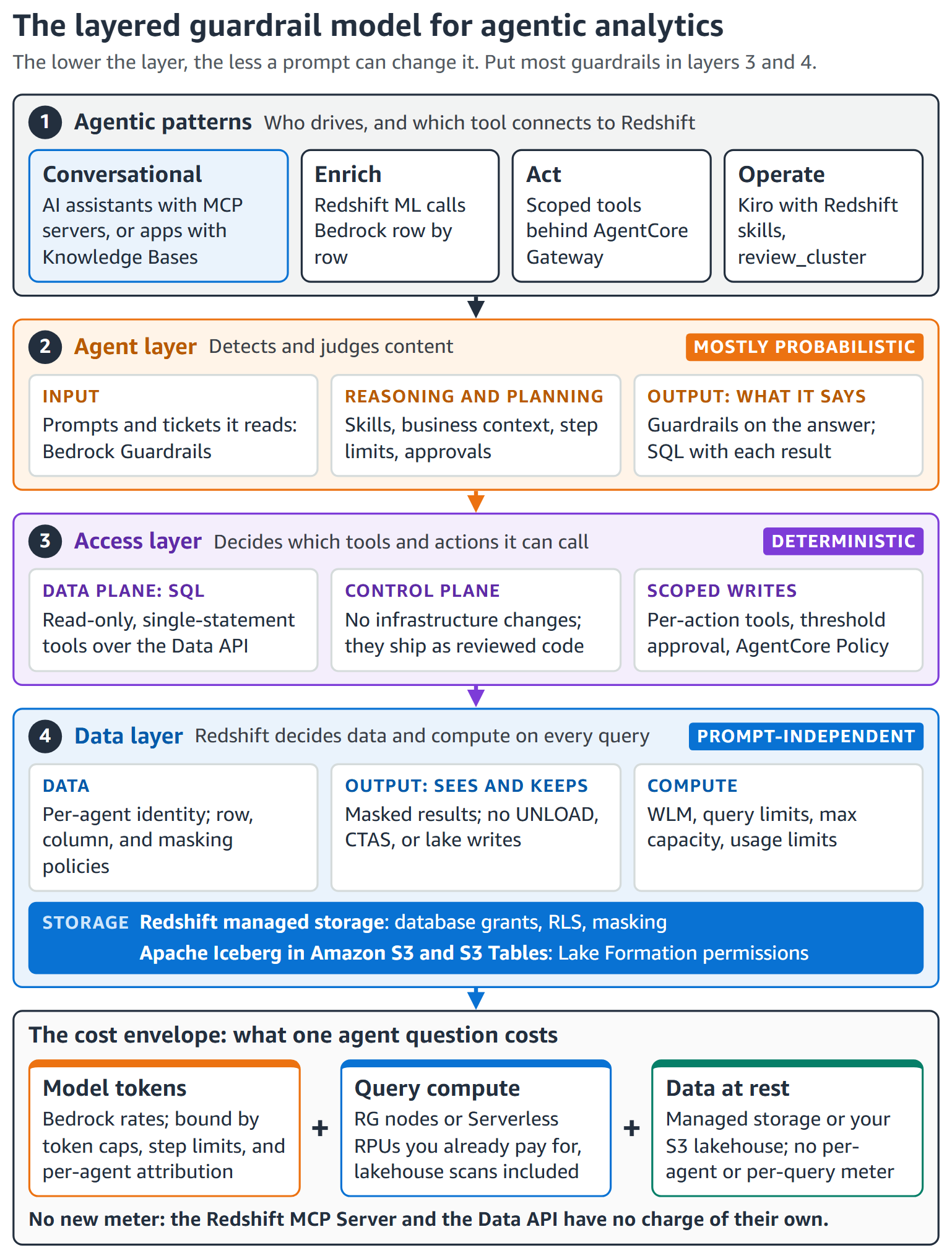
Figure 1: The layered guardrail model. The lower the layer, the less a prompt can change it
Each guardrail type controls one thing and maps to an OWASP risk. Each layer is who enforces it:
- Agent layer: Your agent or application, its framework, and Amazon Bedrock.
- Access layer: The tools between the agent and your data, such as MCP servers and AgentCore Gateway (a capability of Amazon Bedrock AgentCore), and the IAM policies on the identities those tools use.
- Data layer: Amazon Redshift and, for lakehouse tables, AWS Lake Formation.
The following table lists the six guardrail types. Each row names the guardrail type, the main OWASP risk it reduces, and the layer and controls that enforce it.
| Guardrail type | Main risk (OWASP) | Who enforces it |
| Input | Prompt injection (LLM01) | Agent layer: Bedrock Guardrails, input validation |
| Reasoning and planning | Excessive agency (LLM06) | Agent layer: skills, business context, tool allow lists, step limits |
| Tool and action | Excessive agency (LLM06) | Access layer: tools, IAM, Policy in Amazon Bedrock AgentCore, threshold approval |
| Data | Sensitive information disclosure (LLM02) | Data layer: privileges, row and column policies, masking |
| Output | Sensitive information disclosure (LLM02), Improper output handling (LLM05) | Data layer. Agent layer for answers |
| Runtime and cost | Unbounded consumption (LLM10) | Data layer limits, token caps, AWS Budgets |
The agent layer is the first filter, but it cannot be the only one. Most Amazon Bedrock Guardrails checks are model-based classifiers, some with a strength that you tune, so they catch most problems but not all. The guardrails that protect your data in Redshift therefore sit in the access and data layers, which apply fixed rules to the caller’s identity. You need both. AWS Identity and Access Management (IAM) policies decide which Redshift workgroups and APIs it can call, and Redshift and Lake Formation permissions decide what its SQL can touch. Fixed rules give the same answer whichever agent wrote the request, so a prompt injection that gets past the agent layer still cannot reach data that the agent’s identity is not granted.
Agentic analytics patterns on Amazon Redshift
Conversational analytics, the most common pattern, answers business questions from your data in self-service and managed delivery models. The others enrich data, take actions, or help administrators run the warehouse itself.
| Pattern | How it connects to Redshift | Starting agency |
| Conversational analytics, self-service | AI assistants (agents that a person works with directly) such as Kiro, Amazon Quick, and the Amazon SageMaker Data Agent, through the AWS MCP Server or Amazon Redshift MCP Server over the Redshift Data API | Read-only |
| Conversational analytics, managed | Amazon Bedrock Knowledge Bases turns end users’ questions into SQL | Read-only |
| Enrich | Redshift ML with Amazon Bedrock calls a model from SQL | None: the model returns a column value |
| Act | One scoped tool per action | Scoped writes. Human approval for consequential ones |
| Operate | Administrators review and tune the warehouse with Kiro, Redshift skills, and the MCP Server review_cluster tool | Read-only. Changes ship as reviewed code |
Every pattern needs the same two scopes for least privilege: IAM permissions that limit which workgroups and APIs an identity can call, and database permissions that limit what its SQL can read or change. What differs is which identity reaches Redshift:
- Self-service (AI assistants with the Redshift MCP Server or AWS MCP Server). The AI assistant acts on behalf of the user, with the AWS profile in its MCP configuration. If your roles have different scopes, set up a profile for each and point the server at the narrowest one for the task, such as a read-only analyst role for sales questions. The setup steps are in access-layer/redshift-mcp-server and access-layer/aws-mcp-server in the aws-samples repository.
- Redshift MCP Server: A user whose profile assumes a DataPlatformAdmin role runs every agent query as
IAMR:DataPlatformAdmin, with that role’s grants. The server is read-only by default, and the agent can’t switch profiles. To use a broader profile, change it yourself in the MCP configuration. - AWS MCP Server: The agent can switch on each call among the profiles listed in the MCP Proxy for AWS configuration. List only the profiles you want it to use, and put the read-only one first so it’s the default. On provisioned clusters, a script can also choose a database user if the role allows
redshift:GetClusterCredentials, so leave that permission out. - Both: The MCP configuration only controls the MCP tools. An agent that can run shell commands can use any profile on the machine, so the IAM roles and database grants are the real boundary.
- SageMaker Data Agent: The agent runs SQL itself, including cells it fixes, as the signed-in person. Without trusted identity propagation, Redshift sees one
IAMR:user-<id>@<project>database user per project member. With it, Redshift sees the person’s AWS IAM Identity Center user, so row-level security, masking, and grants apply to each person.
- Redshift MCP Server: A user whose profile assumes a DataPlatformAdmin role runs every agent query as
- Custom agents, for example on Amazon Bedrock AgentCore. The database user comes from the role that calls the Data API: the AgentCore Runtime execution role, or the AWS Lambda function’s role behind AgentCore Gateway, such as
IAMR:agent-support. If the agent acts for a specific person, use trusted identity propagation. The agent’s tool exchanges the person’s sign-in token through AWS IAM Identity Center, optionally federated with your external identity provider, and calls the Data API as that person. Redshift then applies their grants (writes included), row-level security, and masking, plus Lake Formation permissions if you enable that integration. - Managed (Amazon Bedrock Knowledge Bases). The knowledge base runs the SQL it generates as one identity. On Serverless workgroups and provisioned clusters, that is its service role with IAM or the user in an AWS Secrets Manager secret. Provisioned clusters also accept a named database user (authentication methods). Knowledge Bases can’t carry the actual user with trusted identity propagation, so when one identity serves many end users, row-level security can’t tell them apart. With one shared knowledge base, a West region manager and an East region manager query as the same database user, so both get every row that user can read. Instead, create one knowledge base or agent for each audience, such as one per sales region, and scope its role, grants, and row-level security policy to that audience.
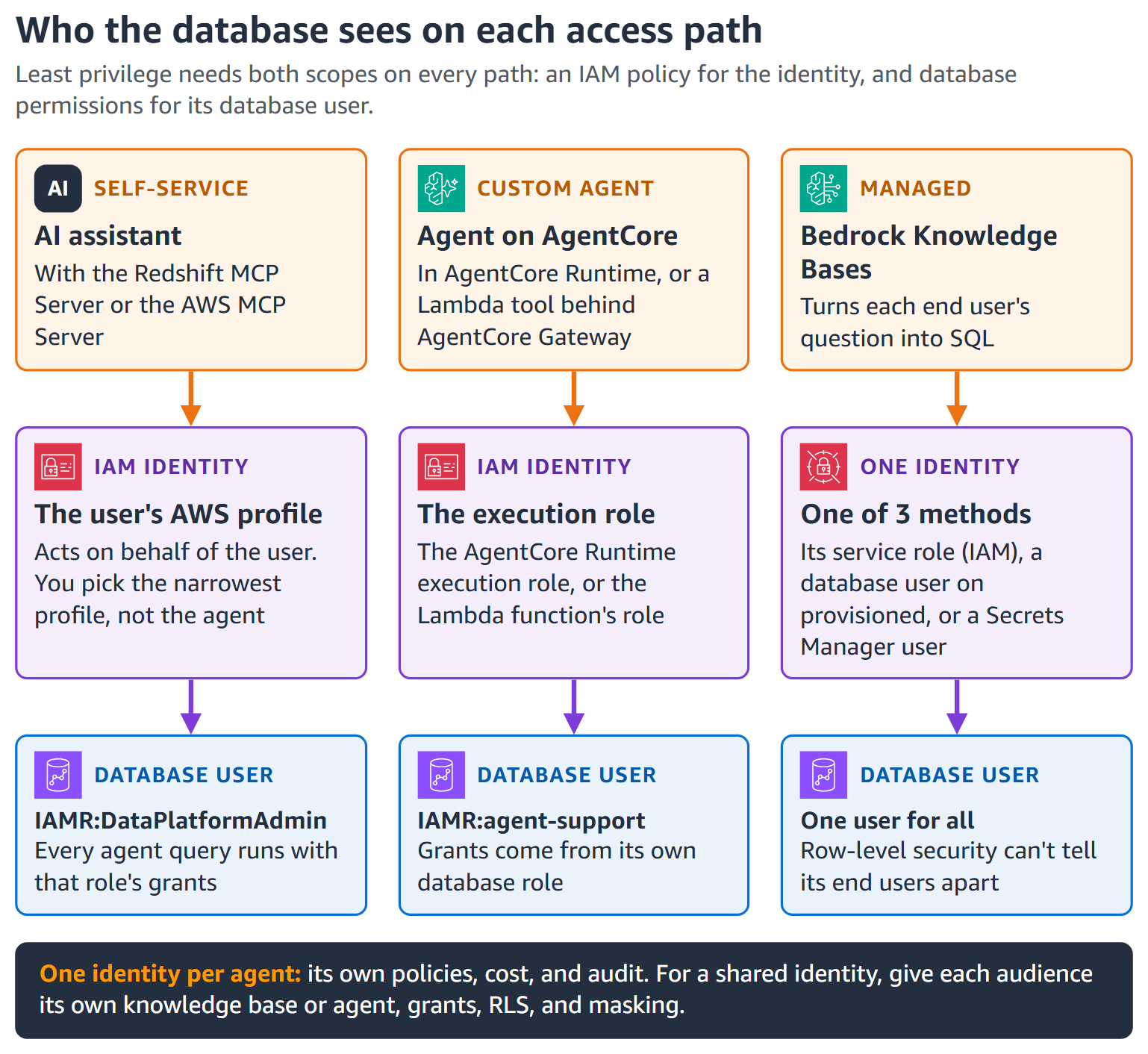
Figure 2: Who Redshift sees on each access path
Decide how much agency to grant
Grant agency, what an agent can do, on two planes. The data plane is SQL on Redshift managed storage or Apache Iceberg tables, governed by Redshift and AWS Lake Formation permissions. The control plane is API calls that create, resize, manage, or delete infrastructure, governed only by IAM. The AWS Agentic AI Security Scoping Matrix bounds agency with permissions and autonomy with oversight. Following it, start read-only (Scope 1), then add scoped writes with a human in the loop for consequential ones (Scope 2). Keep agents off the control plane, and widen autonomy (Scopes 3 and 4) only within those boundaries.
Agent layer: Guide the request
The agent layer, mostly outside Redshift, is the first filter. Its controls run in your agent, Amazon Bedrock, and Amazon Bedrock AgentCore, so you set them up and pay for them there. These include the step, retry, and token limits that cap the agent’s own model spend.
- Input. Bedrock Guardrails filters prompt injection attempts and denied topics, and ApplyGuardrail works with your choice of model.
- Skills. The redshift-guide skill gives agents Redshift-specific knowledge, so fewer queries fail. The Agent Toolkit for AWS (
aws configure agent-toolkit, AWS Command Line Interface (AWS CLI) 2.35.0 or later) and the AWS Data Analytics Plugin deliver skills to Kiro and other AI assistants. - Business context. Business context and skill assets in the AWS Glue Data Catalog tell agents which tables and joins to use. They are in preview in the US East (N. Virginia), US East (Ohio), US West (Oregon), and Europe (Ireland) Regions.
- Agent configuration and oversight. Limit an agent’s tools before it runs. In Kiro, for example, the MCP configuration lists the tools to approve automatically (
autoApprove) and the tools to hide from the agent (disabledTools). Add project instructions, and set step and retry limits in agent frameworks.
Access layer: Limit what the agent can call
The access layer decides which tools an agent can call and what each call can do. Redshift enforces its guardrails the same way for every prompt.
Data plane: A narrow tool surface on every path
Figure 3 shows the tool guardrail each connection path needs, plus least-privilege IAM and database permissions. Each path has a worked example in the access-layer folder of the aws-samples repository, with setup, verification, and clean-up steps.
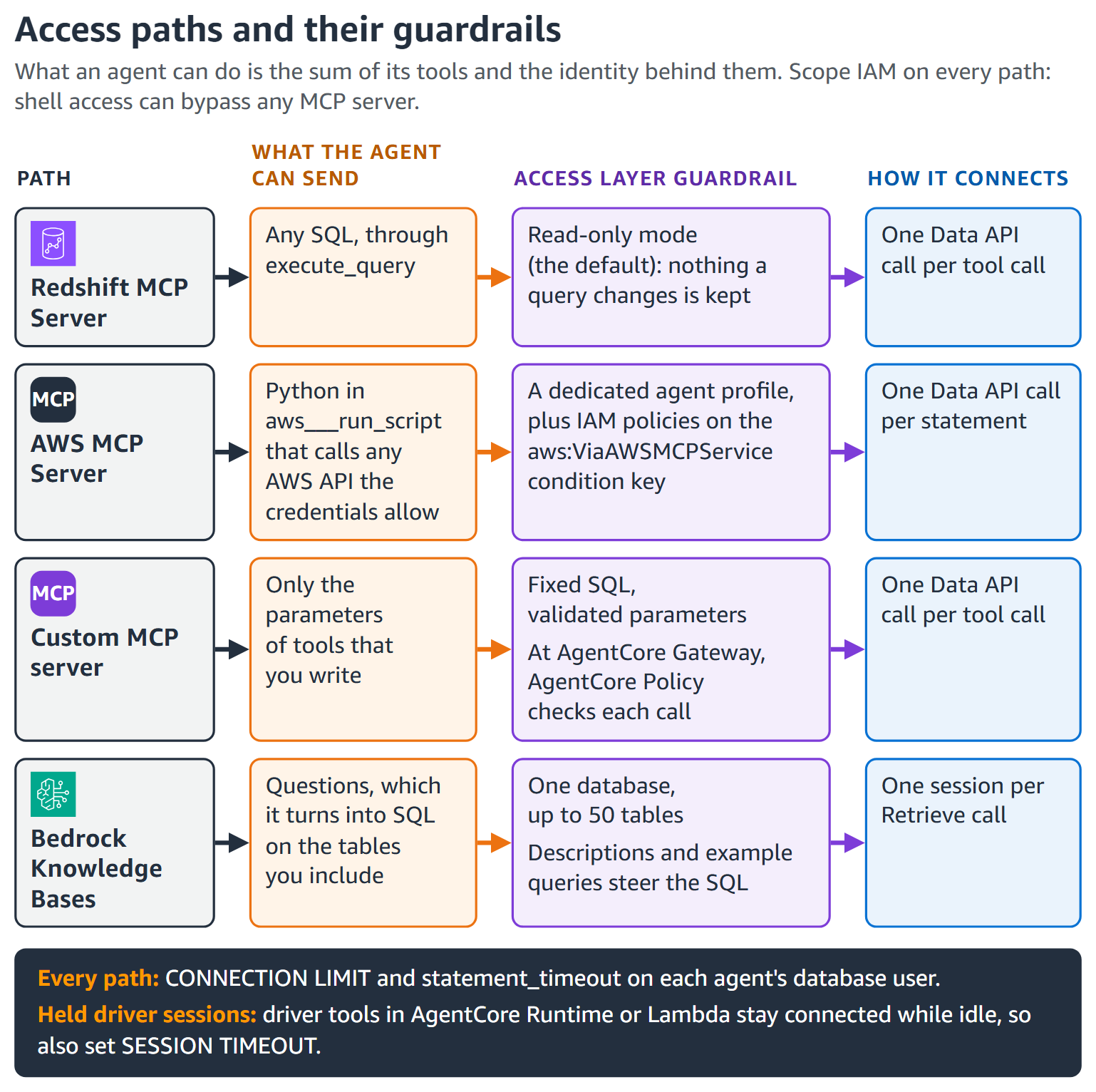
Figure 3: Access paths and their guardrails
Agents with shell access can bypass an MCP server with the AWS CLI, so scope IAM on every path. To allow only the AWS MCP Server path, see AWS MCP Server only, later in this section.
The agent’s IAM policy, access-layer/shared/agent-data-plane-policy.json in the aws-samples repository, has three statements:
- Discover lets the agent list workgroups. It uses
"Resource": "*"becauseListWorkgroupsdoesn’t support resource-level permissions, so it can’t limit where SQL runs. - RunSqlOnOneWorkgroup lets the agent sign in and run SQL on one workgroup only. This is the statement that limits where SQL runs. It includes
redshift-data:BatchExecuteStatement, which the Redshift MCP Server needs before it can run writes or named transactions. Without that action, the server stays read-only by refusing writes itself. With it, writes still needACCESS_MODE=read-writein the MCP configuration, which is off by default, and the agent’s database grants still limit what a write can change. - ReadOwnStatements lets the agent check status and read results only for statements it ran itself.
Custom MCP server: Tools that run fixed SQL. Expose only tools that each run one fixed, parameterized statement against a curated view, under the server’s own IAM role with SELECT on that view only. Have each tool set a fixed StatementName and SQL comment, so AWS CloudTrail and query history name the tool. In the sample server (access-layer/custom-mcp-server/sales_metrics_mcp.py), the agent supplies only a sales region, which the server checks against an allowed list, so prompt injection can at most make the tool query a different allowed region.
AWS MCP Server: Scope the credentials, not the script. Its aws___run_script sends SQL through the Data API as the caller’s mapped database user, so an administrator profile means administrator access. Four guardrails close that gap:
- A dedicated agent profile in the MCP Proxy for AWS, for an agent role with read-only grants.
- No way to switch database users. Allow
redshift-serverless:GetCredentialsorredshift:GetClusterCredentialsWithIAM, notredshift:GetClusterCredentialsor Secrets Manager secrets, which let a caller choose another user. - Agent workgroups only. A service control policy in AWS Organizations denies Data API SQL through AWS managed MCP servers unless the workgroup is tagged
agent-access=true. The same statement also works in an IAM policy or permissions boundary. SCPs skip the management account, so test on a sandbox OU first:
- AWS MCP Server only. To stop the agent’s shell from going around the server, deny
redshift-data:*on the agent role unless the call comes through it. Also deny direct driver sign-in whenaws:ViaAWSServiceis false:redshift-serverless:GetCredentials,redshift:GetClusterCredentialsWithIAMandredshift:GetClusterCredentials, plusGetIdentityCenterAuthTokenwhen you use trusted identity propagation (access-layer/aws-mcp-server/deny-data-api-outside-aws-mcp.json). Attach it to agent roles or permission sets, not as an SCP. IAM can’t tell the local Redshift MCP Server from the AWS CLI, so on that path read-only database grants are the boundary:
Bedrock Knowledge Bases: One database, listed tables, read-only grants. Inclusions (up to 50 tables) and exclusions narrow the generated SQL but aren’t a substitute for guardrails. A timeout of up to 200 seconds (60 in access-layer/bedrock-knowledge-base/kb-redshift-config.json) cancels the query. Scope the service role to one workgroup (and redshift-serverless:GetCredentials on Amazon Redshift Serverless) with SELECT on included tables only. Allow DescribeStatement, GetStatementResult, and CancelStatement on its own statements only. The sync fails without CancelStatement (access-layer/bedrock-knowledge-base/kb-service-role-policy.json).
Scope every write, and keep a human in the loop where it matters
Give an agent one scoped tool per action, never a generic write tool. A write can run on its own when its tool limits it to one validated, low-impact action, so approvals don’t slow routine work. Consequential, irreversible, or above-threshold writes need a human in the loop:
| Mechanism | How it works | Can the agent bypass it? |
| Approve as data (recommended for data writes) | The tool records a request. A people-only identity approves it | No: Redshift enforces it |
| Approve in the agent | The framework asks a person first | Depends on the framework |
| Approve as code review | Schema and infrastructure changes ship as reviewed code | No: your pipeline enforces it |
In the Act pattern, an agent writes to Redshift as part of a workflow, such as issuing a refund. Figure 4 shows how it combines both kinds of write:
- The agent’s only write tool,
refund_order, runs as an identity that can onlyEXECUTEone procedure. - The SECURITY DEFINER procedure checks the order and caps the amount at the remaining refundable amount and $500, locking
support.refundsagainst concurrent over-refunds. A failed check writes nothing and returns an error the agent can report. - Refunds up to $100 are approved. Larger ones wait for the
refund_approversrole, through a second procedure that rejects self-approval. - A payment process pays approved refunds only.
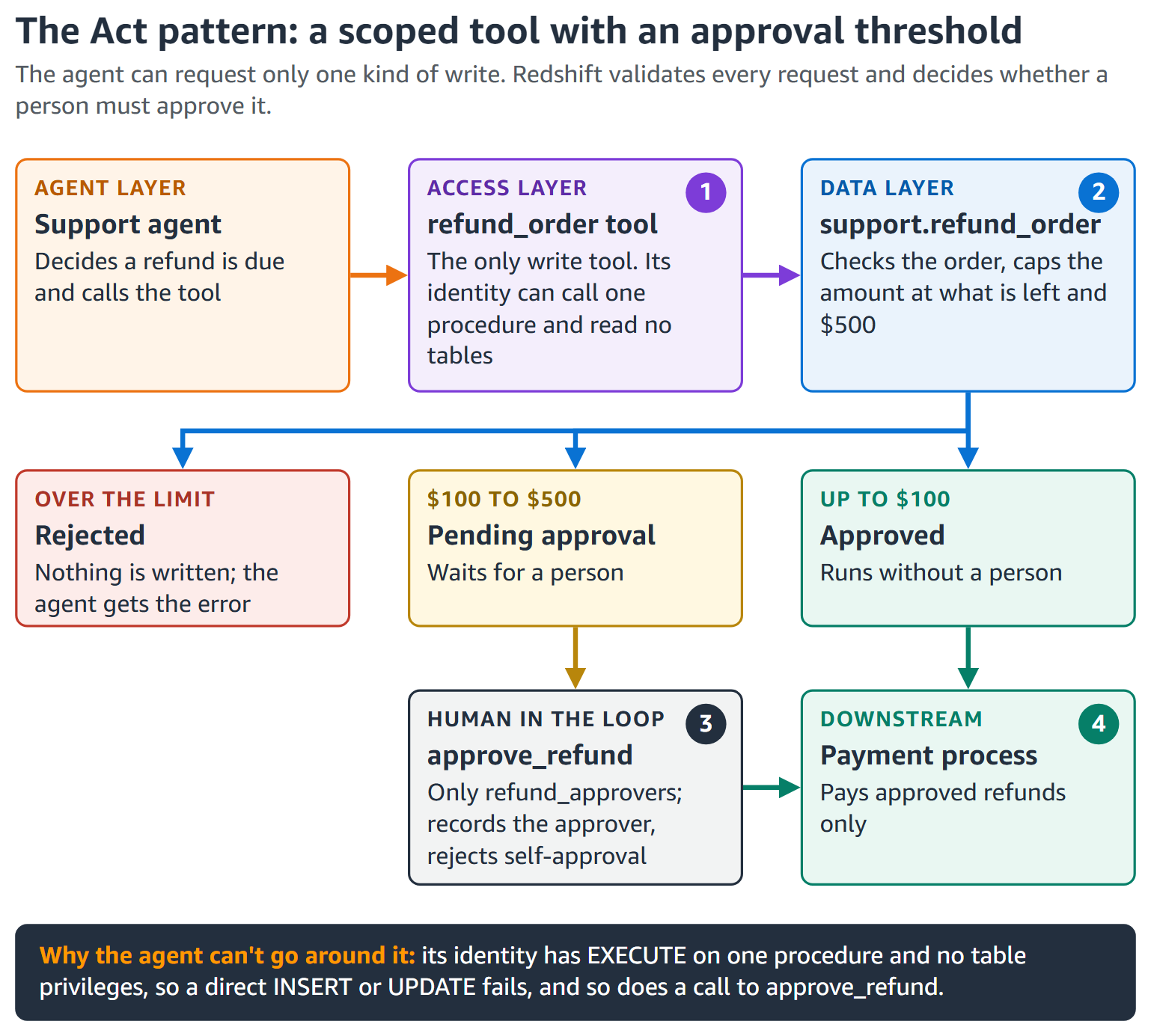
Figure 4: A scoped action tool, with human approval above a threshold
The procedures and grants are in act-refund/refund_procedures.sql. Expose refund_order as its own tool, under an identity separate from the agent’s read path, so the read identity has no write privileges. Scheduled writes that no agent starts, such as a nightly Enrich job that labels tickets with Redshift ML, need a different control. Review the job’s SQL once before you deploy it, then run it under its own identity that no agent can use.
Control plane: Keep infrastructure changes out of agents’ reach
Control plane calls skip database grants, so IAM is the only gate, and an AI assistant’s credentials often reach its shell and the AWS CLI too.
Give every AI assistant a scoped identity. Run Kiro and other AI assistants, and their MCP servers, under an agent-role AWS profile with read-only control plane actions and a permissions boundary. Don’t allow redshift:Get*, which includes GetClusterCredentials. Share the profile through one AWS IAM Identity Center permission set (access-layer/shared/aws-config-example.ini). Role chaining caps sessions at 1 hour.
Deny infrastructure changes through managed MCP servers. With the aws:ViaAWSMCPService condition key, a service control policy can deny create, delete, modify, resize, pause, resume, reboot, restore, and tagging actions made through an agent but not directly (access-layer/shared/deny-infra-changes-through-agents.json). Tagging matters because the data plane deny trusts the agent-access tag.
Data layer: Decide what the agent can reach
The data layer decides what an agent can actually reach, on every query. As the Redshift MCP Server documentation puts it, “The database user’s privileges are the security boundary, not this server.”
Give every agent its own identity: One IAM role, database user, and database role. The IAM role agent-support signs in through the Data API as IAMR:agent-support. On Redshift Serverless, a RedshiftDbRoles tag can grant its database role at sign-in (the aws-samples repository shows the tag). Agents acting for a person can use trusted identity propagation. Grant the role after the user’s first sign-in:
Then narrow what it sees (data-layer/fine-grained-access.sql):
- Row-level security (RLS) filters rows only on tables you attach it to and makes a table default-deny, so attach policies for other roles first.
- Column privileges remove columns, such as email.
- Dynamic data masking transforms values, such as a card’s last four digits.
Limit what agents can discover. Turn on metadata security so catalog views and SHOW list only objects the role can access, so agents cannot plan around hidden tables (superusers and ACCESS CATALOG roles see all). Test on non-production first:
Extend the rules to the lakehouse and other warehouses, so no path skips your filters. Redshift enforces Lake Formation permissions on Iceberg tables, including Amazon S3 Tables (a capability of Amazon S3), and federated permissions carry RLS and masking to an agent warehouse. Plain datashares do not carry RLS filters.
Treat free text as untrusted: Keep Redshift ML instructions in the static PROMPT prefix, and pass row text only as input.
Allow only approved models. The model’s IAM role decides at inference time, so allow bedrock:InvokeModel only on approved model ARNs. By default only superusers can create models. Grant CREATE MODEL to an ML platform role, with ASSUMEROLE ... FOR CREATE MODEL only on approved IAM roles.
Audit each agent’s reach with HAS_TABLE_PRIVILEGE (observe/detection/agent-table-privileges.sql). Until you revoke the default PUBLIC ASSUMEROLE grant, assume every user can use every IAM role attached to the warehouse. The AWS Identity and Access Management Access Analyzer (IAM Access Analyzer) check-access-not-granted check can fail deployments that grant redshift:GetClusterCredentials.
Test as the agent: Superusers and sys:secadmin bypass RLS.
Output guardrails: What the agent sees, keeps, and says
An agent has three outputs: results it reads, copies it keeps, and its answer. Redshift controls what enters the agent and its database-side copies. The application and agent layer govern the rest.
What the agent sees and says
The data layer’s policies double as output guardrails: results hold only permitted rows and readable columns, masked values stay masked, and Lake Formation filters do the same for Iceberg tables.
The sensitive information filtering in Bedrock Guardrails doesn’t inspect toolResult content, so mask in Redshift.
Cap result size too: provisioned clusters can abort on return_row_count, and the Redshift MCP Server’s MAX_RESULT_ROWS (1,000 by default) refuses larger results, protecting the context window, not compute.
Data-layer controls end when results leave Redshift, so check the answer too: Bedrock Guardrails can mask PII and flag ungrounded answers, and the generated SQL makes the answer traceable.
What the agent keeps: Database-side exports and copies
A copy starts with none of the source table’s policies, so treat every database-side write path as an output path:
| Export path | Guardrail |
UNLOAD to Amazon S3 | REVOKE ASSUMEROLE ON ALL FROM PUBLIC FOR ALL (which also blocks COPY and CREATE MODEL). Grant ASSUMEROLE ... FOR UNLOAD to pipeline roles only |
CETAS and INSERT into external tables | Agent roles own no external schemas |
| Writes to Apache Iceberg tables | No Lake Formation write permissions for agent-facing roles |
CTAS, SELECT INTO, and INSERT ... SELECT | REVOKE CREATE ON SCHEMA public FROM PUBLIC. No CREATE or INSERT for agents |
| Datashares | No datashare privileges for agent roles |
The MCP Server’s read-only mode denies UNLOAD and CALL, but other paths bypass it, so privileges are the durable line (data-layer/exports-and-copies.sql). Audit exports in SYS_UNLOAD_HISTORY, SYS_QUERY_HISTORY, and CloudTrail S3 data events.
Figure 5 summarizes which layer controls each output.
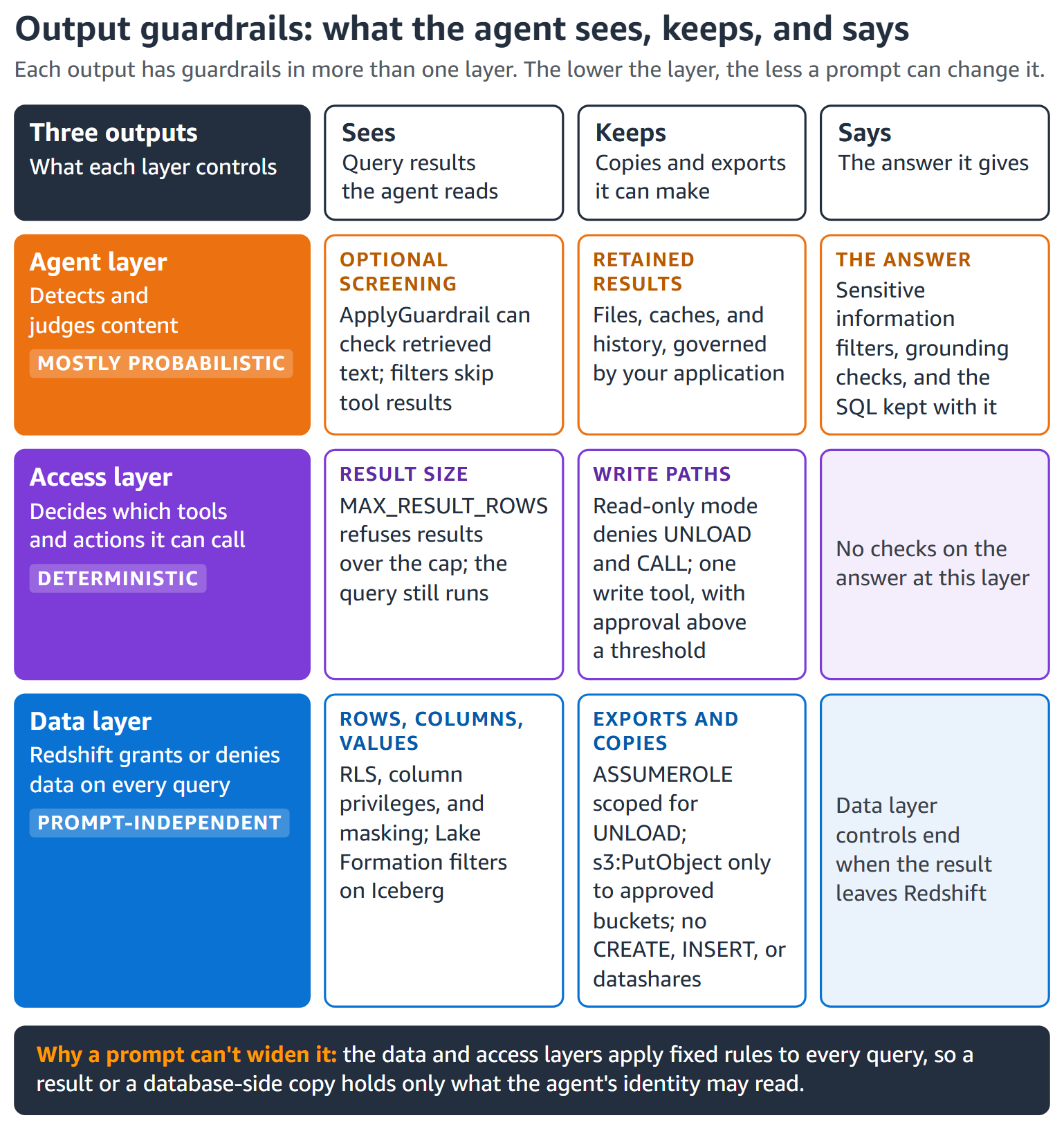
Figure 5: What the agent sees, keeps, and says, and which layer controls each
The cost envelope: Predictable by design
Each agent question has three cost parts (Figure 1): model tokens at Bedrock rates, query compute on Redshift provisioned clusters or Amazon Redshift Serverless RPUs that you already pay for (older RA3 and DC2 clusters also bill lakehouse scans per terabyte), and data at rest. These compute guardrails are part of Redshift, and you pay only for the Redshift compute your queries use:
| Guardrail | Provisioned | Serverless |
| Separate lane for agents | WLM queues by user role | Queues by user role, or a dedicated workgroup |
| Stop a runaway query | Query monitoring rules that log, hop, or abort | Workgroup query limits or queue rules that log or abort |
| Cap each statement | statement_timeout per agent user | Same as provisioned |
| Cap connections | CONNECTION LIMIT and SESSION TIMEOUT per agent user | Same as provisioned |
| Cap capacity | Fixed node count. Concurrency scaling limits | Max capacity in RPUs |
| Cap spend per period | Concurrency scaling and Spectrum limits | RPU-hour limits per day, week, or month |
Set three ceilings on day one (Figure 6): a per-statement timeout for each agent user, max capacity on the agent workgroup, and a daily usage limit. Queue rules are checked every 10 seconds, so the timeout is the tighter cap.
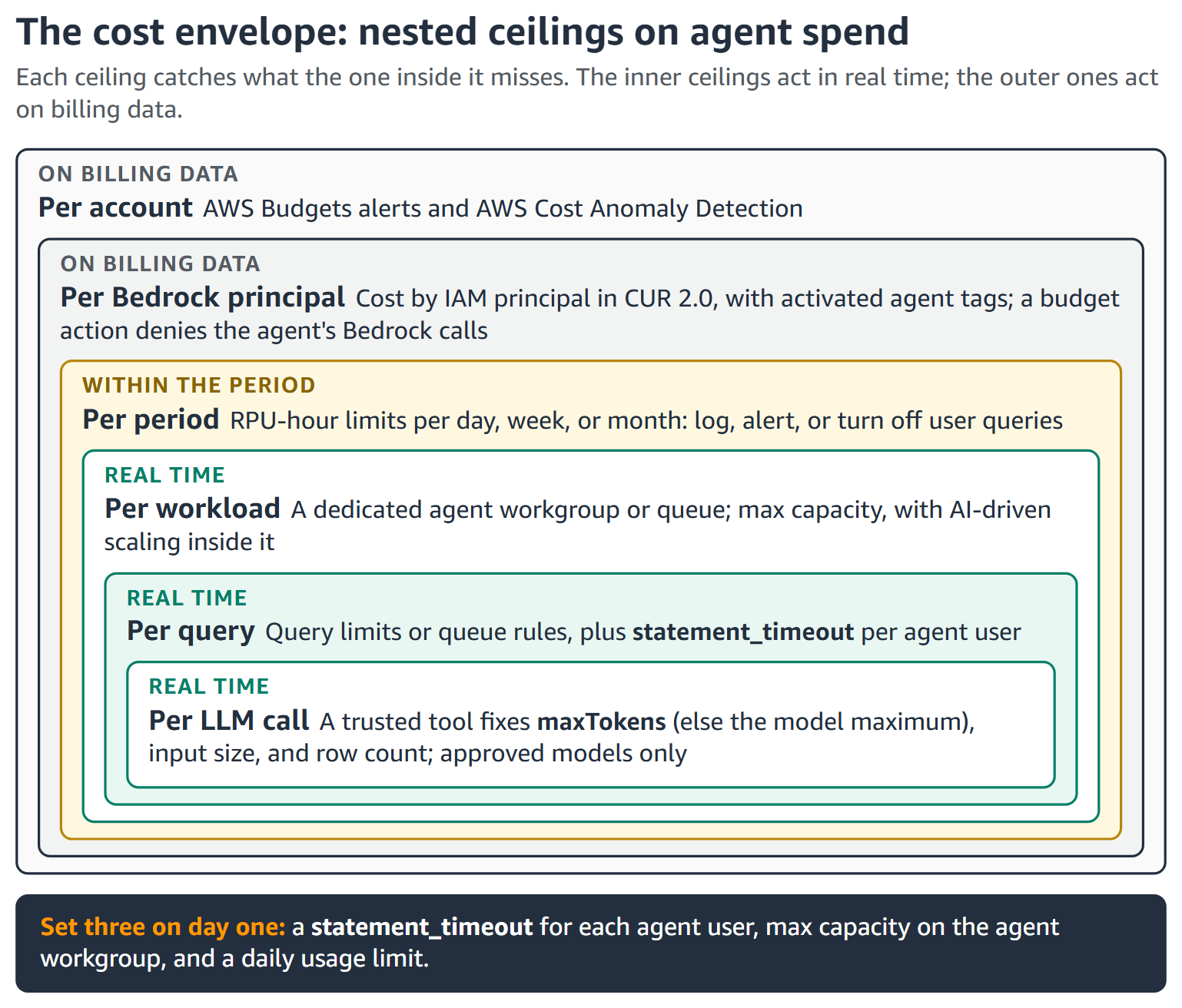
Figure 6: The cost envelope. Each ceiling catches what the one inside it misses
Max capacity and the usage limit do different jobs (see Billing for on-demand compute capacity). Max capacity caps RPUs. The usage limit logs, alerts, or stops user queries once the period’s RPU-hours are used (cost-envelope/serverless-ceilings.sh). emit-metric only publishes a metric. Alarm on it, or choose Alert on the AWS Management Console.
Each Serverless workgroup or RG cluster accepts at most 2,000 connections. In our tests, Data API tools opened one connection per call, but an idle open driver transaction kept Serverless compute running until the 1-hour timeout. On Serverless, deny redshift-serverless:GetCredentials when aws:ViaAWSService is false. In our tests, this blocked driver sign-in, not direct Data API calls. On each non-superuser agent user (superusers ignore connection limits), set:
Spend less per answer
- Reuse work: The result cache, composition for new queries, and materialized views for repeated joins.
- Right-size the engine. For lake-heav...