Working on machine learning projects in production can be a bit challenging. If you've built models in real-world environments, you know how quickly things get complicated once you step outside the clean boundaries of a Jupyter notebook.
Data scientists, software engineers, and compliance teams all want something different from a model. As a model becomes more complex, so do the challenges in managing it. This includes evaluation scripts located in various places, metric summaries manually transferred into documentation, and zero standardized ways to review what a model is actually doing before it is deployed.
When you work on several ML projects, you begin to recognize a consistent set of operational challenges. I recognized the need for a better way to consistently and easily evaluate models. As a result, I started ModelBrief, an open-source Python package to simplify the model reporting process and standardize it without requiring major changes to the existing codebase.
In this article, I will explain various challenges that break model evaluation as an organization scales. I will cover the main ideas and drawbacks where we have an isolated reporting layer, cover the main ideas and challenges in developing ModelBrief, and provide step-by-step instructions to incorporate model evaluation in your projects.
What We'll Cover:
- The Challenges of Machine Learning Evaluation
- How I Built ModelBrief
- Technical Challenges and How We Solved Them
- How the ModelBrief Evaluation Architecture Works
- Hands-On Tutorial: Setting Up ModelBrief
- Conclusion
The Challenges of Machine Learning Evaluation
In theory, evaluating a machine learning model sounds simple: you run test data through your model and calculate your target metrics. But in practice, issues do come up for teams sometimes:
- You may have different models and different reporting scripts. Switching from a scikit-learn estimator to XGBoost or a PyTorch neural network often means writing completely different evaluation scripts from scratch.
- There's the risk of accidental retraining. Many heavy monitoring frameworks try to take over the whole training process. But when evaluating a finished model artifact, you want a read-only pass. Accidental re-fits or state changes during evaluation can introduce subtle bugs.
- You'll also need to make model results easier to understand. Accuracy scores and loss curves may be useful to technical teams, but they don't always give project leaders a clear picture of how a model is performing. Turning these metrics into meaningful summaries takes time that could otherwise be spent improving models. Addressing these issues requires separating the evaluation phase from the training phase entirely.
How ModelBrief Started: Rethinking Machine Learning Evaluation
I didn't come up with the idea for ModelBrief as part of some grand software architecture vision. It actually started out of sheer exhaustion.
A few years ago, I found myself leading a project where we were pushing several distinct models into production across different domains, some classical tabular models using scikit-learn and XGBoost, and others custom deep learning pipelines.
Every single time a model reached the validation stage, the same method repeated itself: someone had to write a bespoke evaluation script. One data scientist would pull confusion matrices into a markdown file, another would export CSV metrics into a shared drive, and product managers would ask for a clean PDF summary that didn't exist unless someone spent an hour formatting a Jupyter notebook output.
Worse still, I noticed that teams started having different views. Data scientists felt they were constantly having to justify their models, while data engineers were worried about deploying models they couldn't easily check or understand.
I realised that although we have great tools like MLflow, Weights & Biases, and Kubeflow for training and managing machine learning models, evaluating models and preparing reports were still mostly done manually using separate scripts and copy-and-paste work.
I felt there was a need for something simpler. Not another big platform that changes how teams train their models, but a lightweight tool that takes an already trained model, evaluates it, checks its performance and produces a clear, consistent report.
This led me to build ModelBrief as an open-source Python library designed to bring consistency to MLOps reporting without forcing teams to rewrite their codebases. But building it right meant confronting some deep engineering challenges.
How I Built ModelBrief
I developed ModelBrief by first turning the reporting problem into a set of engineering requirements: the library had to accept an already-trained model, avoid calling fit(), work when validation data was missing, keep large frameworks optional, continue when a non-essential analysis failed, and produce the same findings in console, HTML and PDF formats. These requirements guided how I designed and built the library.
# Core entry point: store a trained model and available datasets report = ModelBrief(model=model, X_train=X_train, y_train=y_train, X_test=X_test, y_test=y_test, ai=False) The first thing I built was the main part that controls how ModelBrief works. It doesn't train models. It checks the supplied data, identifies the model and its task, generates predictions, and sends the results for analysis.
I designed it this way so that ModelBrief could support different types of machine learning tasks, including classification, regression, clustering, time-series analysis, anomaly detection, computer vision and NLP, without having to change how users interact with the library.
I also made sure the library could work with different machine learning frameworks. For example, it can use predict() for models built with Scikit-learn, while PyTorch and TensorFlow models can use separate adapters to handle their predictions. This keeps the main code simple and makes it easier to support different frameworks without making the entire library more complicated.
class CustomAdapter(BaseAdapter): def predict(self, X): raw_output = self.model.custom_forward_pass(X) return raw_output Once predictions are available, ModelBrief builds a structured result containing the model overview, dataset summary, detected task, parameters, performance metrics, feature importance, confusion matrix, error analysis, and chart data.
I deliberately kept this analytical result independent of presentation. The console formatter, standalone HTML generator, and ReportLab PDF generator consume the same result, which prevents each output format from calculating metrics differently.
result = evaluator.evaluate(model, X_test, y_test) console_text = console_renderer.render(result) html_report = html_renderer.render(result) pdf_report = pdf_renderer.render(result) Another important part of the development was making sure users didn't have to install every machine learning framework just to use it. I made tools such as XGBoost, LightGBM, CatBoost, PyTorch, TensorFlow, computer vision, NLP, and Groq AI optional. Users only need to install the extras relevant to their work.
I also made sure that AI explanations were optional. ModelBrief first carries out its regular evaluation, while Groq AI can provide additional explanations when enabled. If an optional feature fails, the library records a warning rather than stopping the entire reporting process.
Finally, I built ModelBrief as a proper Python package, with separate modules for the main functionality, examples, documentation, and automated tests. I used pytest to test different parts of the library and check that new features work as expected.
This approach has allowed this tool to grow and support different machine learning tasks while keeping its main purpose unchanged: evaluate already-trained models, preserve their existing state and generate clear, consistent reports.
Technical Challenges and How We Solved Them
Building this open-source library came with several technical challenges. Two of the main ones involved making the library work with different machine learning frameworks and keeping the code simple to maintain.
Challenge 1: Supporting Different Machine Learning Models
Different machine learning frameworks handle predictions in different ways. For example, Scikit-learn uses predict(), while PyTorch uses its own model structure and prediction methods. Trying to handle every framework with separate conditions in the main code would have made the library difficult to maintain.
To solve this problem, I used an approach called the Adapter Pattern. I created a common base class called BaseAdapter that allows developers to provide their own prediction logic for different models. This means ModelBrief can work with different frameworks without requiring users to change their original models or rewrite their existing code.
from modelbrief import BaseAdapter class CustomModelAdapter(BaseAdapter): def predict(self, X): return self.model.custom_forward_pass(X) Challenge 2: Making AI Features Optional and Reliable
AI-generated explanations and suggestions can be useful, but not every developer wants to depend on external services or API keys. This is particularly important for teams working in offline environments or automated CI/CD pipelines where internet access may not be available.
To tackle this problem, I made AI features optional and disabled by default (ai=False). ModelBrief can carry out its regular evaluation and generate reports without connecting to any external AI service.
Developers who want AI-generated insights can enable the feature using their Groq API key, either through an environment variable (GROQ_API_KEY) or by providing it directly in their code. This ensures the core library remains usable even without an internet connection or AI configuration.
How the ModelBrief Evaluation Architecture Works
To make model evaluation reliable, I designed this open source library to work with models that have already been trained, without changing or retraining them.
The library takes the trained model and the available datasets, runs predictions, analyses the results, and generates structured reports. Throughout this process, the original model and its settings remain unchanged.
The diagram below shows how the model and data move through ModelBrief, from evaluation to the final reports.
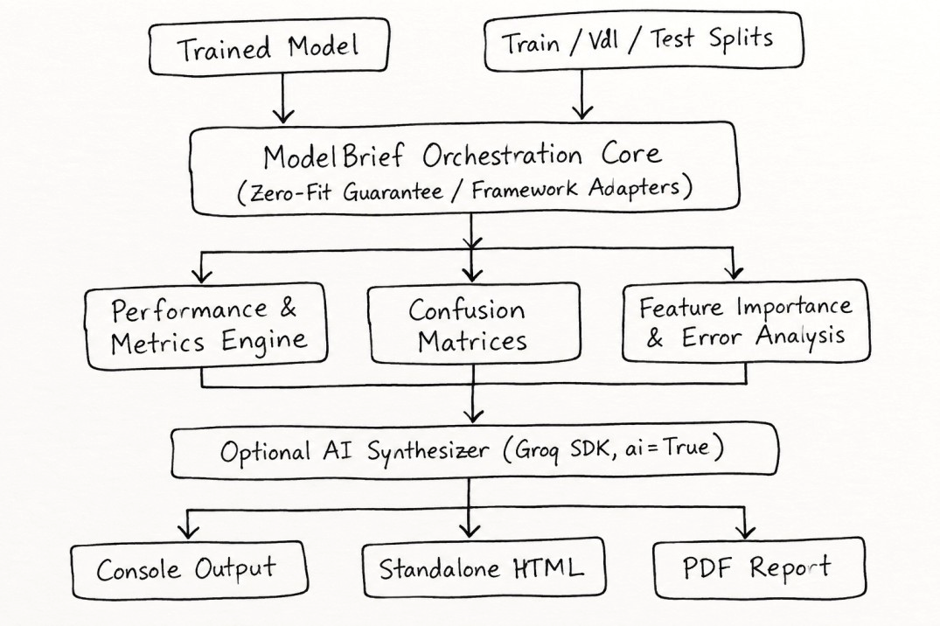
Fig 1: ModelBrief architecture for Machine Learning evaluation and reporting
In a typical workflow, the trained model and available datasets (training, validation and testing data) are passed into a separate evaluation process.
Instead of training the model again, ModelBrief uses the existing trained model to make predictions and analyse its performance. The results are then passed through three main components:
- Model performance analysis: Calculates relevant performance metrics depending on the task, such as classification scores, regression errors and feature importance.
- Report generation: Presents the results in clear formats, including console summaries, interactive HTML reports and PDF documents.
- Optional AI explanations: Uses an AI provider to turn evaluation results into written explanations and suggestions when the developer enables the feature and provides the required API key. Each component works independently. This means that if an optional feature, such as generating a chart or connecting to an AI service, fails, the main evaluation can still complete and produce its results.
Hands-On Tutorial: Setting Up ModelBrief
Now that you understand the idea and architecture behind the library, let’s look at how you can set up ModelBrief so you can try it out in your own Python projects.
Step 1: Installation
You can install the core library via pip. Depending on what libraries your project relies on, you can install optional extras to keep your environment clean.
# Core package pip install modelbrief # Framework-specific extras (install only what you need) pip install "modelbrief[xgboost]" pip install "modelbrief[pytorch]" pip install "modelbrief[ai]" # Optional: for Groq-powered AI summaries #Step 2: Running a Basic Model Evaluation #To generate a complete evaluation report, pass your trained estimator along with your dataset splits to ModelBrief. #Here is a practical example using a standard classifier: from modelbrief import ModelBrief from sklearn.ensemble import RandomForestClassifier from sklearn.datasets import load_iris from sklearn.model_selection import train_test_split # 1. Prepare data and train a simple model X, y = load_iris(return_X_y=True) X_train, X_test, y_train, y_test = train_test_split(X, y, test_size=0.2, random_state=42) model = RandomForestClassifier() model.fit(X_train, y_train) # 2. Pass model and splits into ModelBrief report = ModelBrief( model=model, X_train=X_train, y_train=y_train, X_test=X_test, y_test=y_test, ai=False # Keep AI features turned off for now ) # 3. Export reports in different formats print(report.show()) # Print an immediate summary to terminal report.html("reports/iris_audit.html") # Save an interactive HTML file report.pdf("reports/iris_audit.pdf") # Generate a formal PDF document Running this script automatically extracts estimator parameters, calculates standard performance metrics, constructs confusion matrices, and analyzes feature importance all without requiring manual plotting code.
Step 2: Enabling Optional AI Explanations
Sometimes non-technical stakeholders need qualitative summaries alongside raw statistics. ModelBrief includes an optional integration powered by Groq to translate performance data into written risk notes and recommendations.
By design, this feature is completely opt-in (ai=False by default). No external network calls are made unless explicitly enabled.
Setting Up Your API Key
To use the AI feature, set your Groq API key in your environment variables:
#export GROQ_API_KEY="your_actual_groq_api_key_here" #Or configure it inside your Python script before initializing the report:o import os from modelbrief import ModelBrief # Set API key programmatically if not set in environment os.environ["GROQ_API_KEY"] = "your_actual_groq_api_key_here" # Initialize ModelBrief with AI explanations turned on report = ModelBrief( model=model, X_train=X_train, y_train=y_train, X_test=X_test, y_test=y_test, ai=True # Enables AI summary modules ) report.html("reports/ai_assisted_audit.html") When enabled, the AI feature looks at the evaluation results to identify possible problems. For example, if a model performs very well on training data but poorly on testing data, it can flag this as a possible sign of overfitting and suggest ways to improve the model.
Conclusion
Building reliable machine learning systems requires more than just training models. How we evaluate, understand, and report their performance is equally important.
By separating model evaluation from training, keeping dependencies optional and automating report generation, this library provides a more consistent way for teams to assess their models. It also makes it easier for data scientists, software engineers and other stakeholders to understand results, identify potential problems and make better decisions before deploying models.
In conclusion, the goal is simple: make machine learning evaluation easier, more consistent, and more transparent.
Thank you for reading. If you find this useful, please leave ModelBrief a star on GitHub.