Enterprises running hybrid networks on AWS Cloud WAN connect branch offices, data centers, and remote clients to AWS over private connections, such as AWS Direct Connect, AWS Site-to-Site VPN, and SD-WAN. These clients, per location, might resolve both private DNS on AWS and public DNS on the internet. Today, that means deploying Amazon Route 53 resolver endpoints for every AWS Region and replicating split-DNS and DNS filtering rules for every customer site. Amazon Route 53 Global Resolver already simplifies this with a single internet-reachable anycast IP that resolves both public and private domains, removing per-Region forwarding and split-DNS configuration.
Building on that foundation, today we are launching Amazon Route 53 Global Resolver for private connections, which extends resilient, secure, anycast DNS resolution to on-premises and branch-office clients over your existing private connections. You enable the feature by associating your existing AWS Cloud WAN network configuration with Global Resolver. If you have integrated Direct Connect or VPN with AWS Cloud WAN, you can now use Global Resolver without separate inbound endpoints and without sending DNS over the public internet to resolve public and private domains. Clients without internet access, or those restricted from using the internet for compliance reasons, can now take advantage of the anycast resolution of Global Resolver.
In this post, you will learn:
- How a single privately routable resolver IP provides automatic multi-Region failover for public and private domains.
- How DNS views enforce split-DNS and DNS filtering rules per AWS Cloud WAN segment (for example, production, development, and test).
We cover the challenges you face today, the common workarounds, and what the new capability delivers. We also provide a step-by-step walkthrough showing how to implement the feature for your network architecture.
Global Resolver for hybrid DNS architecture
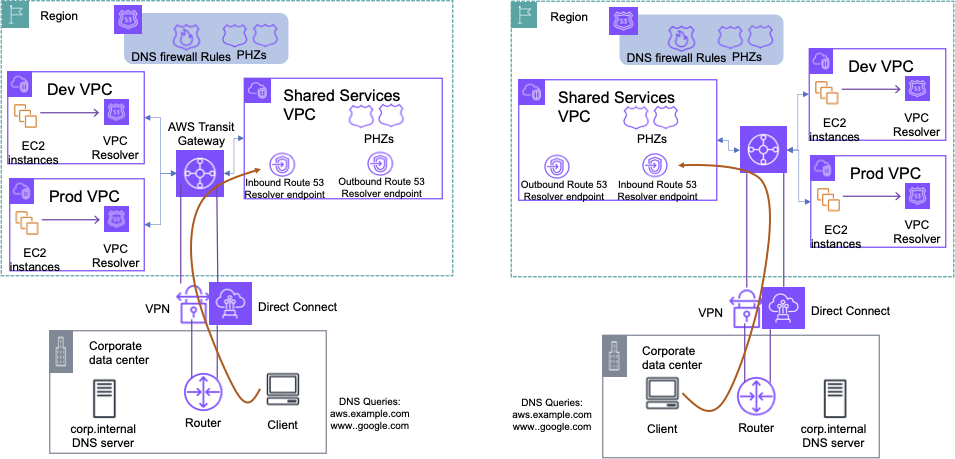
Figure 1: Traditional hybrid DNS architecture on AWS
Before Global Resolver, customers with hybrid cloud environments deployed Amazon Route 53 Resolver inbound endpoints in each AWS Region. DNS queries were forwarded from each location to the AWS Region it connects to over AWS Direct Connect or Site-to-Site VPN. Figure 1 shows a typical environment: workloads in two AWS Regions and two on-premises data centers, with the per-Region Route 53 Resolver inbound endpoints the customer must maintain. “To resolve private and public internet domains and route queries appropriately, customers implemented split-DNS configuration on the client side at each location, deciding which queries go to AWS and which resolve to the internet.
As this environment scales to multiple locations and Regions, three recurring pain points emerge:
- High maintenance cost from replicated configuration – Split-DNS rules and DNS filtering policies must be created and kept in sync at every location and Region. As sites and segments grow, keeping them consistent and compliant becomes expensive and error prone.
- No easy cross-Region failover – Each location typically has its own forwarding rules, with inbound forwarders tied to a specific Region. When that Region becomes inaccessible from a location, there is no simple, built-in way to fail over DNS resolution to the next closest Region, which puts the continuity of DNS resolution at risk.
- Inconsistent filtering and fragmented logging – Enforcing the same DNS filtering rules across many branch locations is challenging, and query logs are scattered across appliances and Regions, which makes centralized auditing and security investigation difficult.
Introducing Global Resolver for private connections over AWS Cloud WAN
For many enterprises, a private path for DNS resolution is the preferred choice, for several reasons:
- Compliance and security – Customers in regulated sectors such as financial services and gaming can’t send private-domain DNS traffic over the public internet, where unauthorized parties could observe it.
- No internet connectivity – Some clients and locations have no internet access, so an internet-reachable resolver can’t serve them.
- Operational fit with existing private IPs – A privately routable resolver IP means you can keep the static private addressing of your data centers and connections, rather than adopting new client authentication.
With Global Resolver for private connections, you can extend resilient DNS resolution privately over your existing AWS Cloud WAN network, meeting your high availability, segmentation, and DNS filtering requirements over the connections you already have.
We built this capability on AWS Cloud WAN because AWS Cloud WAN customers are already set up for exactly the multi-Region, multi-location model that Global Resolver needs:
- Multi-Region connectivity is already in place – AWS Cloud WAN spans multiple Regions and locations under a single network policy, so associating a resolver IP with multiple Regions needs no new global network construct.
- Private connections already exist – AWS Cloud WAN customers have already attached Direct Connect and Site-to-Site VPN connections (and SD-WAN through Connect attachments), so Global Resolver turns on as a configuration step, not a new build-out.
- Segmentation maps cleanly – Existing AWS Cloud WAN segments map directly to Global Resolver configurations (DNS views), extending the segmentation you already enforce for DNS resolution.
Architecture walkthrough
The integration of Global Resolver over AWS Cloud WAN is shown in Figure 2.
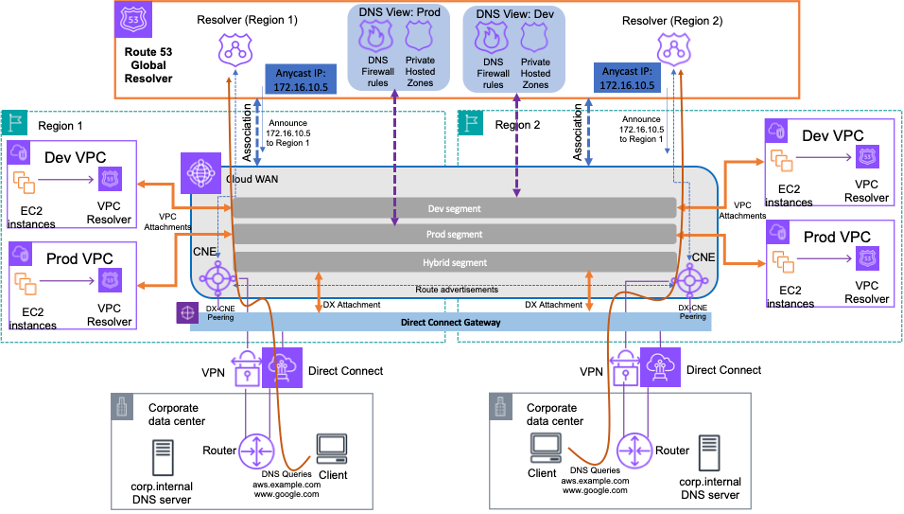
Figure 2: Global Resolver over AWS Cloud WAN for hybrid DNS resolution
Figure 2 shows how Global Resolver over private connections replaces the per-Region Route 53 Resolver inbound endpoints. Instead of maintaining inbound endpoints per Region and forwarding DNS from every location, clients now point to a single, privately routable resolver IP that is reachable from multiple Regions over your existing AWS Cloud WAN connections. You can resolve both public internet domains and private domains (hosted on Amazon Route 53) over your private network. Because the same IP is served from more than one Region, queries resolve at the nearest available Region and fail over automatically if it is inaccessible.
You allocate one or more privately routable IP addresses from your own pool as the resolver target for your clients. The IPs must not conflict with your network’s CIDR blocks (or your AWS Cloud WAN inside CIDR block, if configured), and if public, they must not be routed externally. Each IP is associated with two or more AWS Cloud WAN Regions and reachable from each, which provides anycast DNS resolution. In each Region, the AWS Cloud WAN Core Network Edge routes queries arriving from on-premises over the Direct Connect or Site-to-Site VPN attachment to the Global Resolver private IP. You can also segment DNS queries by using different Global Resolver configurations (DNS views), each mapped to one or more AWS Cloud WAN segments. A DNS view is a logical grouping of private hosted zones (PHZs) and DNS Firewall rules that your clients’ queries must observe, which gives you built-in split-DNS behavior. In the figure, separate Prod and Dev DNS views isolate each environment’s PHZs and filtering rules. The Dev view maps to the Development segment and the Prod view to the Production segment, which scopes resolution per segment without new constructs. With DNS Firewall rules applied within the view, you can block or allow domains by using AWS-managed or custom domain lists and advanced inline protections consistently across all locations. You can also store all DNS queries centrally, auditing from one place instead of collecting logs from appliances and Regions individually.
How a query flows and fails over
When a client at a branch office or data center sends a DNS query, it travels over the existing private connection and across your AWS Cloud WAN network to the nearest associated Region, where it’s evaluated against the DNS view for the client’s segment. Private domains resolve against their private hosted zones, public domains resolve to the internet, DNS Firewall rules are enforced, and the query is logged centrally.
Because the same IP is served from multiple Regions, if the nearest Region becomes unavailable, resolution fails over automatically to the next closest Region. You can also configure a second resolver IP on the Global Resolver and have clients use it for extra redundancy, proactively steering queries to a different subset of Regions. For example, if your Global Resolver spans Regions 1, 2, 3, and 4, you can assign one resolver IP to Regions 1 and 2, and a second resolver IP to Regions 3 and 4.
Walkthrough: Configuring Global Resolver over AWS Cloud WAN
In this walkthrough, assume that a customer has a global AWS Cloud WAN network across two Regions, us-east-1 and us-west-2 (chosen for simplicity), with AWS Cloud WAN segments (prod, dev, and hybrid) for network separation. We configure Global Resolver over AWS Cloud WAN and define DNS views to apply to the core network segments.
Step 1: Create a Global Resolver for private DNS resolution
In the Amazon Route 53 console, go to Global Resolvers and choose Create global resolver. Specify the Regions where you want Global Resolver to provide the resolution path. Use the same Regions as your AWS Cloud WAN core network, or a subset. Only Regions that are part of both Global Resolver and the core network can provide resolution. You now have the option to disable the public IP and allow communication only over a private network (Figure 3).
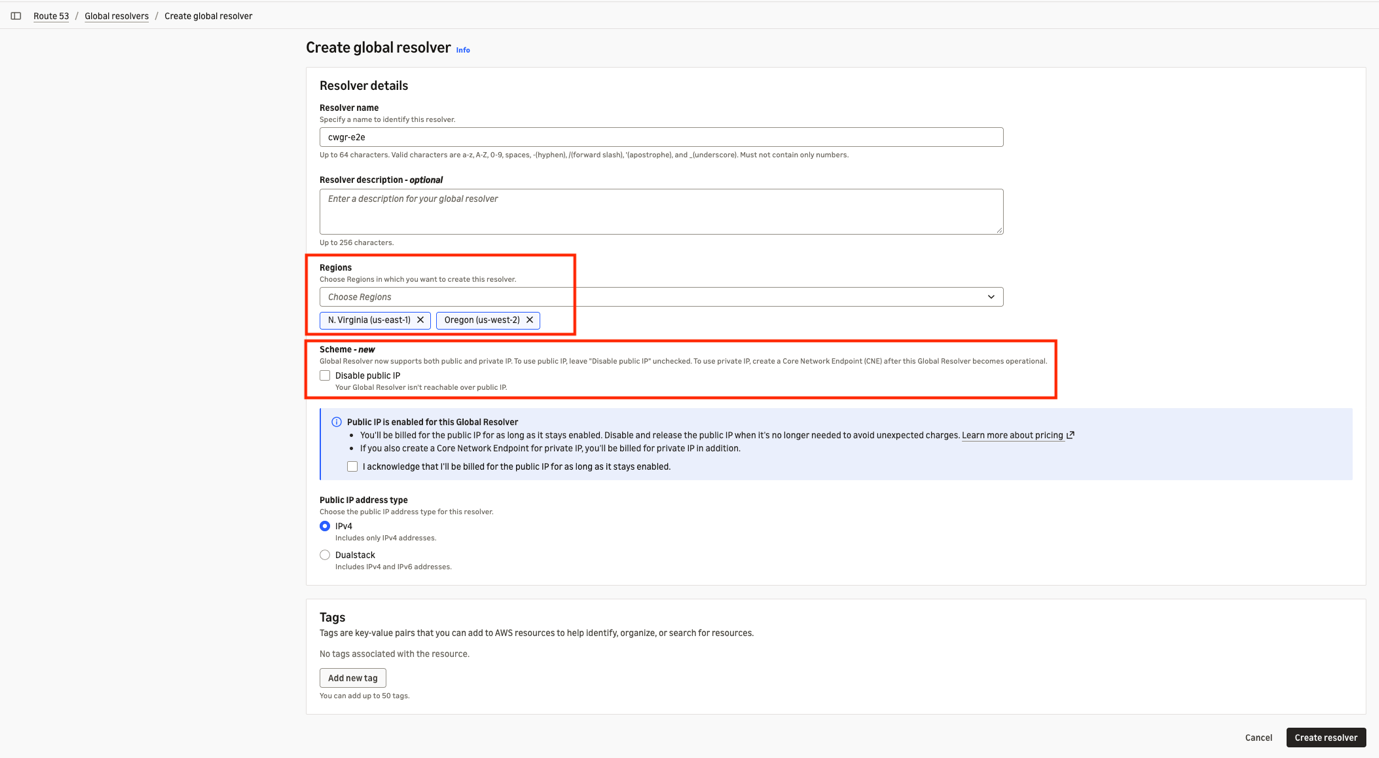
Figure 3: Creating a Global Resolver in two Regions, with the option to keep it private
After creation, you can view the Global Resolver details (Figure 4). The public IP is disabled, and the private IP shows as disabled because private connectivity isn’t yet configured. If you already have a Global Resolver, you can instead modify it to disable the public IP and allow only private connectivity. AWS then disables and releases those public IPs.
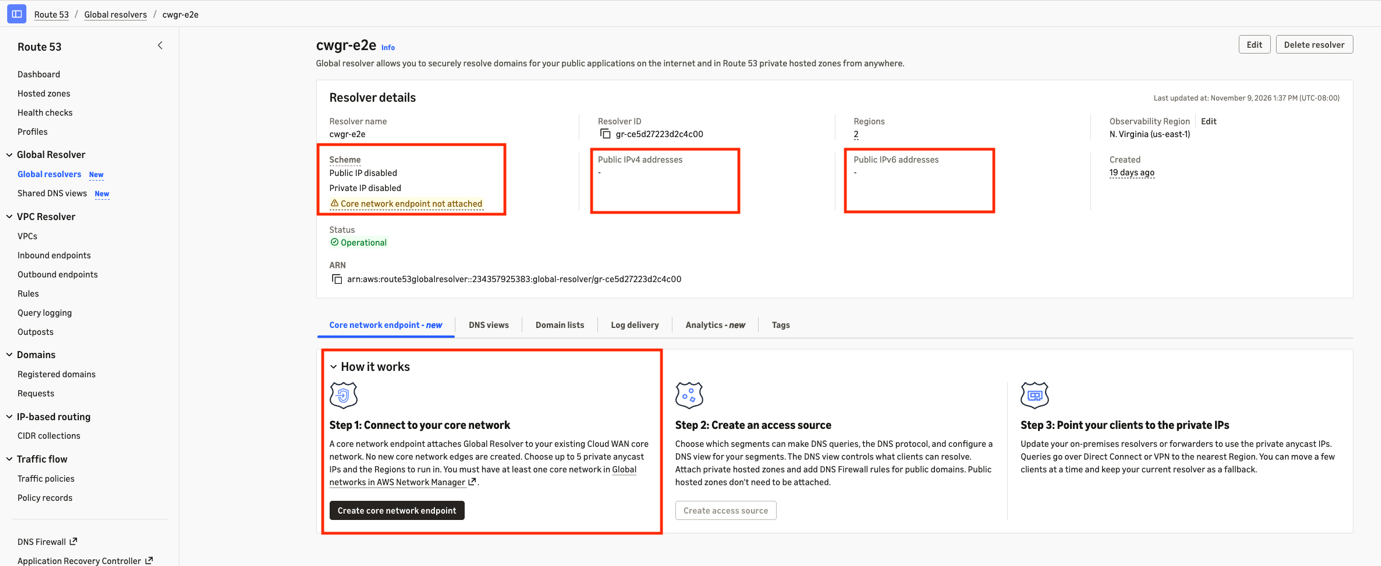
Figure 4: View of a Global Resolver that allows private IP communication
Step 2: Configure a Global Resolver core network endpoint on AWS Cloud WAN
You can now configure a core network endpoint on AWS Cloud WAN, which Global Resolver uses to receive DNS queries from the private network connected through AWS Cloud WAN. From the UI shown in Figure 4, choose Create core network endpoint to open the configuration UI (Figure 5).
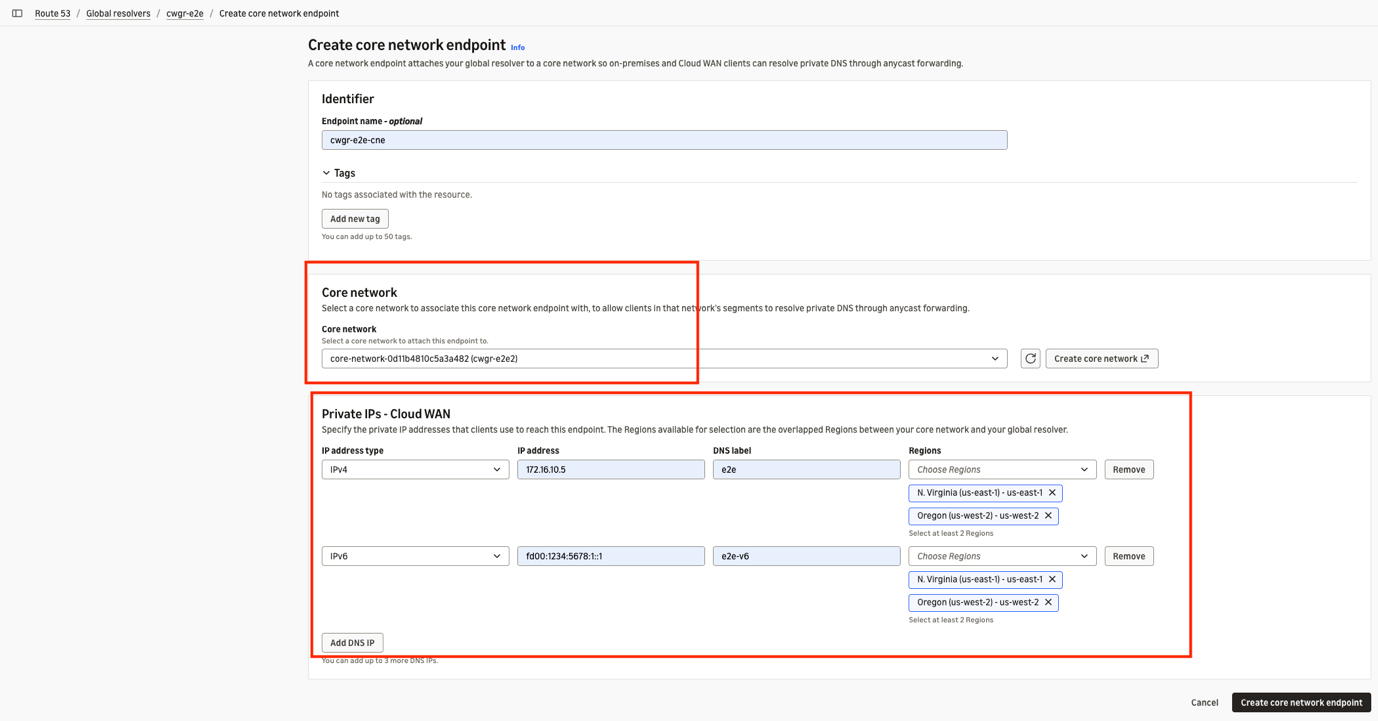
Figure 5: Configuration of a Global Resolver core network endpoint for AWS Cloud WAN
The resulting endpoint is shown in Figure 6. It links the Global Resolver to the core network and defines the private DNS IPs over which it is reached. You can create one endpoint per Global Resolver per core network. At configuration, you specify the core network and the Regions from which you want to serve the DNS queries. Global Resolver maintains the same anycast private IP in those Regions, so local queries route directly through each Region’s core network endpoint path.
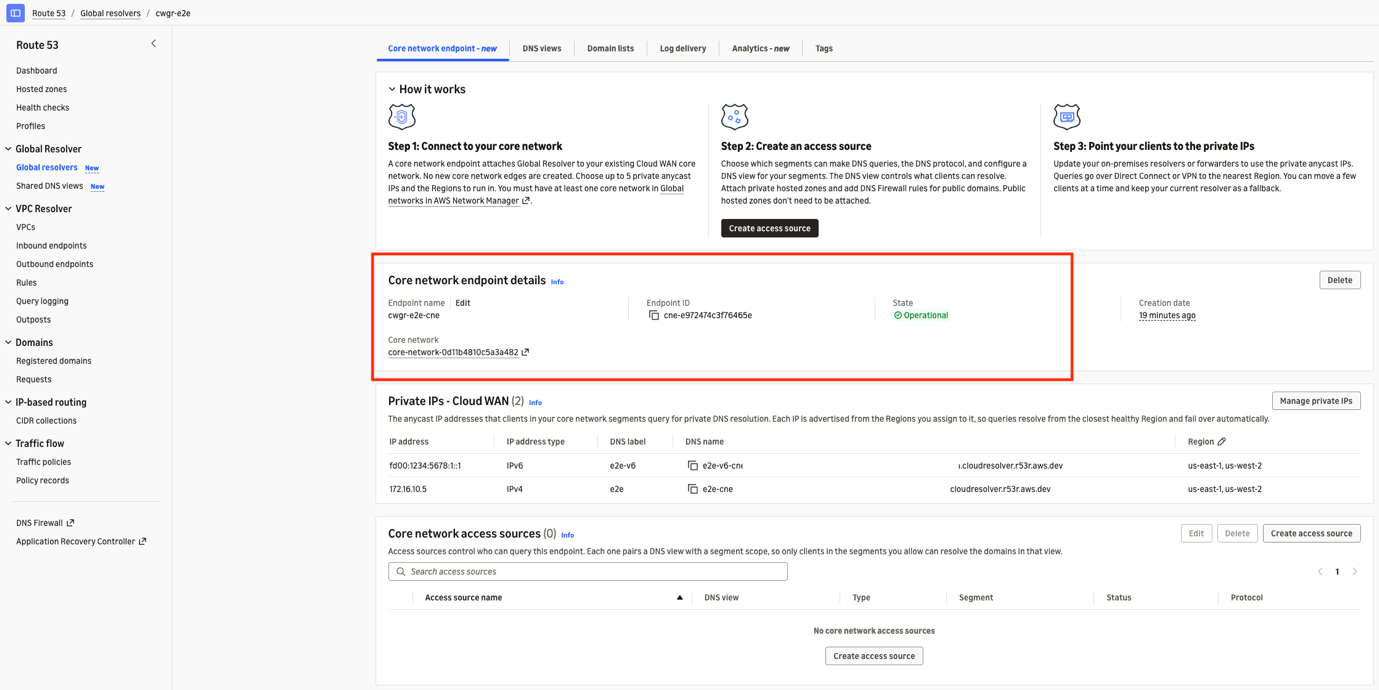
Figure 6: Core network endpoint and network access source configuration in Global Resolver
Step 3: Define DNS views and DNS filtering in Global Resolver
You can now create DNS views as described in Managing DNS views with Amazon Route 53 Global Resolver. The resulting views are shown in Figure 7.
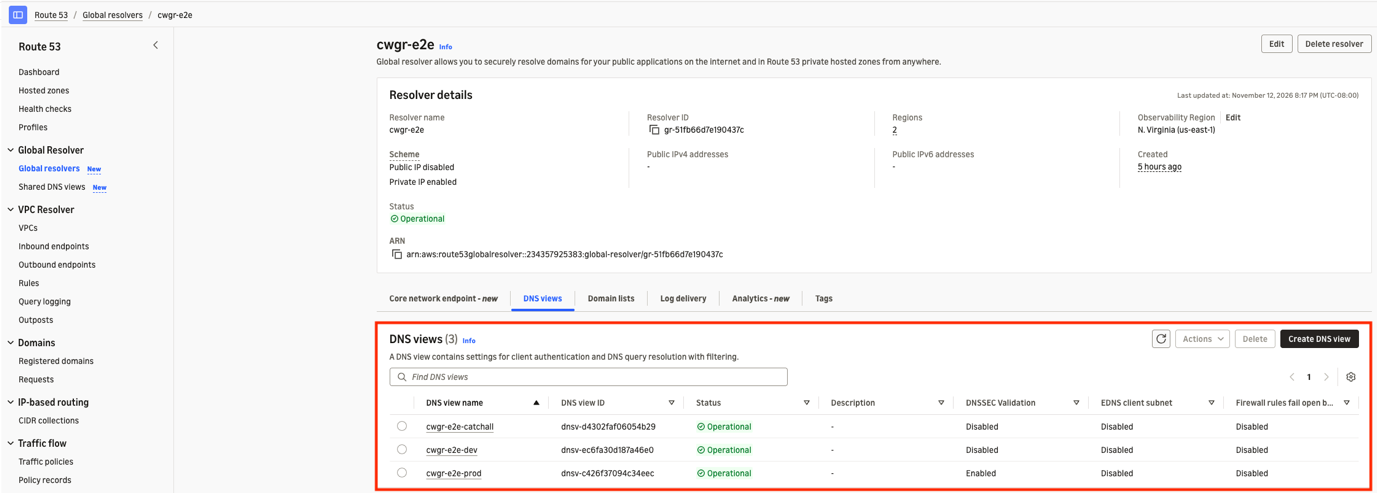
Figure 7: DNS views for Global Resolver
You can also create DNS domain lists. For the steps, see Build domain lists in the Amazon Route 53 Developer Guide. The domain lists for this setup are shown in Figure 8.
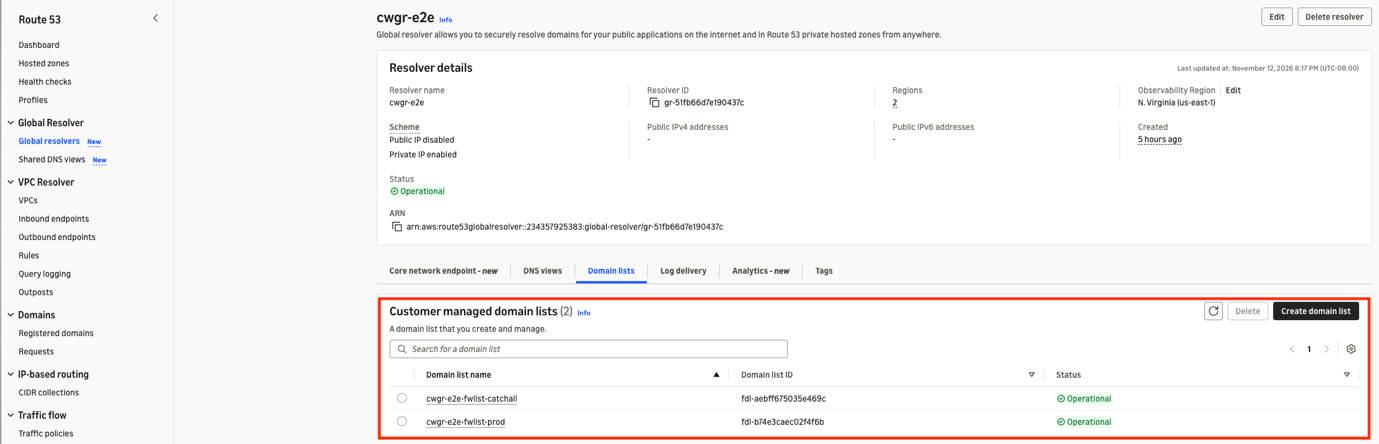
Figure 8: DNS domain lists for DNS filtering in Global Resolver
Each DNS view is also configured with DNS filtering rules based on the domain lists.
Step 4: Create an access source in Global Resolver
Access sources govern which clients can query this endpoint. By pairing a DNS view with a segment scope, each access source makes sure that only clients in your permitted segments can resolve the domains in that view. Choose Create access source (Figure 6). You first choose a DNS view (Figure 9), which opens the access source configuration UI.
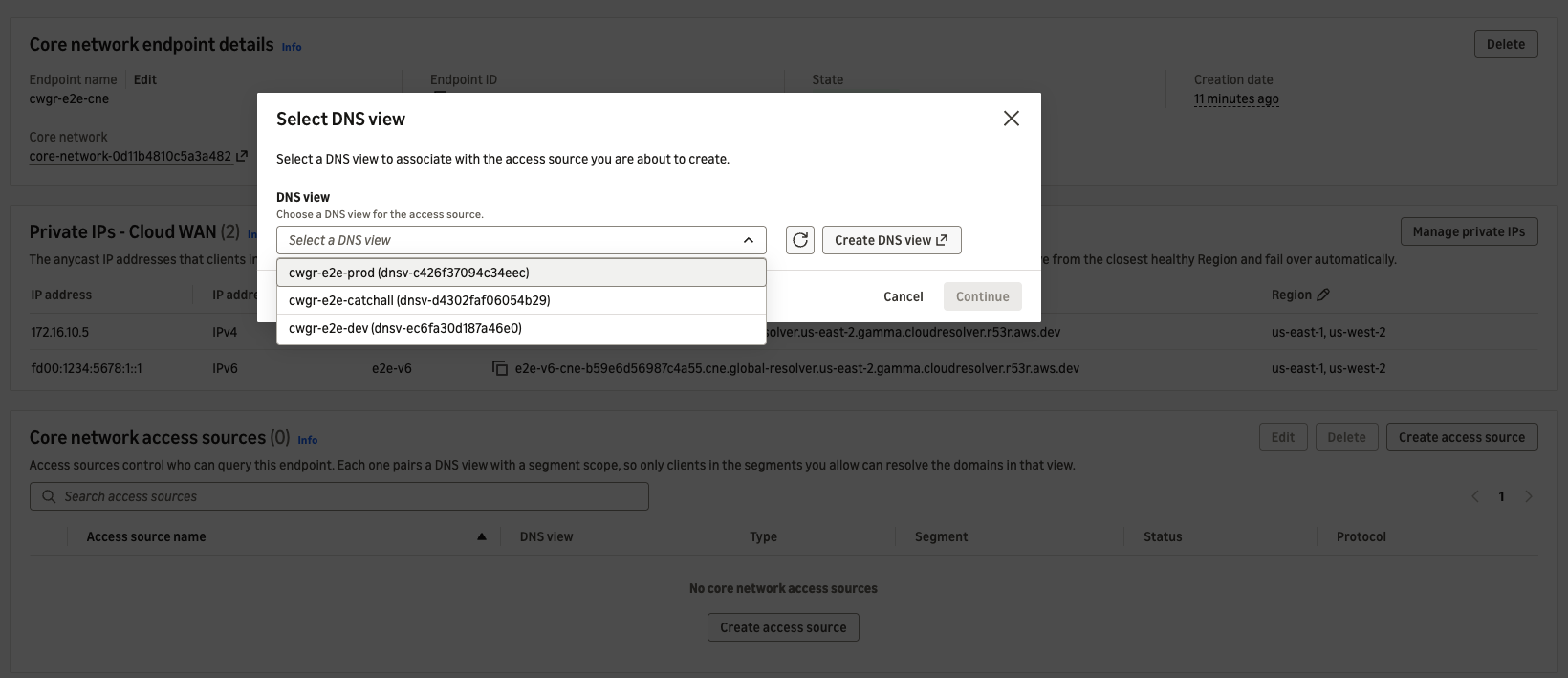
Figure 9: DNS view selection for a Global Resolver access source
Choose the DNS view, and then choose Continue to configure the remaining parameters (Figure 10). You can apply the access source to all segments or to a specific segment, and specify the DNS lookup protocol: Do53, DoH, or DoT.
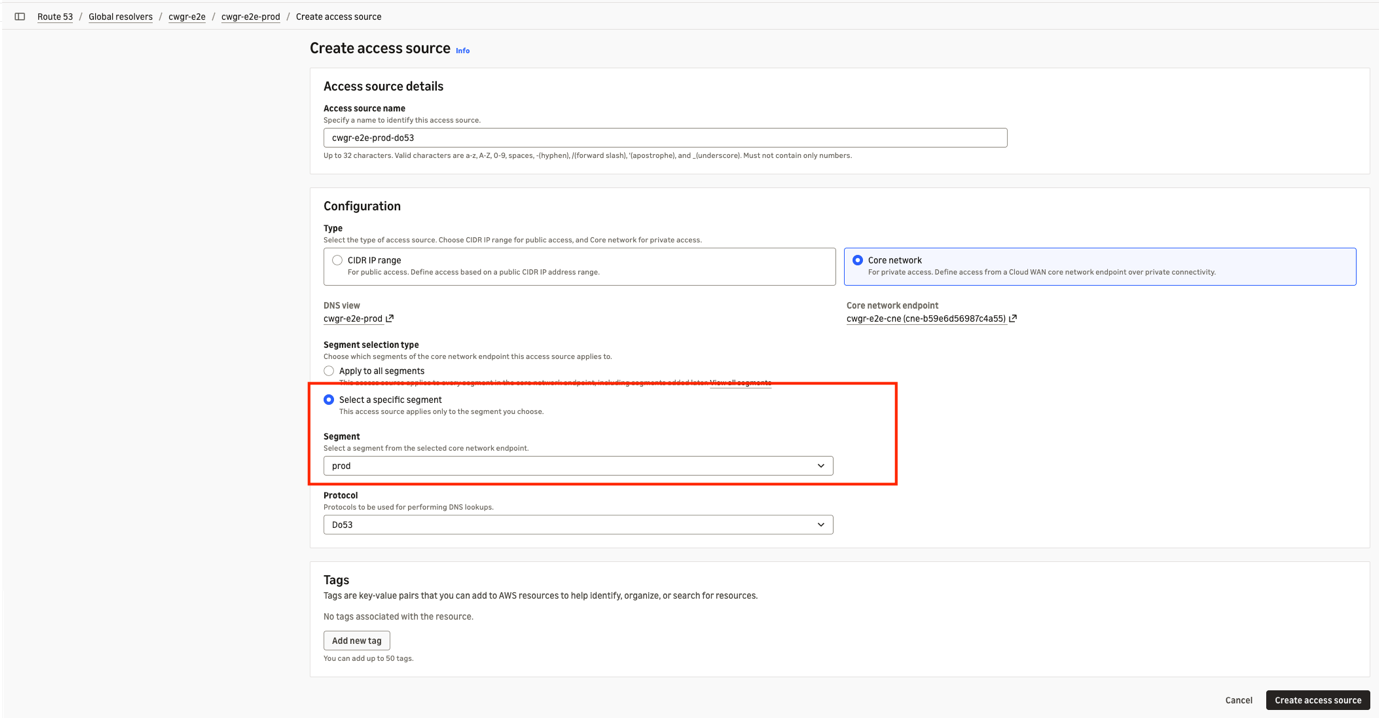
Figure 10: Configuration of an access source for Global Resolver
In Figure 11, we created access sources that each map a segment to a DNS view, applying that view’s PHZs and DNS Firewall rules: cwgr-e2e-prod-do53 maps the prod and hybrid segments to the cwgr-e2e-prod view, cwgr-e2e-dev-do53 maps the dev segment to the dev view, and cwgr-e2e-catchall-do53 maps all other segments to the cwgr-e2e-catchall view. This segments your DNS by the needs of each network segment and its applications, giving the setup shown in Figure 12.
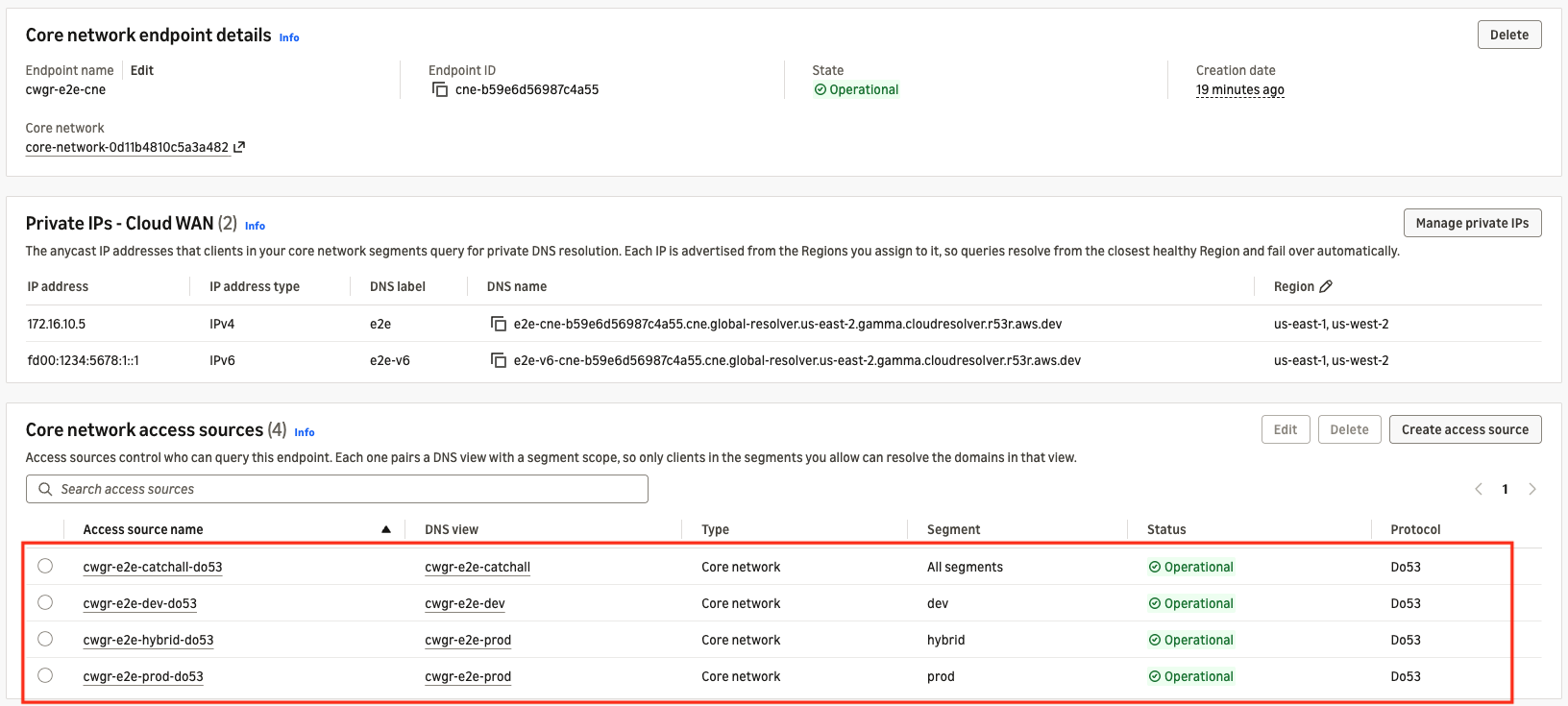
Figure 11: Core network access sources configured in Global Resolver
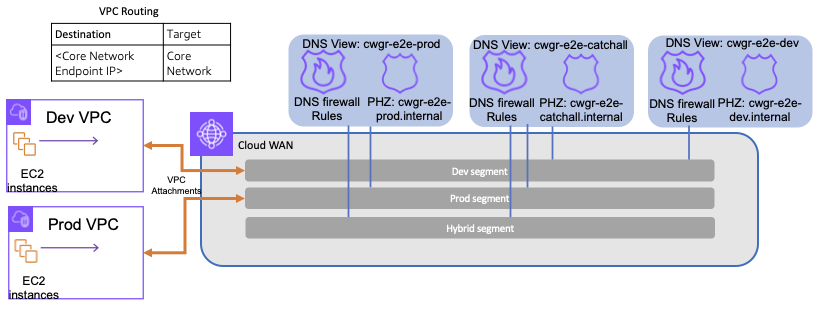
Figure 12: Test setup configuration for DNS segmentation
After setup, test resolution by pointing your on-premises DNS servers to the Global Resolver private IP and following the resolution path. The primary use case is resolution from on-premises over private paths such as Direct Connect or Site-to-Site VPN into AWS Cloud WAN. You can also test from your virtual private cloud (VPC). In that case, verify that you have a route from the VPC to the core network for that destination (Figure 12). Querying from an instance in the prod segment, you can resolve the domains in the associated DNS view but not those in other views (Figure 13).
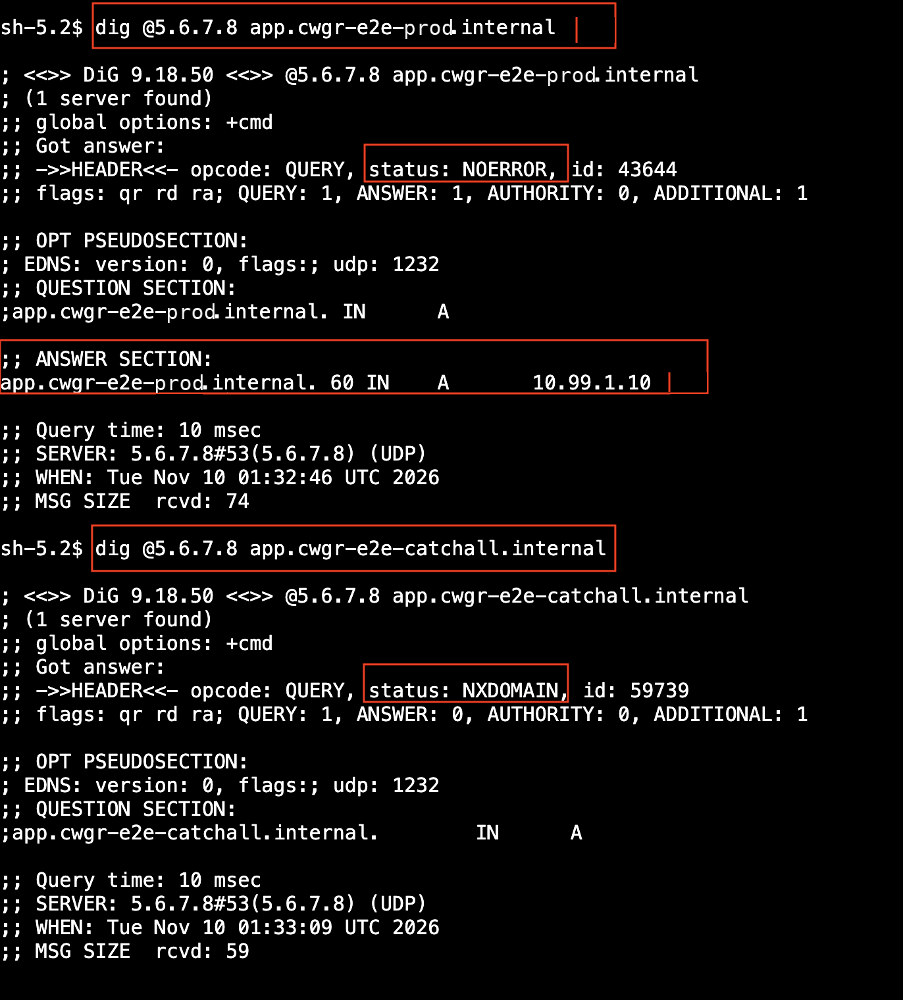
Figure 13: Amazon EC2 console screenshot showing DNS resolution on a production EC2 instance
Considerations
Keep the following in mind as you plan a deployment:
- DNS query routing for AWS Direct Connect – When the hybrid architecture involves AWS Direct Connect, if global resolver is not available in the same region as the direct connect interface, then it will ECMP to all the regions configured for your global resolver in the same continent.
- AWS Cloud WAN policy update – To support this capability, update your AWS Cloud WAN core network policy to version
2026.10. If your core network policy uses an older version, update it. - Query protocols and privacy – Global Resolver over AWS Cloud WAN supports Do53 and the encrypted DoH and DoT protocols, which protect queries from eavesdropping and manipulation in transit. Choose the protocol that matches your privacy and client requirements.
- IP and Region planning – Plan which private IP addresses you will dedicate as resolver targets, and which Regions each IP is associated with. Associate each IP with two or more Regions to benefit from failover.
- Failover expectations – Understand the failover behavior your clients will experience, and design your client and forwarder configuration (including the optional second IP) around your availability goals.
- AWS Transit Gateway topologies – This post shows an AWS Cloud WAN-only topology, but customers who use AWS Transit Gateway and AWS Direct Connect Gateway for on-premises-to-Region connectivity can also use this feature, provided there is a path from the transit gateway to the AWS Cloud WAN network. This approach is often taken for traffic segmentation and blast-radius isolation, as covered in Achieving traffic segmentation in multi-AWS Region environments using AWS Transit Gateway and AWS Cloud WAN.
Summary
Hybrid networks on AWS Cloud WAN need DNS resolution that is resilient, consistent, and secure across many locations and Regions, without replicating configuration site by site. Global Resolver over AWS Cloud WAN delivers this by extending Amazon Route 53 Global Resolver privately over your AWS Cloud WAN network. A single privately routable IP gives you anycast-like multi-Region failover for public and private domains. DNS views map cleanly to your AWS Cloud WAN segments, so you can manage resolution per environment or business unit without added operational overhead as you scale.
To get started, create a Global Resolver with the public IP disabled in the Amazon Route 53 console and attach a core network endpoint to your AWS Cloud WAN network. For more details, see see the Connecting a global resolver to a core network page in AWS documentation


