
The holiday season, the festive season, the “how is the year almost over?” season. Whatever you call it, there’s a lot to get done. Gifts to buy, meals to plan, travel details to sort out, all while your regular responsibilities refuse to take time off.
In Firefox 161, we’re introducing a few new updates that can help you save time during the busiest months of the year, plus a new place to browse when you have a few minutes to cross something off your list. So you can cut down on the time spent prepping for the holidays, and get back to the people you’re doing it all for.
Set VPN rules for individual sites
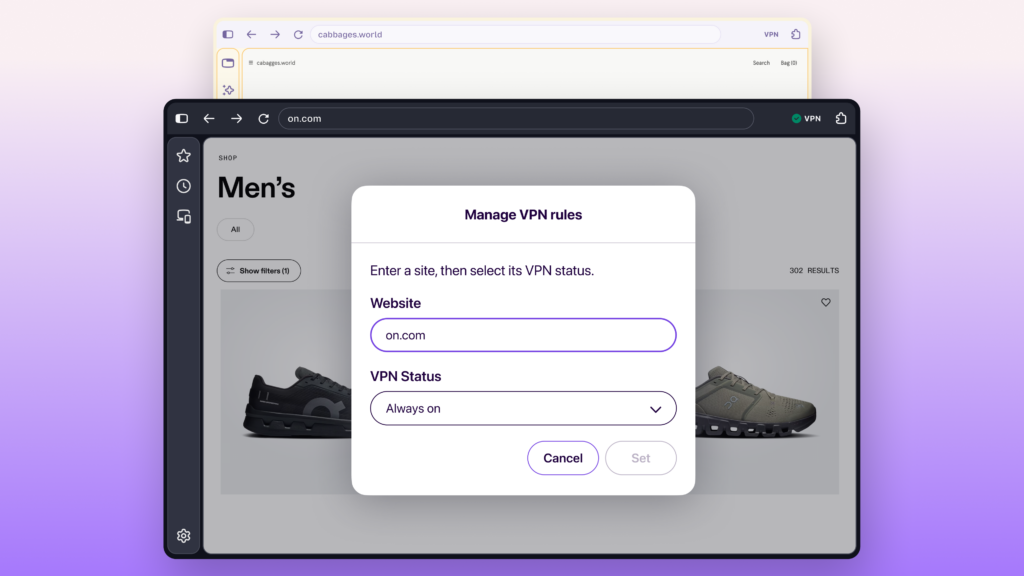
Searching for the perfect gift? You might want to use a VPN to compare how prices differ by region. Sites like your bank or favorite streaming service, however, might work better without it.
Firefox’s free built-in VPN on desktop now lets you choose which sites automatically open with VPN on, and which open with it off. This way, your preferences are applied automatically, and you can save time skipping the constant toggling on/off every time you visit a different site.
Open the VPN panel from your toolbar and select Manage VPN rules, or go to Settings → Privacy & Security → VPN → Manage VPN rules. Add a website and choose Always on or Always off. Once a rule is set, that site will automatically open with your VPN preferences on future visits.
Bonus: VPN data is unlimited through January 31, 2027, so now’s the perfect time to experiment with rules and find the setup that works best for you. Check VPN availability in your region and sign in with a Mozilla account to get started.
Listen to pages when your hands are full
Already available on desktop, the ability to read pages aloud in Reader View is now rolling out on Firefox for Android. So when holiday prep keeps your hands busy, you can catch up on that article you’ve been saving while you untangle the tree lights, or hear the next step in your cookie recipe without getting flour on your phone.
On Android, tap the Reader View icon in the address bar, then tap the headphones icon in the pop-out menu. You can play, pause, rewind, fast-forward, adjust the playback speed, or choose a voice. You can even keep listening with your screen off. For added privacy, Firefox uses only voices that work directly on your device, so the page text and audio stay there.
Meet the Fire button in Classic Window: A faster way to start fresh
Anyone who shares a computer with family knows the risk: one stray autofill suggestion or search history entry, and the gift you spent weeks planning and searching for is no longer a surprise. Before you hand the computer over to the next person, press the  button in your desktop toolbar in Classic Window to help keep your gifts a secret until the big day.
If you’ve used the button in Private Window, you’ll recognize the icon. There, it lets you quickly reset your private browsing session. It’s now gradually rolling out to Classic Window on desktop, where it does something different: it gives you easily accessible control over the data Firefox saves as you browse.
It’s always in reach, so you can clear your browsing and downloads history, cookies and site data, temporary files, saved form info, and website permissions and preferences directly from your toolbar. If you choose to delete everything, you’ll be signed out of sites and your current window will close, and Firefox will open a new one for you to start fresh. Because you’ve got enough to do without hunting through settings to clear it all.
If you don’t want to delete everything or close your open window, you can choose which browsing data to delete and your current window will remain open.
Browse Firefox from your car dashboard
You can now download the Firefox app directly from Google Play in cars with Google built-in. Whether you are waiting for your kid at school pick-up, charging your EV between long drives, or taking a breather in the parking lot before braving the holiday shopping frenzy, you can use Firefox right from your parked car’s dashboard. Less squinting at a mobile screen; more getting stuff done.
The best part? Our commitment to privacy comes along for the ride. Firefox is built on the principle that not even Mozilla should know which websites you visit or what you do there, and your browsing history will never be shared with the car manufacturer.
A little time back this holiday season
When your day is already full, even a few small shortcuts can help. We hope the new improvements in Firefox 161 make it easier to get things done online – not only during the holiday rush, but also long after the decorations come down.
To learn about the other new features released in Firefox 161, check out our newest release notes. And once you’ve given them a go, let us know what you think on Mozilla Connect.
The post Lighten the holiday load with these four Firefox 161 updates appeared first on The Mozilla Blog.


