This is a guest post by Gbeminiyi Abolarin, Senior Infrastructure and Reliability Engineer at Topstep, in partnership with AWS.
For a live trading platform, the cache is on the critical path, not a convenience layer. When it runs on a single self-managed node with no replica and no automatic failover, one instance failure is the difference between a normal session and an outage. This post shows how Topstep migrated roughly 53 million keys from self-managed Redis OSS to a fully managed, Multi-AZ Amazon ElastiCache for Valkey cluster. The team used RedisShake for a blue/green cutover, then completed the transition with a single Amazon Route 53 DNS change in a few seconds and no application code changes beyond a small TLS configuration update.
We cover Topstep’s starting architecture, the drivers behind the move, the migration approach, the DNS and TLS considerations that teams often overlook, and the latency and operational gains Topstep realized.
Current architecture
Topstep is a funded-trader evaluation platform that evaluates traders in a simulated trading environment. Behind the platform sits a transaction-and-risk-management stack that handles three workloads:
- Token and session caching: Validating and storing the credentials that keep trader sessions active.
- Real-time job orchestration: Queued background jobs (through BullMQ, a job-queue library) that run tasks such as settlement and evaluation scoring. These jobs execute small server-side Lua scripts that bundle several cache operations into one atomic step.
- Event-driven workflows: Downstream processes that react to trading activity and must stay available during live sessions.
For over a year, all three ran on a single self-managed Redis OSS 7.4 instance on one EC2 R5.4xlarge node, inside a shared management account. That design concentrated several risks in one place:
- A single point of failure: One node, no replica, and no automatic failover, so any instance failure meant a full cache outage.
- Resource contention: The batch jobs and the interactive session cache shared the same engine and competed for the same resources.
- A production workload in a non-production account: The cache sat alongside continuous integration and continuous delivery (CI/CD) tooling and IAM resources rather than in a dedicated production account.
The drivers: Why migrate
As Topstep’s trading platform grew and trader activity increased, these three risks became harder to tolerate. Three factors drove the decision to migrate to a fully managed Amazon ElastiCache for Valkey 7.2.6 cluster:
- Managed Multi-AZ replication with automatic failover: A node loss no longer meant an outage. On the self-managed node, the team also handled OS patching, Redis OSS upgrades, backups, and recovery themselves.
- Headroom to absorb the nightly batch burst: Heavy Lua scripts and multi-megabyte objects competed with interactive reads, which spiked read P90 latency to approximately 250 ms. A right-sized managed cluster with performance headroom would absorb the burst.
- A dedicated production account: The team wanted a production account separate from shared tooling, as part of a broader operational-excellence effort.
The target state was a Multi-AZ ElastiCache for Valkey pair with automatic failover, TLS in transit, and instance types based on AWS Graviton for performance headroom. ElastiCache would handle patching and backups instead of Topstep’s team, and the team would stay responsible for monitoring their own application and cluster metrics.
Why ElastiCache for Valkey
As a Linux Foundation-hosted, open-source fork of Redis OSS 7.2, Valkey is a drop-in replacement with full protocol compatibility. No application code changes were needed beyond a small TLS configuration update. Topstep’s source was Redis OSS 7.4, a post-fork release, so the on-disk formats (RDB, AOF) differ between it and Valkey 7.2.6. The team validated that all BullMQ Lua scripts ran correctly on Valkey 7.2 and tested with a representative dataset before committing. For version-specific details, see the Valkey migration guide.
Choosing the migration approach
Topstep required a blue/green cutover: an independent green environment to validate under production-like load, with rollback one DNS change away. This approach de-risked moving a cache on the critical path of live trading.
The team used RedisShake rather than the managed migration for two reasons. First, the blue/green capability was essential. Second, their post-fork Redis OSS 7.4 source falls outside the Redis OSS ≤ 7.2 range that the managed migration supports, because Valkey forked from Redis OSS 7.2.4. Although the on-disk formats (RDB, AOF) differ between Redis OSS 7.4 and Valkey 7.2.6, the wire protocol is fully compatible. As a result, RedisShake could replicate at the command level rather than rely on file-based migration.
If you don’t require blue/green, ElastiCache Online Migration provides a fully managed, zero-downtime migration experience from self-managed Valkey or Redis OSS on EC2 to node-based clusters or Serverless.
Migration architecture
The team ran RedisShake in PSYNC mode as a Kubernetes deployment on a dedicated memory-optimized node in an Amazon EKS cluster. In that mode, RedisShake replicated roughly 53 million keys from the self-managed Redis OSS 7.4 source to the new ElastiCache for Valkey 7.2.6 cluster. Because the source and target sat in different AWS accounts, the two accounts’ virtual private clouds (VPCs) were connected with VPC peering. Security groups were scoped to let the bridge instance reach both the source node and the target endpoint on the Redis port. This let RedisShake synchronize across the account boundary without coupling the two environments. The MaiCoin team published a similar RedisShake migration walkthrough that Topstep used as a reference.
The following table summarizes the before and after state of the cache tier:
| Before | After | |
| Engine | Redis OSS 7.4 on EC2 R5.4xlarge | Valkey 7.2.6 on cache.r7g.2xlarge |
| Topology | Single node, single AZ | Primary + replica across two AZs |
| Failover | None | Automatic Multi-AZ failover |
| Account | Shared management account | Dedicated production account |
| TLS | Off | On |
| Endpoint | A record (redis.internal.example.com → EC2 IP) | CNAME (same hostname → ElastiCache primary endpoint) |
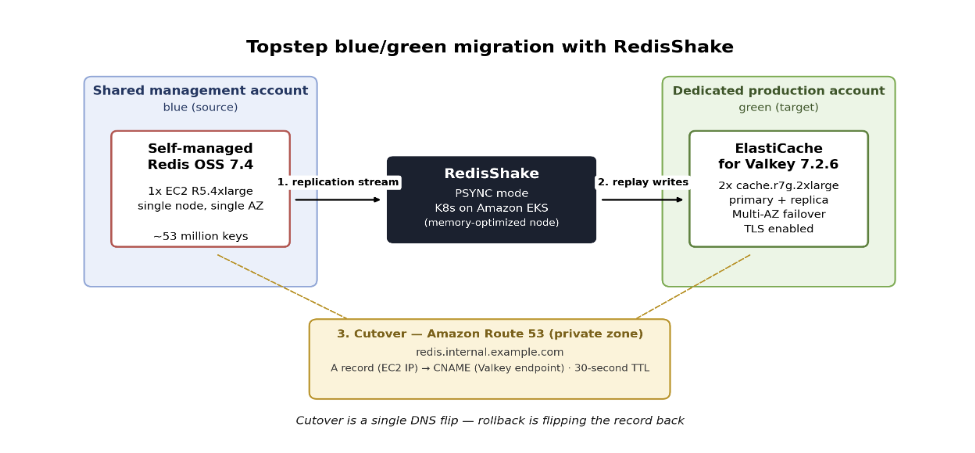
Figure 1: Blue/green migration flow in which RedisShake replicates the Redis OSS source to the ElastiCache for Valkey target, and a single Amazon Route 53 record flip completes the cutover with rollback a flip away
Migration execution
The migration ran in four phases:
- Provision the green cluster. The team stood up ElastiCache for Valkey 7.2.6 (cache.r7g.2xlarge, primary + replica, Multi-AZ, TLS enabled) in the dedicated production account using infrastructure as code, with VPC peering to the source account.
- Synchronize with RedisShake. RedisShake ran as a Kubernetes deployment on a dedicated memory-optimized node in the production Amazon EKS cluster, in PSYNC mode, replicating roughly 53 million keys in real time until replication lag converged to near-zero.
- Validate, then cut over. The team verified key-count parity between source and target and ran application smoke tests against the green cluster. The team then changed the Amazon Route 53 A record to a CNAME that pointed at the ElastiCache primary endpoint (30-second TTL), and services picked up the new target within a few seconds.
- Soak and decommission. The source Redis OSS instance stayed running as a warm standby during a soak period. After confirming no anomalies, the team decommissioned the blue environment.
DNS and TLS considerations
Two details of the cutover are often overlooked but important to get right: how the DNS record was structured, and how TLS verification kept working through a custom hostname.
DNS: An A record becomes a CNAME
The cutover relied on a private hosted zone record in Amazon Route 53 (redis.internal.example.com) that resolves only inside associated VPCs:
- Before migration, this was an A record that pointed at the IP address of the EC2 instance.
- At cutover, it changed to a CNAME that pointed at the primary endpoint of the ElastiCache replication group (
master.<cluster-name>.<id>.use1.cache.amazonaws.com).
ElastiCache Multi-AZ failover operates behind that endpoint automatically, so no further DNS changes are needed when the primary fails over to the replica.
TLS: Verifying a certificate that doesn’t match the custom hostname
With TLS enabled on the ElastiCache cluster, the server certificate covers *.<cluster-name>.<id>.use1.cache.amazonaws.com, not the custom hostname redis.internal.example.com. Standard hostname verification would therefore fail when clients connect through the custom DNS name. Topstep solved this at the application level while keeping full CA-chain verification active (rejectUnauthorized: true):
- Topstep added a
REDIS_TLS_ALLOWED_CERT_NAMESsetting, loaded from AWS Secrets Manager. - Topstep used the built-in
tls.checkServerIdentityfunction in Node.js to verify the certificate against an allowlist of valid AWS endpoint names rather than the dialed hostname. Certificates that match none of the allowed names are rejected.
This lets the team switch backends with a single DNS change without disabling TLS verification. That’s an important consideration for any team putting a custom DNS name in front of a TLS-enabled ElastiCache cluster.
Results
After cutover, the ElastiCache for Valkey cluster delivered consistent low-latency performance:
| Metric | Value |
| Read latency P99 | ~1.25 ms |
| Read latency P90 | Sub-millisecond |
| Write latency P99 | ~0.5 ms |
| EngineCPUUtilization P99 | Low single digits |
These are direct improvements over the self-managed deployment:
- Latency: Nightly batch burst latency dropped from approximately 250 ms at P90 on the single-node Redis OSS instance to well within the team’s target on ElastiCache for Valkey.
- Patching: The team moved from self-managed updates to an automated weekly maintenance window.
- Backups: The team moved from self-managed schedules to service-managed nightly snapshots with 5-day retention.
- Failover: Automatic Multi-AZ failover replaced manual recovery with no replica.
- Agility: Scaling up, creating a new cluster, or adjusting node types is now easier with a managed service, so capacity can grow alongside trading volume. See scaling node types for details.
Together, these offloads free up roughly 1–2 engineer days per month.
Customer perspective
“We moved roughly 53 million keys from a single self-managed Redis OSS server to a managed, Multi-AZ ElastiCache for Valkey cluster, and cut over by pointing a DNS name at the new cluster, so services never had to change hostnames and rollback was one DNS change away. That removed our single point of failure and took routine patching and backups off the team’s plate.”
— Gbeminiyi Abolarin, Senior Infrastructure and Reliability Engineer, Topstep
Lessons learned
- Place DNS in front of your cache endpoint from the start. Topstep’s Route 53 CNAME turned the cutover into a single record update, without any code changes or redeployments. If your application connects by IP or a non-abstracted hostname, add a DNS layer before planning any migration.
- Validate in isolation, then keep the blue environment as a rollback target. Run functional tests, load tests, and latency benchmarks against the green cluster while blue continues serving production. After cutover, keep the source intact for at least 24–48 hours before decommissioning.
- Combine engine migration with account isolation. By provisioning the green cluster in the target account from the start, Topstep avoided a two-step process and completed both goals in a single project.
Conclusion
Topstep’s self-managed Redis OSS node had no replica, no automatic failover, and lived in a shared non-production account. That left the trading platform exposed to outages and nightly batch latency spikes as high as 250 ms. By using RedisShake to replicate roughly 53 million keys in real time and a single Route 53 DNS flip, the team completed a blue/green cutover to Amazon ElastiCache for Valkey 7.2.6. The cutover took a few seconds and required no application code changes other than a small TLS configuration update.
The results: Read P99 latency of approximately 1.25 ms and write P99 of roughly 0.5 ms, automatic Multi-AZ failover in place of manual recovery, account isolation and TLS in transit, and 1–2 engineer-days per month freed from patching and backup work. Because Valkey is a drop-in replacement, Topstep can adopt future performance and efficiency gains through in-place, zero-downtime upgrades.
To learn more, see Amazon ElastiCache for Valkey, Online Migration to ElastiCache, and RedisShake on GitHub.
The author team would like to thank Alexander Premo, Director of Engineering at Topstep, for his support during the migration and for coordinating and engaging the teams that made it possible.


