Gears of War: E-Day delivers an impressive visual and technical showcase. The game brings together several advanced graphics technologies, including Unreal Engine 5’s Nanite and Lumen, MegaLights, and RTX Mega Geometry for more accurate ray-traced shadows and reflections, alongside a range of upscaling and frame generation technologies.
However, today we’re focusing on a less-discussed technology that plays an equally important role in bringing this visually rich, densely detailed world to systems with more limited hardware resources: storage technology designed to reduce RAM usage.
We’ll begin by examining its behavior on a high-end system with plenty of resources to spare, before moving to a more modest configuration that better represents the hardware available to the average PC gamer. This will allow us to see how much of a difference the technology makes, particularly on lower-end systems.
The Storage Tech Explained
The Storage Tech Explained
In an interview with Digital Foundry, The Coalition explained how they leveraged the Xbox Series S’s fast SSD to bring the dense world of Gears of War: E-Day to a memory-limited system. By effectively using the NVMe SSD as an extension of system memory, they can dynamically load and offload complex city data in real time. This approach allows the game to stream the necessary assets for each scene just in time, overcoming the console’s limited RAM.
Digital Foundry notes that the true “special sauce” lies in The Coalition’s smart data management. The team employs advanced heuristics to determine which assets are fetched from the SSD and when, carefully balancing performance. Overusing this technique could harm frame rates, so the system is tuned to swap data only when it benefits the experience.
Gears of War: E-Day also supports DirectStorage, although based on our previous testing, this alone does not always result in high SSD activity or read rates.
Is this storage tech also used on PC?
Is this storage tech also used on PC?
YouTuber Mostly Positive Reviews shared his findings in a recent post on X, where he found higher-than-usual SSD activity in Task Manager when playing the game.
Gears of War E-Day is visually very impressive, but something has to be done with how the game either compiles shaders or streams data.My 14400F is constantly sitting at 80% CPU usage, 16GB RAM is maxed out, and disk read is sitting at a constant 120 MBps, with spikes up to 500 MBps. Will test this with the 9060 XT as well.These are settings I chose to maintain 60 fps, which it does, except for the massive shader compilation stutters every so often.October 7, 2026
Based on his findings, we decided to investigate further.
Test System
Desktop:
- MSI GeForce RTX 5090 VANGUARD SOC Launch Edition
- Ryzen 7 9800X3D
- 64GB (2x32GB) G.SKILL Flare X5 DDR5 @6200 MHz CL30
- Crucial T700 Gen5 SSD
- Sabrent Rocket 4 Plus-G SSD Gen4
- ADATA XPG SX8200 Pro SSD Gen3
- Samsung 870 EVO SATA III SSD
- ASUS ROG STRIX B850-F Gaming WiFi
- Corsair Nautilus 360 RS AIO Cooler
- HAGS enabled
- Windows 11 26H2 (Build 26300.9711)
- NVIDIA GeForce Game Ready Driver 617.42
Laptop:
- RTX 4060 Laptop GPU
- Intel Core i7-13620H
- 16GB DDR5
- PCIe Gen4 NVMe SSD
- Samsung 870 EVO SATA III SSD
- HAGS enabled
- Windows 11 26H2 (Build 26300.9711)
- Nvidia GeForce Game Ready Driver 617.42
SSD Activity and Read Rate
SSD Activity and Read Rate
Task Manager does not use a low enough polling period to measure SSD activity accurately, so we used HWInfo with the polling period set to 20 milliseconds. We tested SSD activity across all of the game’s graphics presets at 4K using DLSS Quality.
| Peak Bandwidth | Average Bandwidth |
|---|---|---|
Ludicrous | 3.7 GB/s | 1.3 GB/s |
Ultra | 2.8 GB/s | 1.2 GB/s |
High | 2.5 GB/s | 1.05 GB/s |
Medium | 1.5 GB/s | 824 GB/s |
Low | 858 MB/s | 359 GB/s |
In our previous tests of games that relied heavily on the SSD, none came close to sustaining 1 GB/s of average bandwidth. The highest we recorded was 366 MB/s in Forspoken at 4K with maximum settings, while many titles stayed well under 100 MB/s. Some games did show higher peak bandwidths, but these spikes lasted only a few milliseconds. For our purposes, it’s the sustained throughput – reflected in the average bandwidth – that truly matters.
In Gears of War: E-Day at higher settings, we essentially have a steady stream of a little over 1 GB/s at all times, indicating that the disk is indeed being utilized as an extension of system memory. As you can see, peaks hit up to 3.7 GB/s of throughput.
System Memory Usage
System Memory Usage
We measured RAM usage on our high-end system to see how much the game will use across each generation of SSD tested.
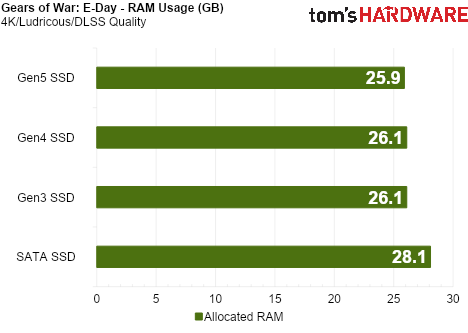
The game uses a significant amount of system memory, but having the game installed on an NVMe SSD – regardless of generation – saves about 2GB of RAM. The storage technology seems to be working as expected.
Visual Impact
Visual Impact
Since the game’s average read bandwidth far exceeds the limits of a SATA SSD, we expect that installing the game on one would lead to visual issues – and that is exactly what we observe.
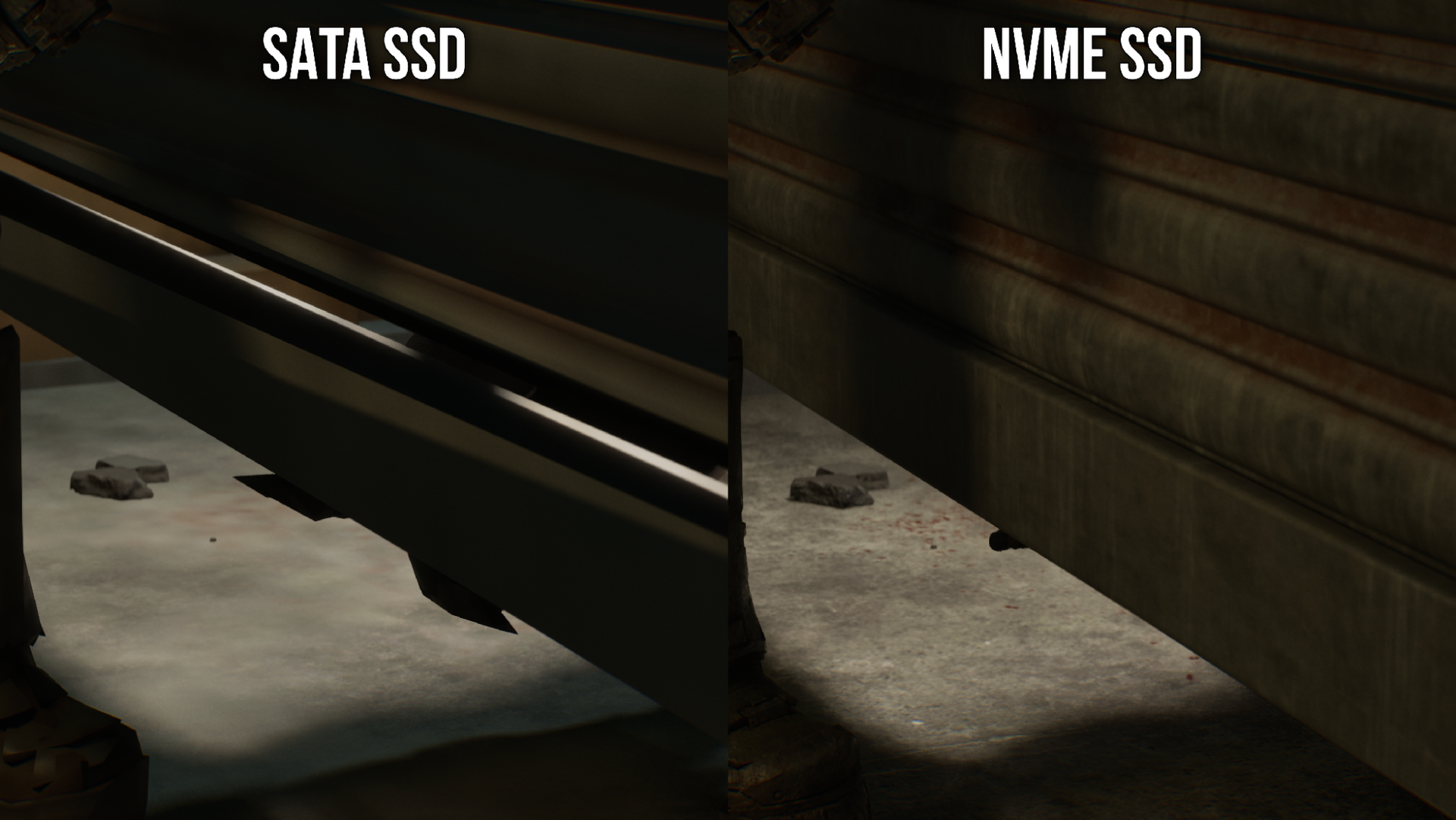
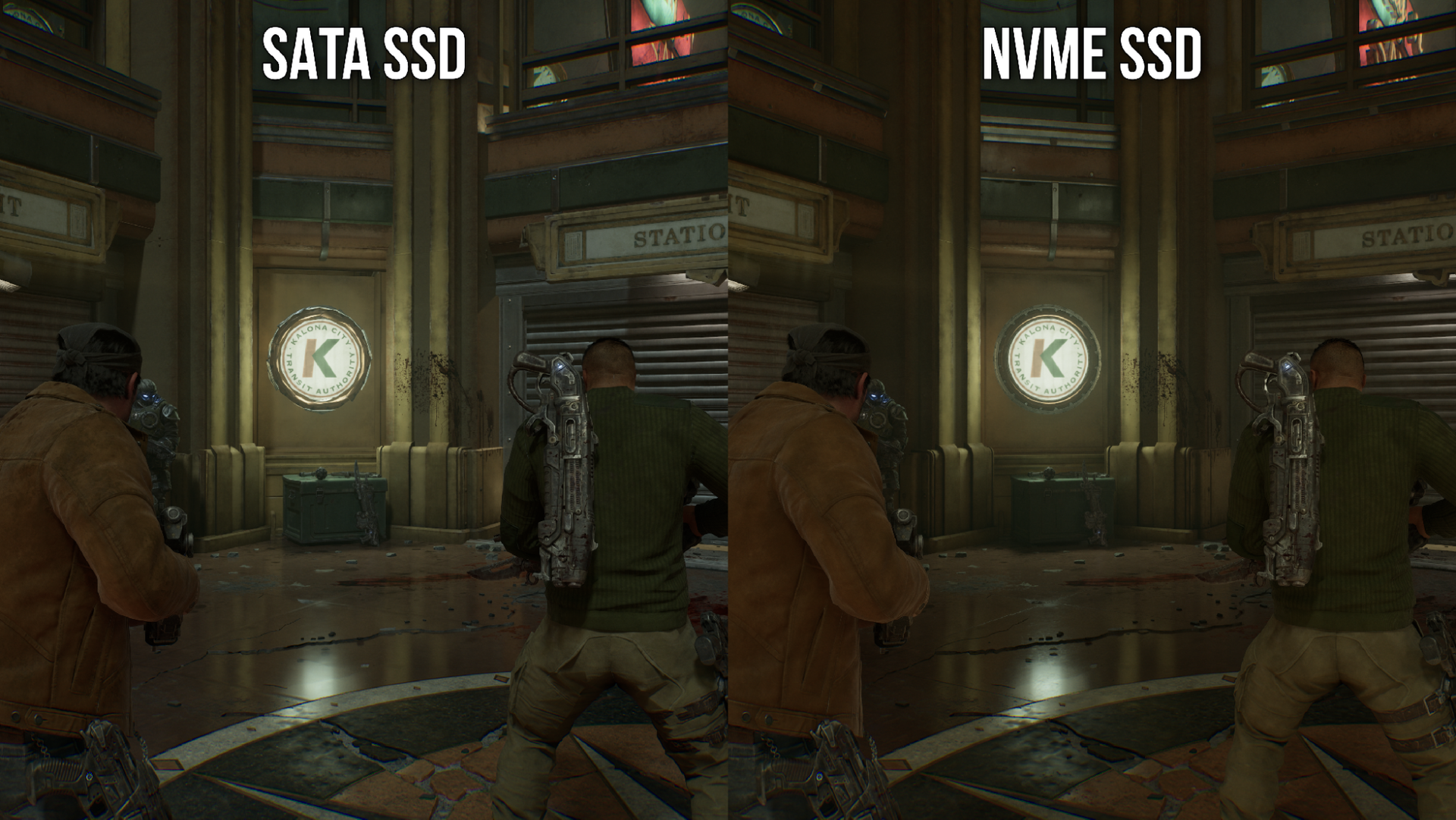
In the first comparison, textures are slow to load, which noticeably reduces image quality. In the second comparison, lighting and shadows take some time to appear. While everything eventually loads correctly, running the game on a SATA SSD does hurt immersion.
Performance Comparison Across Four Generations of SSDs
Performance Comparison Across Four Generations of SSDs
We tested the game across four generations of SSDs to evaluate any impact on performance. Using a high-end system with ample memory, we aim to determine the behavior of the storage technology on a system that is not resource-constrained. We will then compare the performance of our laptop’s internal PCIe 4.0 NVMe SSD with that of a SATA SSD.
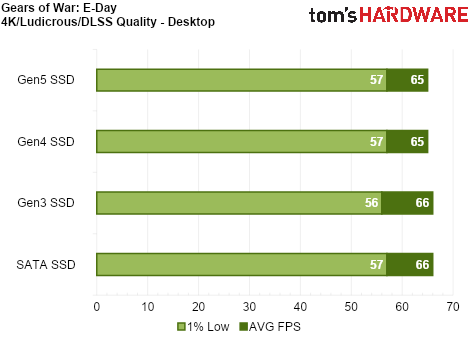
On a system with sufficient memory, installing the game on a SATA SSD has no measurable performance impact. The only drawback is the aforementioned visual degradation.
Now, we focused on our lower-end system with only 16GB of DDR5.
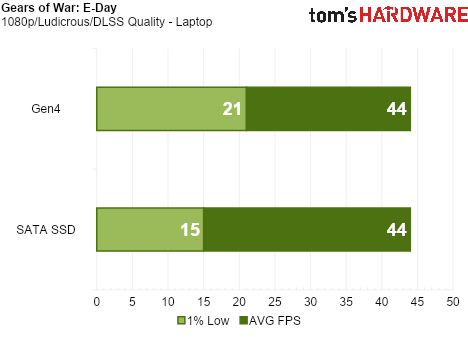
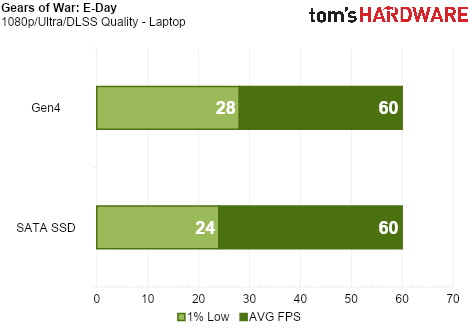
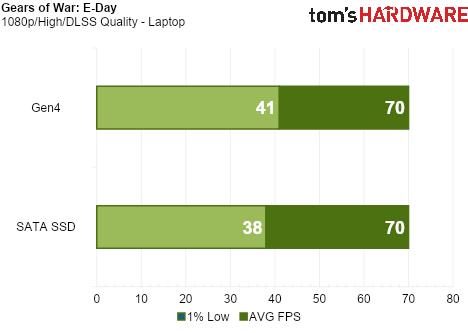
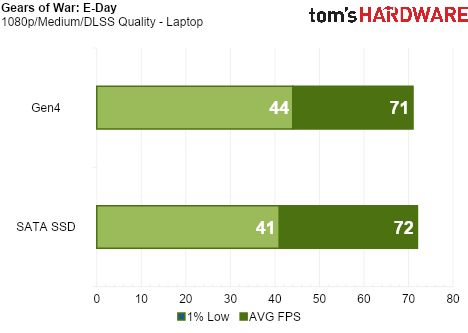
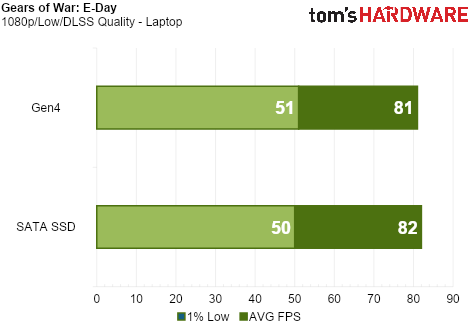
Now we start to see the benefit of installing the game on an NVMe SSD, especially on higher settings.
Although the average frame rate remains virtually identical on both the NVMe and SATA SSDs, increasing the graphics preset impacts the 1% lows. The NVMe SSD delivers smoother frametimes, resulting in a more responsive and fluid gaming experience.
Final Thoughts
Final Thoughts
While the concept isn’t entirely new – Windows already uses virtual memory to page data to disk when physical memory is exhausted – The Coalition has fine-tuned this technology specifically for their game. Their approach ensures that the data being paged out won’t noticeably slow down gameplay as it’s read from disk. In our testing, this technology successfully reduces RAM usage when the game is installed on an NVMe SSD.
Placing the game on an NVMe SSD also enables near-instant asset loading. For systems with 16GB of RAM or less, an NVMe SSD can deliver higher 1% lows, resulting in smoother performance. With RAM prices climbing and many players using machines with 16GB – or even 8GB – of memory, it’s reasonable to wonder if other developers will adopt similar techniques. For titles striving to create visually dense, richly detailed worlds, leveraging fast storage could be a practical way to preserve their vision on lower-end systems.