As Kubernetes fleets grow, so does the gap between the resources teams reserve and the resources their workloads actually use. Clusters running at low utilization consume compute that is paid for but never used. At the scale of hundreds or thousands of clusters, the waste compounds into millions of dollars annually. Static right-sizing workloads is one obvious remedy, but it is not the most efficient solution. Kubernetes does not ship an out-of-the-box solution that continuously tunes CPU and memory to match real demand across a large, multi-tenant fleet. Teams that want this capability must build their own multi-dimensional scaling strategy. Salesforce was one of the first enterprise companies to pioneer Vertical Pod Autoscaler (VPA) adoption at a large production scale across the fleet along with Horizontal Pod Autoscaler (HPA). The multi-dimensional scaling strategy with a combination of both VPA and HPA optimized workload resource reservations and drove more than $5 million in cumulative infrastructure cost savings.
How we started
Salesforce operates a large multi-tenant Kubernetes platform spanning over 1,400 live Amazon Elastic Kubernetes Service (Amazon EKS) clusters. Individual clusters can be as large as 2,500 nodes and support about 1,000 workloads (Deployments, DaemonSets, StatefulSets, and more). Salesforce is one of AWS’s largest customers and we work closely with AWS to scale our Kubernetes platforms.
In the platform’s early days, when the fleet was around 100 clusters and the total number of nodes and workloads was small, we managed workload right-sizing through static configurations. As our fleet rapidly grew, that operational model became inefficient and unsustainable.
We identified three key challenges with static resource management:
- Risk of production incidents – Inaccurate CPU and memory requests and limits often led to CPU throttling under unexpected load or pods being terminated.
- High operational toil – Engineers constantly had to work through historical telemetry and tweak static configurations across environments.
- Scalability bottlenecks – As the number of clusters, nodes, and workloads expanded, maintaining optimal resource configurations across a massive fleet became impossible.
To address these challenges and move away from static workload configurations, the Salesforce Kubernetes platform engineering team adopted the VPA to complement the HPA already running across our environments. By combining VPA for dynamic workload right-sizing with HPA for replica scaling, the team built multi-dimensional autoscaling strategies. The team has also migrated from the traditional Cluster Autoscaler to Karpenter to optimize compute resources and empower internal developers to self-serve infrastructure needs. Working in close partnership with AWS and the open source Kubernetes community, we rolled out VPA, HPA and Karpenter configurations across development, staging, and production environments with no customer-impacting incidents.
Solution overview
Autoscaling requirements vary by workloads. The Kubernetes platform engineering team matched each workload to one of three approaches based on its usage pattern: VPA alone, HPA alone, or a combination of both. The following sections describe when each pattern applies.
Vertical Pod Autoscaler (VPA) only
VPA tunes CPU and memory requests based on observed consumption, correcting pods that are under- or over-provisioned. It suits workloads that scale by resource size rather than replica count. For example, leader-follower workloads where adding replicas provides no additional benefits. The team applied VPA-only configurations to Amazon EKS add-ons and workloads that fit this pattern.
Horizontal Pod Autoscaler (HPA) only
HPA adjusts replica counts for Deployments, ReplicaSets, ReplicationControllers, and StatefulSets using built-in resource metrics (CPU and memory) or custom external metrics. Stateless workloads and Kubernetes webhook servers were the primary candidates, since they scale horizontally by adding identical replicas.
Multi-dimensional autoscaling (VPA + HPA)
The Istio service mesh is a representative example of multi-dimensional autoscaling, where VPA and HPA operate together to handle high production loads. The Istio control plane (istiod) performs two distinct functions, each with a different scaling characteristic:
- Configuration distribution (horizontal scaling with HPA) – Each control plane pod maintains connections to a set of data plane proxies. As the number of proxies grows, HPA provides additional control plane pods to hold the average at roughly 500 connected proxies per pod.
- Configuration generation (vertical scaling with VPA) – Every istiod pod generates the same configuration, so adding replicas provides no benefit. Larger environments instead require pods with higher CPU and memory allocations, which VPA adjusts.
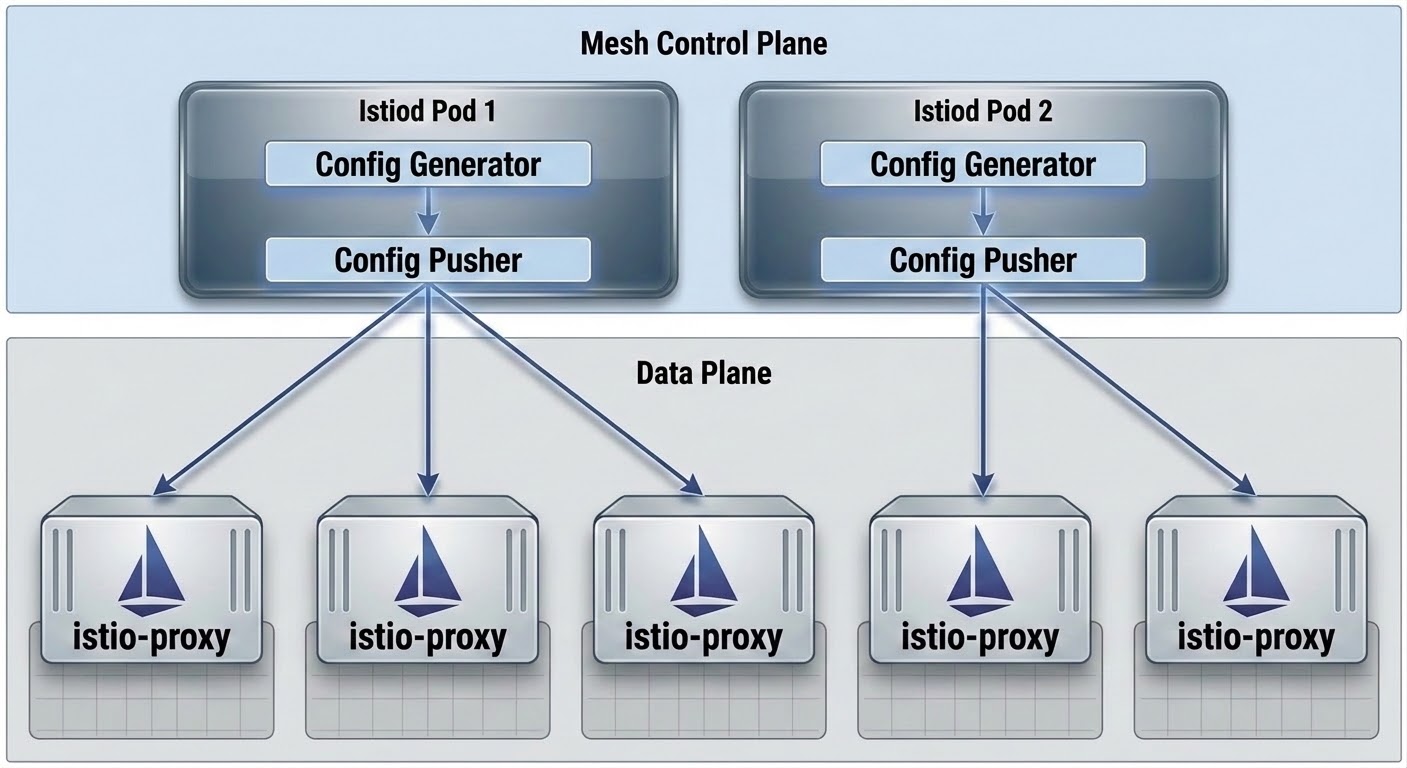
Figure 1: Istio control plane distributing configuration from istiod pods to data plane proxies
The key to running VPA and HPA together on the same workload is to scale the target replica or pod on an independent metric dimension, which prevents VPA and HPA from auto resize workload on the same signal:
Vertical scaling (VPA) adjusts istiod pod CPU and memory allocation based on resource utilization.
Horizontal scaling (HPA) adjusts the istiod replica count based on the number of connected data plane proxies.
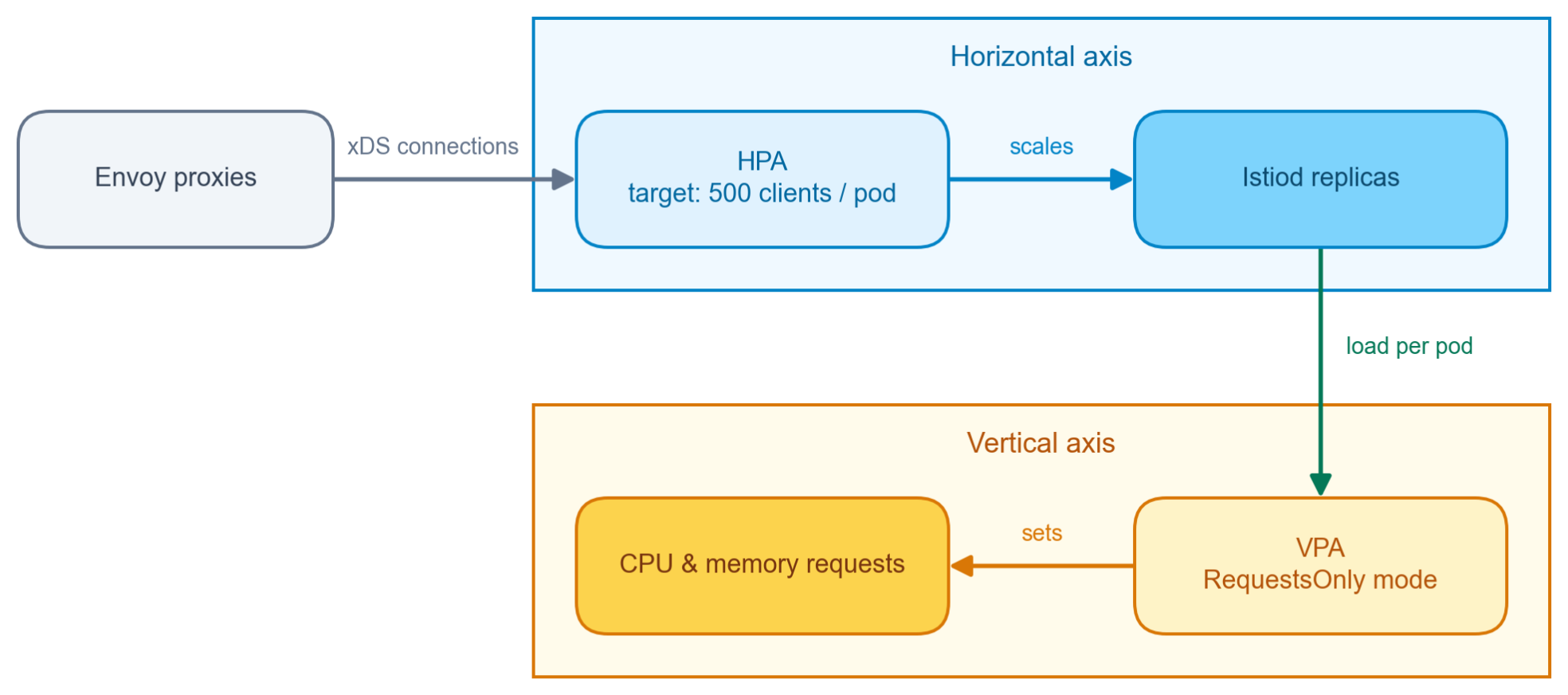
Figure 2: HPA scaling istiod replicas by connection count and VPA right sizing CPU and memory requests
Operational safeguards and rollout tooling
Beyond selecting an autoscaling strategy for each workload, the Salesforce Kubernetes platform engineering team invested in technical analysis, custom tooling, and operational safeguards to enable and release VPA and HPA configurations safely across the production fleet. The main focus areas were:
- Continuous integration and continuous delivery (CI/CD) – Integrated VPA and HPA configurations into our Spinnaker pipelines and Terraform modules for version-controlled rollouts and automated testing across development, staging, and production clusters.
- Staggered rollouts – Rolled out VPA and HPA changes in phases, progressing from lower environments to production and from low impact to high impact services. Each stage includes bake time and post-deployment analysis before the next begins.
- Rollback support – Built rapid-rollback Day-2 operations mechanisms, including automated Managed Operations (MO) and feature toggles, so operators can pause a VPA or HPA release and revert to static resource configurations without service disruption.
- Functional and performance testing – Ran end-to-end functional and performance benchmarks with in-house load-testing suites to evaluate system stability and recommendation accuracy under a range of workload conditions.
- VPA recommendation algorithm analysis – Reviewed VPA’s decaying histogram algorithm and evaluated percentile targets (for example, P90) against our in-house monitoring metrics.
- Workload startup resource analysis – Measured initialization burst patterns across workloads to set appropriate minAllowed and maxAllowed values, so pods receive adequate CPU and memory during startup.
- Cost-savings tracking – Developed cost-tracking tooling to measure infrastructure optimization and quantify savings across environments.
- VPA guardrails – Applied multi-layered safeguards, including minimum replica thresholds, Pod Disruption Budgets (PDBs), eviction rate limiting, and reduced updater run intervals, to eliminate restart loops and prevent unexpected pod evictions.
- Monitoring and alerting – Built operational dashboards in Grafana and our in-house metrics platform, with automated alerts for VPA and HPA component health, eviction rates, restart rates, and synthetic workload health.
Future expansion
Through the successful release of Vertical Pod Autoscaler (VPA) and HPA configs, the team plans to further expand capabilities across several key operational initiatives:
- In-place resource resizing for DaemonSets: To right-size DaemonSet resources for both high availability and cost optimization, the team plans to use the VPA Eviction-Free InPlace Resize feature. This capability will allow dynamic CPU and memory adjustments without requiring pod restarts or evictions, mitigating disruptions to the DaemonSet workloads.
- In-place autoscaling: The team is turning on the InplaceOrRecreate update mode across standard workloads, triggering pod evictions or recreations only when the underlying node lacks sufficient CPU or memory resources, else resize pod in-place.
- VPA invocation policy: Extend VPA to effectively right-size sidecar containers injected into the application pods. By configuring the VPA admission webhook to execute after other mutating webhooks, VPA ensures accurate pod resource specifications for every container.
- Fleet monitoring: To support VPA and HPA enablement across diverse workloads, the team enhanced kube-state-metrics and the metrics collection agent to send relevant metrics directly into the central metrics platform. The platform end users can build dashboards and alerts, compare HPA and VPA configurations through metrics queries, and measure right-sizing and cost savings without relying on the platform team.
- AI and machine learning workload optimization (stretch goal): Extend autoscaling frameworks to support AI inference and model serving workloads. By pairing VPA with HPA for model serving demands, the platform aims to maintain optimal latency while reducing idle compute costs.
Lessons learned
The following lessons come from running VPA and HPA together across the production fleet.
Set the right expectations
The Vertical Pod Autoscaler (VPA) is intended for steady-state, long-term resource optimization rather than handling sudden workload traffic spikes. Using the decaying histogram algorithm, VPA analyzes historical usage metrics across a standard 8-day window, weighing the most recent data heavily to gradually refine workload recommendations. While VPA handles automated long-term right-sizing, real-time load surges are best managed through Kubernetes resource limits and horizontal scaling with HPA.
We do not recommend using VPA update limits for 2 reasons.
- Lack of declarative clarity, VPA calculates limits based on the request-to-limit ratios specified in the workload spec, which is non-declarative and unintuitive for the users.
- When relying on request-to-limit ratios, VPA cannot adjust limits quickly enough to handle sudden load spikes, leading to potential workload throttling or out-of-memory (OOM).
Using VPA alongside HPA and other autoscalers
Running VPA and HPA concurrently is fully supported, provided they do not scale on the same metric. To avoid race conditions and conflicting scaling behavior, configure VPA and HPA to target distinct metric dimensions. For example, use VPA for CPU and memory, paired with HPA driven by custom or external metrics suited to the application’s scaling needs.
Always start with Off mode
When enabling VPA on new workloads, we strongly recommend using the “Off” mode (read-only mode) for initial release. Operating in Off mode enables engineering teams to continuously collect telemetry, review generated recommendations, and analyze proposed CPU and memory adjustments without risk of automatic pod restarts or unintended resource right-sizing in production environments.
RequestsOnly controlledValues
During our testing, we observed that allowing VPA to adjust resource limits based on the workload’s request-to-limit ratios could cause unintended throttling or pod termination during load spikes, because VPA could not raise the limit fast enough to cover the surge.
To address this, we recommend configuring the VPA resource policy with controlledValues: “RequestsOnly”. This ensures VPA manages only CPU and memory requests, leaving limits as defined in the workload spec.
Set higher resource limits
Before defining container resource limits, run scale tests to establish accurate peak usage profiles. As a best practice, set resource limits to at least 4 times of the maximum observed resource usage. This provides a safety buffer against transient load spikes.
Limit VPA updater execution frequency
To minimize continuous pod evictions and prevent workload instability, tune the VPA updater to run periodically rather than continuously. The team restricts the updater run interval to every 30 minutes.
Set VPA maxAllowed to avoid unschedulable pending pods
When configuring VPA, define maxAllowed resource boundaries in the VPA resource policy so that upper recommendations do not exceed the maximum allocatable resources of the underlying node.
Without upper boundary limits, VPA can recommend resources that exceed the total allocatable CPU or memory on any node in the node pool. When VPA resizes or recreates pods to apply these oversized requests, the Kubernetes scheduler cannot place the pods on any available node, leaving critical workloads stuck indefinitely in the Pending state.
Conclusion
By combining VPA and HPA, the Salesforce Kubernetes platform team moved from static resource management to a dynamic, multi-dimensional autoscaling strategy across its EKS fleet. Operational guardrails, performance and scale testing, and automated rollouts let the team reduce infrastructure cost while keeping workloads stable and avoiding customer-impacting incidents. Looking ahead, the team plans to expand in-place resource resizing and extend autoscaling to AI workloads. For other teams running Kubernetes at scale, the main takeaway is that VPA and HPA can work together safely, as long as they scale on independent metrics and are rolled out behind proper testing and guardrails.