
- Windows 11 is bringing in a feature for Copilot+ PCs that will troubleshoot problems
- We've heard about this before, but Microsoft has shown off a new demo of the feature working in a video clip
- Because it uses the NPU, this 'PC diagnostics' functionality can stay local, and not tap the cloud, which is good news from a privacy perspective — but doubters remain
Microsoft is working towards a world where if there's a problem with your Windows 11 PC, Copilot will be able to help solve it (or it'll try to, anyway).
Windows Central reports that Microsoft's Ignite conference is underway, and the company has written a blog post about 'Building Windows for the next era of work' that touches on a whole host of topics pertaining to AI and Copilot.
While aimed at the business world, the 'local PC diagnostics' capabilities of Copilot will be usable by consumers, at least if they own a Copilot+ PC, as this feature will run by locally leveraging the NPU (and not via the cloud).
We knew that this was what Microsoft had been angling towards, but the below YouTube clip is the first time we've seen Copilot in action troubleshooting a PC issue — in this case, a problem with Bluetooth headphones.
The user must give the AI permission to access files and read system information, and then it runs a scan on the system (with no changes being made) in an attempt to find the root of the problem.
This can be a multi-step query session (a running troubleshooting conversation) on alternative fixes if the initially proposed solution doesn't produce the goods.
As you may have seen, Microsoft is working on integrating Copilot with the Windows 11 search box (in the taskbar), albeit as an opt-in choice (it won't be on by default, in other words).
Alongside this, Microsoft has a plan for allowing Copilot to deal with files on your local drives, so you can ask the AI in natural language to find, copy or rename files and so on.
As Microsoft puts it: "Tidying a cluttered Downloads folder or pulling project files together takes a sentence."
It's hard to imagine how that might go wrong.
These features are "coming soon" for Copilot+ PCs, we're told.
Analysis: steering clear of the cloud — but not the broader risks that some fear
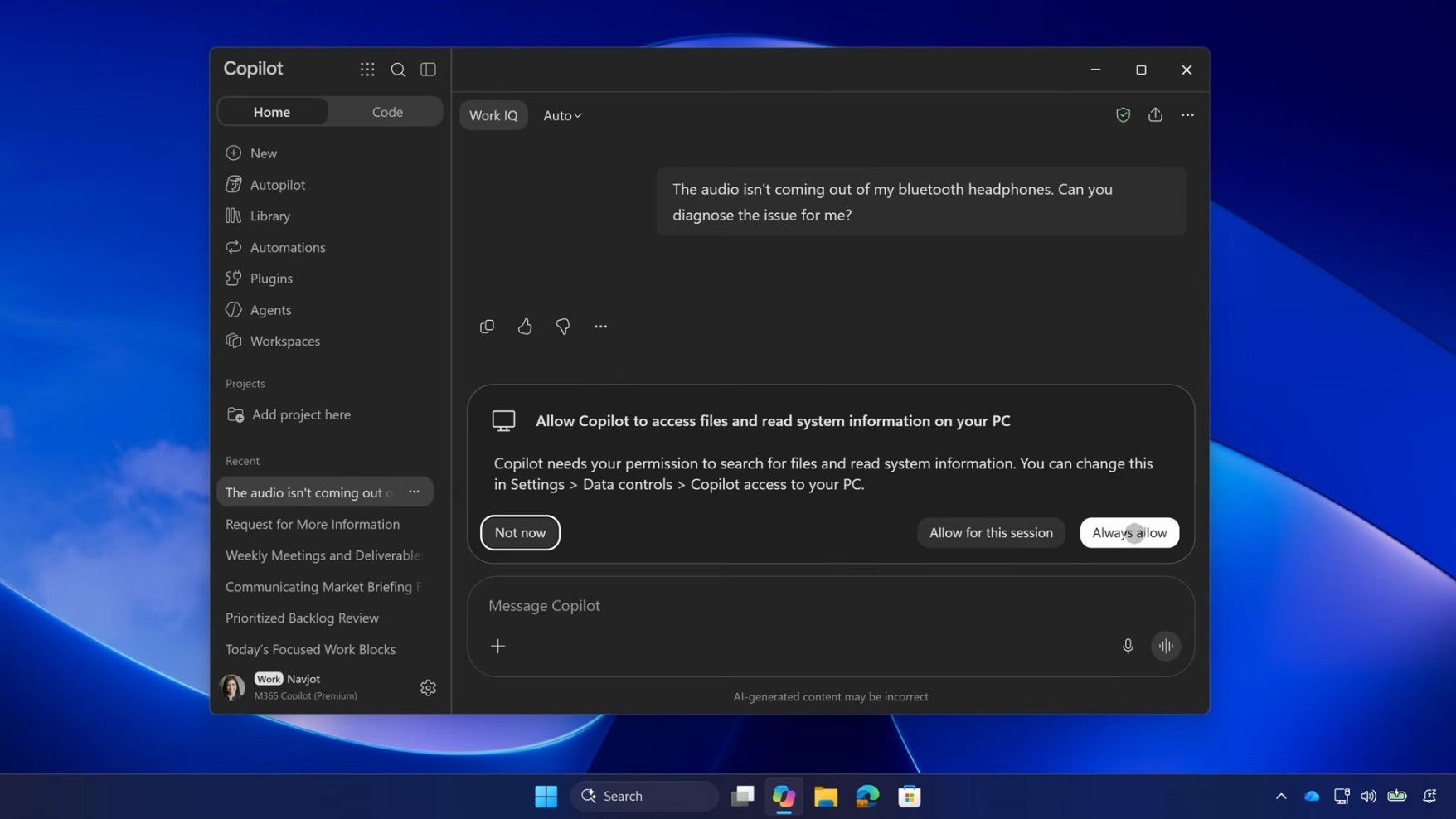
The idea of Copilot troubleshooting a PC has mainly provoked a mixture of mirth and cynicism on social media. It's worth bearing in mind, though, that you must give Copilot explicit permission to carry out these tasks — and it's also good that the work is done locally. This is because if the AI was carrying out these tasks in the cloud, that would raise concerns around privacy and where the various bits of system information that Copilot is using might end up.
As for that negative reaction, it includes comments from those on Reddit such as: "Hey Copilot, Outlook.com isn't working. Can you fix that?" (A reference to the recent huge Microsoft outage, of course).
Another Redditor jokes about the best possible fix they could envisage for Windows 11: "So it [Copilot] can remove itself?"
Even if the AI is working locally, and on a read-only basis – without any ability to change system settings, so it's just providing advice – there will continue to be Windows 11 users who don't want anything to do with Copilot on their PC. A lot of that is down to much broader trust issues relating to AI in general, but it's also about Microsoft's penchant for bugs (with its monthly updates) — the combination of which is enough to make some folks feel very uncomfortable.


