Amazon Cognito helps you implement secure sign-in and access control for users, microservices, and AI agents in minutes. Many of you rely on it for some of the most critical data you operate: the identities and attributes your applications use to authenticate and authorize every request. Recently, we launched point-in-time recovery (PITR) for Amazon Cognito user pools, which lets you restore a user pool to an earlier point in time if an accidental deletion, a faulty migration, or an erroneous bulk operation changes data you need. It’s turned on automatically for user pools on the eligible feature plans.

Before this launch, protecting user pool data meant building your own solution, such as exporting user attributes and group data on a schedule. That approach was time-consuming to build and operate, versioning the exports to find a clean point in time was another challenge, and reconstructing a pool from them was complicated. Users also got new sub identifiers as part of the restore process, which might break any downstream reference to the originals. Passwords, multi-factor authentication (MFA) settings, and passkeys might not be recovered, so every affected user had to reset.

In this post, we show you how to recover a user pool after an erroneous bulk operation, using the preview to review changes before you approve them.

How PITR works

On eligible user pools (see Prerequisites), Amazon Cognito now tracks changes so you can recover the pool to any point within the recovery window. The length of that window depends on your user pool feature plan. The window accrues from the time the pool is on an eligible feature plan, and you can only recover to a point at which PITR coverage already existed.

One behavior to understand is what happens to passwords during a recovery. A recovery restores passwords for users it recreates. A user who still exists and changed their password after the target time keeps the same password. The recovery doesn’t revert password changes, so users who legitimately changed their credentials don’t lose them.

A recovery is preview-based and has three steps:

  1. Initiate a recovery to a target point in time (InitiatePointInTimeRecovery). Amazon Cognito pauses write operations to the user pool and generates a preview for your review before any changes are applied. Read operations and sign-in continue to work normally. The call returns a RestoreId.
  2. Review the recovery preview (DescribePointInTimeRecovery). Amazon Cognito reports how many users, groups, MFA settings, and passkeys the recovery would create, update, or delete to return the pool to its state at the target time.
  3. Approve or cancel. If the preview looks right, you approve the recovery with StartPointInTimeRecovery, and Amazon Cognito restores the pool to its state at the target time. If it doesn’t look right, you cancel it with CancelPointInTimeRecovery; no changes are applied, and write operations resume.

Prerequisites

To follow along with this post, you need:

  • An AWS account with an Amazon Cognito user pool on the Essentials or Plus feature plan. The recovery window is up to 1 day on Essentials and up to 14 days on Plus. The examples use a pool named anycompany-prod-user-pool in the US East (N. Virginia) AWS Region (us-east-1).
  • The AWS Command Line Interface (AWS CLI) configured with permissions for the Amazon Cognito user pools PITR operations.

Before you run a recovery, keep these limits in mind:

  • You can run one recovery at a time per user pool, and one successful recovery per 24 hours per pool.
  • The target time must be at least 15 minutes in the past and no earlier than the pool’s creation time.
  • Recovery is initiated from the pool’s primary Region and can’t start while a multi-Region replication (MRR) operation, such as replica creation or deletion, is in progress on the pool.

Recovering a user pool after an unintentional change

AnyCompany runs its user sign-in on an Amazon Cognito user pool, anycompany-prod-user-pool.

At 15:45 PDT, an operator runs a bulk change that’s supposed to set an attribute on a subset of users. A defect in the script instead deletes and modifies users. By 15:54 PDT, support receives cases of failed sign-ins and the operator halts the script. The team needs the pool as it was at 15:39 PDT. They decide to use PITR and preview the recovery before approving it.

Step 1: Start the recovery

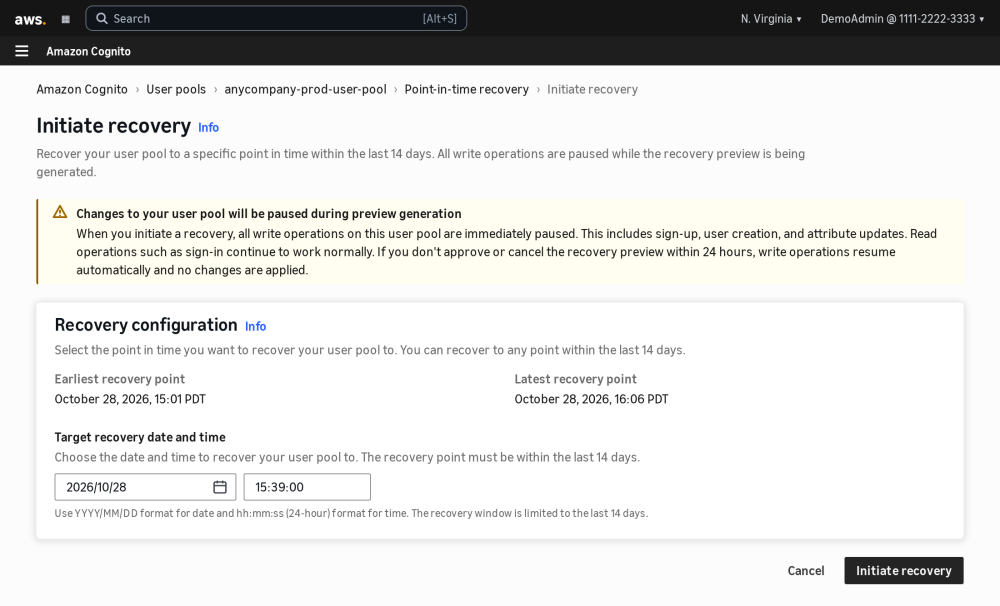
The team initiates a recovery with a target time of 15:39 PDT by running the command in the preceding example. Figure 1 shows the same step in the console, where the team enters the target time and starts the recovery. The response includes a RestoreId that identifies this recovery throughout the workflow, along with a RestoreStatus and the RestoreTimestamp that you targeted.
aws cognito-idp initiate-point-in-time-recovery \ --user-pool-id us-east-1_EXAMPLE \ --restore-timestamp 2026-10-28T22:39:00Z
Figure 1: Initiating a recovery to a target point in time

Figure 1: Initiating a recovery to a target point in time

Step 2: Review the recovery preview

DescribePointInTimeRecovery returns the Restoration for this RestoreId, including a RestorePreview that summarizes how many entities will be affected if the pool is returned to the target time. The team reviews the preview and confirms the number of affected users matches the scope.

aws cognito-idp describe-point-in-time-recovery \ --user-pool-id us-east-1_EXAMPLE \ --restore-id a69b8c1e-9866-441d-EXAMPLE11111

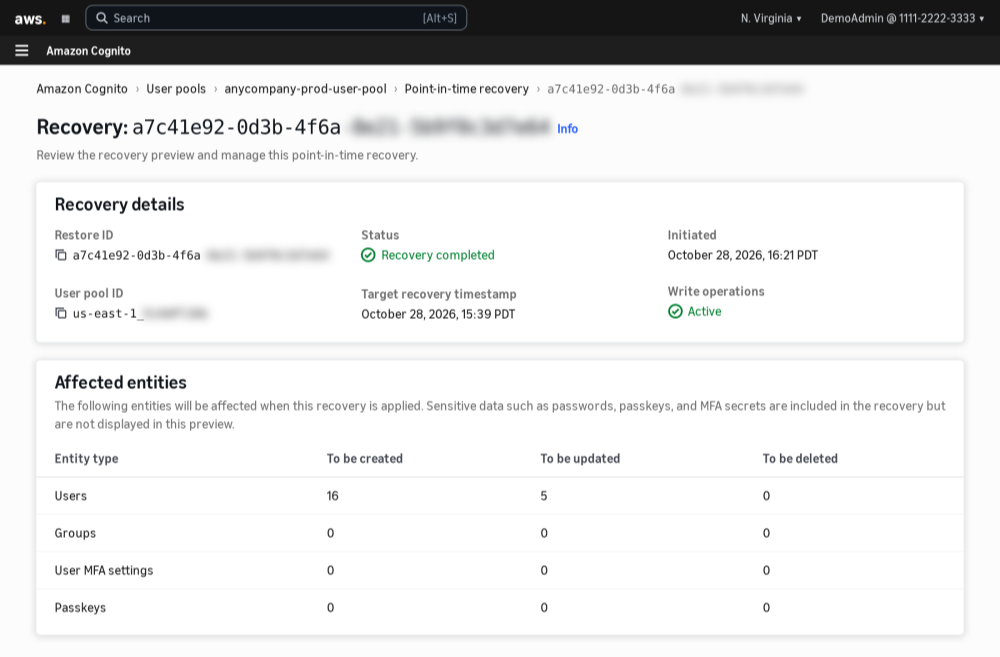
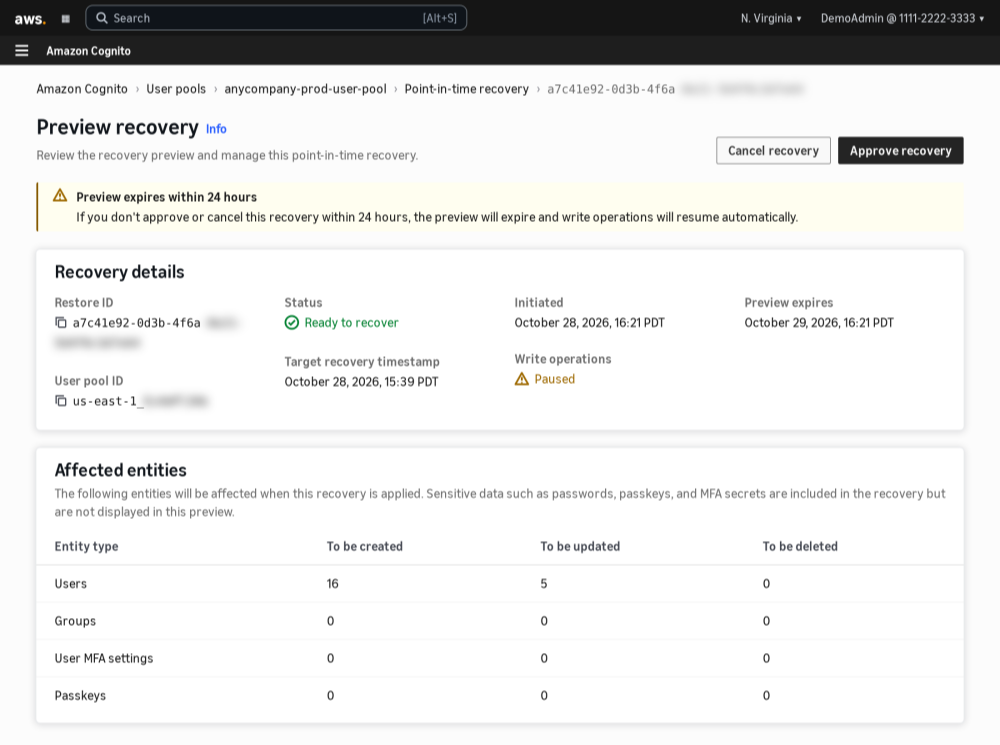
In this case, the preview reports 16 users to create and 5 users to update, as the following sample response shows. Figure 2 shows the same preview in the console, with the create, update, and delete counts for users, groups, MFA settings, and passkeys. These numbers match the scope of the bulk operation, so the team continues. If the preview had shown unexpected changes, the team could cancel the recovery with no changes applied.

 { "Restoration": { "RestoreId": "a7c41e92-0d3b-4f6a-EXAMPLE11111", "RestorePreview": [ { "Entity": "Users", "CreateCount": 16, "DeleteCount": 0, "UpdateCount": 5 }, { "Entity": "Groups", "CreateCount": 0, "DeleteCount": 0, "UpdateCount": 0 }, { "Entity": "User MFAs", "CreateCount": 0, "DeleteCount": 0, "UpdateCount": 0 }, { "Entity": "Passkeys", "CreateCount": 0, "DeleteCount": 0, "UpdateCount": 0 } ], "RestoreStatus": "PREVIEW_GENERATED", "RestoreTimestamp": 1793227140, "TriggerTimestamp": 1793228700 } }

Figure 2: Reviewing the recovery preview before applying

Figure 2: Reviewing the recovery preview before applying

Step 3: Approve the recovery

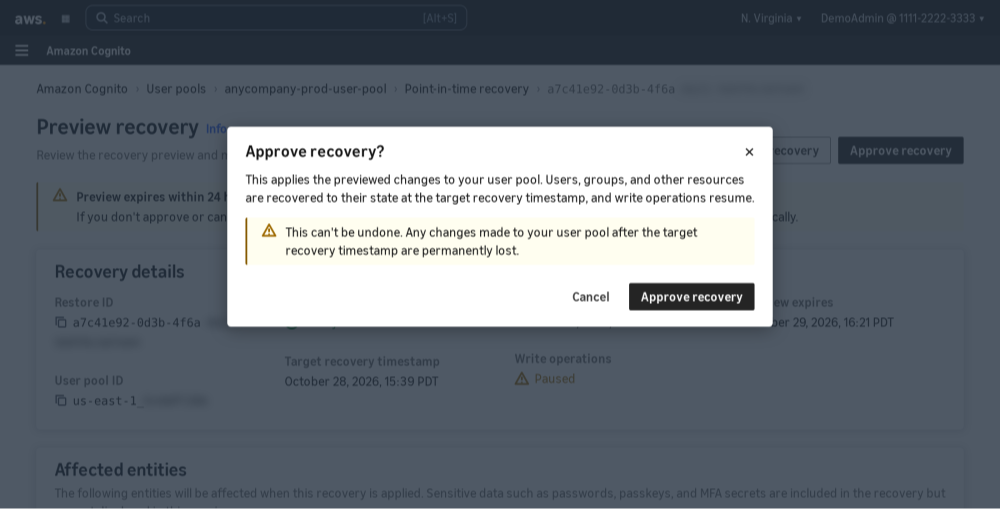
If the preview is correct, the team approves the recovery with the command in the following example, and Amazon Cognito restores anycompany-prod-user-pool to its 15:39 PDT state. Figure 3 shows the approval step in the console, and Figure 4 shows the confirmation that appears after the recovery starts. Writes to the user pool resume automatically after the recovery completes or is canceled.

aws cognito-idp start-point-in-time-recovery \ --user-pool-id us-east-1_EXAMPLE \ --restore-id a7c41e92-0d3b-4f6a-EXAMPLE11111

Figure 3: Approving the recovery

Figure 3: Approving the recovery


Figure 4: Recovery confirmation

Figure 4: Recovery confirmation

aws cognito-idp cancel-point-in-time-recovery \ --user-pool-id us-east-1_EXAMPLE \ --restore-id a7c41e92-0d3b-4f6a-EXAMPLE11111

Your application integration doesn’t change

Because PITR rolls back the data in your existing user pool rather than creating a new one, your application integration doesn’t need any changes. A recovery restores user data and leaves your user pool configuration in place, so configuration changes you made after the recovery point are preserved. For example, a custom attribute you added to the schema, an AWS Lambda trigger you updated, or a password policy you tightened stays as it is. The user pool ID also stays the same, and so do your app client IDs and secrets, managed login and domain, identity provider and SAML/OIDC configurations, and the provider Amazon Resource Names (ARNs) that services such as Amazon API Gateway and Application Load Balancer use to validate tokens. Recreated users keep the same sub identifiers, so downstream references to them keep working.

How PITR complements multi-Region replication

Multi-Region replication and PITR address different failure modes. Multi-Region replication keeps a synchronized replica of your user pool in another Region, so if the primary Region is impaired, you can fail over traffic to a replica Region with minimal downtime. PITR helps with data problems, such as erroneous bulk operations that corrupt your user pool’s state. You roll back to any point within your recovery window without changing your application integration.

Security considerations

A recovery changes the identity data that every sign-in and authorization decision depends on, so treat recovery permissions like any other high-impact administrative access.

  • Separate who initiates a recovery from who approves it. Because initiating and approving are separate API actions, you can assign them to different AWS Identity and Access Management (IAM) roles. Give an operator the permission InitiatePointInTimeRecovery, and give an approver the permission StartPointInTimeRecovery. Both permissions need DescribePointInTimeRecovery and ListPointInTimeRecoveries to review the preview, and CancelPointInTimeRecovery to stop a recovery. IAM keeps the two permissions on separate roles, but it doesn’t stop one person from assuming both. Assign the roles to different people or teams, and grant the approver role only for the duration of an approved change.
  • Treat initiating a recovery as sensitive. Initiating a recovery pauses write operations on the user pool until the recovery is approved or canceled. If no action is taken within 24 hours, the preview automatically cancels and write operations are resumed. While writes are paused, users can’t sign up, reset their passwords, or update their profiles. A user pool also allows only one successful recovery per 24 hours, so an unauthorized recovery uses up a recovery you might need for a real incident.
  • Review restored users after a recovery. A recovery recreates users who were deleted after the target time, including users you removed on purpose, such as employees who have left or compromised accounts. After a recovery completes, check the recreated users against your incident timeline. Disable any that should stay removed and revoke their sessions with AdminUserGlobalSignOut.
  • Monitor recovery activity. Amazon Cognito records PITR API calls in AWS CloudTrail. Create an Amazon EventBridge rule that notifies your security team whenever InitiatePointInTimeRecovery or StartPointInTimeRecovery is called, so that no recovery goes unnoticed.

Pricing

PITR is included at no additional charge in eligible feature plans with a recovery window of up to 1 day on the Essentials feature plan and up to 14 days on the Plus feature plan.

Conclusion

In this post, we showed you how to recover an Amazon Cognito user pool after an erroneous bulk operation with PITR, from reviewing the changes in a preview to approving the recovery. PITR provides protection for your users’ identities, with no custom export-and-restore pipeline to build or operate. Because the recovery happens in place on the same user pool, your application integration keeps working unchanged. PITR is already enabled for eligible user pools. Before you need it, separate the initiate and approve permissions, add an alert on recovery calls, and practice the preview workflow on a test pool.

To get started:

If you have questions about this post, contact AWS Support or start a new thread on AWS re:Post.


Howie Li

Howie Li

Howie is a Product Manager at Amazon Web Services, where he strives to make auth easy by default. Outside of work, Howie enjoys exploring cultures and food through travels and making new ice cream flavors inspired by them.

Sergii Nozhka

Sergii Nozhka

Sergii is a Senior Software Development Engineer at Amazon Web Services, where he works on Amazon Cognito, helping customers build secure and scalable identity experiences. Outside of work, Sergii enjoys cooking and traveling with family.

Priyank Bhardwaj

Priyank Bhardwaj

Priyank is a Software Development Manager at Amazon Web Services. He leads the User Pool Management team for Amazon Cognito, helping customers build secure and scalable identity experiences. Outside of work, Priyank enjoys running outdoors and working on DIY projects around the house.