TL;DR
- PyTorch models now run in the web browser on the GPU through ExecuTorch, with no conversion to another framework’s format. You export with torch.export to an ExecuTorch .pte file, and the same file runs in any WebGPU browser via ExecuTorch’s new WebGPU backend.
- It works across a broad range of models: LLMs (e.g. Llama 3.2, Qwen3, Gemma 3), vision-language (e.g. SmolVLM), segmentation, depth, object detection, super-resolution and speech-to-text (e.g. Whisper). Everything runs locally in the tab, and no data leaves the device. Try it in the ExecuTorch WebGPU Playground.
- On the same machine, WebGPU is 4–7× faster than ExecuTorch’s CPU path (Webassembly + XNNPACK) on prefill and 2–10× faster on decode.
Why the Browser?
The web is the largest deployment surface with billions of users on Chrome, Firefox and Safari. Browser inference ensures privacy by keeping users’ prompts, model inputs, and outputs on the user’s device rather than the server. This reduces network latency, enables offline use-cases, and lowers server-side inference costs. With the ExecuTorch WebGPU backend, PyTorch models get a native path to GPU-accelerated inference in WebGPU-enabled browsers on desktop, laptop and mobile.
WebGPU, the modern successor to WebGL, provides native compute shaders, shared memory, storage buffers, and barriers, making it viable for high-performance ML inference directly in the browser. Today, running a PyTorch model in the browser usually means first converting it to another framework’s format, such as GGUF, ONNX or TFLite. The ExecuTorch WebGPU backend lets PyTorch models reach the browser without leaving the PyTorch toolchain.
Backend Design
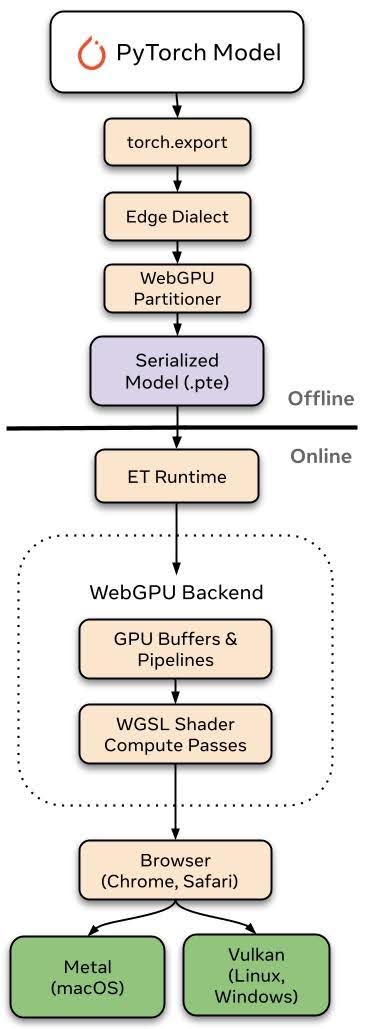
[Figure 1: ExecuTorch WebGPU backend design: a PyTorch model is exported once to a .pte file and runs in any WebGPU browser through the ExecuTorch Wasm runtime]
Three principles guided the WebGPU backend’s design:
- Architecture, export, and dynamic runtime. Models export through ExecuTorch’s
torch.export()and WebGPUPartitioner and run via WGSL compute shaders. At runtime, the WebGPU runtime allocates GPU buffers and dispatches compute shaders into command buffers. Dynamic shapes are handled via allocate-at-max buffers with per-dispatch workgroup recalculation to enable batched prefill, and the runtime routes shapes to specialized WGSL kernels at runtime.
- Same artifact across multiple devices and browsers. One model (.pte file) runs in WebGPU browsers such as Chrome and Safari, natively on Metal (macOS), Vulkan (Linux/Android) and D3D12 (Windows), translating WGSL to Metal Shading Language, SPIR-V or HLSL depending on the platform. For browser deployment, the dynamic C++ runtime compiles to Webassembly via Emscripten and
emdawnwebgpubridges its WebGPU API calls to any browser’s WebGPU JavaScript API.
- Zero friction for the end user. With WebGPU, models run in the browser sandbox with no native installation, backend server, and no data leaving the device. For developers, deployment is a .pte file served over CDN on a web page. Pipeline compilation, memory management, and dispatch scheduling are all handled through the WebGPU backend, with all data staying in GPU device memory within the browser tab.
Performance
We benchmarked ExecuTorch WebGPU against ExecuTorch’s own Webassembly (wasm) CPU backend (XNNPACK, multi-threaded) on the same machine, using quantized Llama 3.2 1B and Qwen3-0.6B in Google Chrome on Apple M1 Pro. Each data point is the median of 5 runs after 3 warmups, across 128 to 8K tokens of context, with identical token IDs for both backends. Both are timed with wall-clock time, since GPU timestamps aren’t available for CPU execution. WebGPU uses 4-bit groupwise weights (group size 64) with fp32 activations; the CPU uses XNNPACK’s 4-bit weights with 8-bit dynamic activations.

[Figure 2: ExecuTorch WebGPU is 4–7× faster than ExecuTorch Wasm (XNNPACK) on prefill and 2–10× faster on decode, measured in Chrome on Apple M1 Pro]
Models in Practice
We’ve validated the WebGPU backend across models with very different architectures, demonstrating that the operator coverage generalizes beyond autoregressive text generation:
LLM Inference
- Llama 3.2 1B (4-bit quantized)
- Qwen2.5-0.5B (4-bit quantized)
- Qwen3-0.6B (4-bit quantized)
- Gemma 3 1B
Vision-Language Understanding
- SmolVLM: image question answering and captioning
Vision
- Depth Anything V2: monocular depth estimation
- SAM 2 (SAM 2.1 Hiera Tiny): promptable image segmentation
- D-FINE: object detection
- Real-ESRGAN: super-resolution
- Background Removal (MODNet): foreground segmentation
Voice
- Whisper (base): speech-to-text
- Phonon-31M-EN: text-to-speech
On-Device Training
- LoRA and DiReFT fine-tuning for Llama 3.2 1B, Qwen2.5 0.5B and Qwen3 0.6B, aimed at personalized assistants and domain adaptation on-device

[Figure 3: ExecuTorch WebGPU demonstration]
Try it: ExecuTorch WebGPU Playground
The ExecuTorch WebGPU Playground runs many of the models above, all on the same WebAssembly + WebGPU runtime. All the prompts, photos, camera frames and audio never leave your device. Each model’s Hugging Face repo includes the .pte files, a model card, and the exact export recipe.
What’s Next
The backend is still in early development. We’ll keep making the backend faster and more stable, and expand operator, data type, and model coverage.
Contributions / Feedback
ExecuTorch is open source, and we’d love your contributions to the WebGPU backend. If something breaks or a model you care about isn’t supported, open an issue or reach us on the ExecuTorch Discord. Contributions are welcome too, whether that’s new operators, new models or performance improvements.
Learn more at ExecuTorch Documentation | ExecuTorch repo | WebGPU Backend
The post ExecuTorch WebGPU: PyTorch Models on the GPU, in the Browser appeared first on PyTorch.


