Public sector organizations are exploring how to use AI at a fixed, predictable cost. For agencies operating under fixed annual budgets and strict compliance rules, knowing what AI will cost next quarter is a prerequisite for moving beyond pilots into production.
Most AI inference today is priced per token. That model works well during experimentation, but it becomes uncomfortable as adoption grows. An agent makes 10 calls where a chat session made one. A retrieval feature triples prompt length. Teams multiply. The monthly number moves in a direction nobody forecast, and the tail of the distribution is exactly where you have the least control.
Amazon Web Services (AWS) offers a path to fixed-cost AI inference that doesn’t require giving up pay-per-use entirely. This post walks through a pattern we built and measured. It uses committed capacity as the default path, pay-per-use as the relief valve, and a gateway in between that decides which to choose. The result is a predictable monthly cost for AI inference that holds as adoption grows.
Buy the capacity, not the requests
There’s another way to buy inference beyond paying per token, and that’s renting the GPU. Deploy an open-weight model onto an endpoint you control, and you pay for the server by the hour whether it’s busy or idle. That single change moves cost from the variable column to the fixed column because after the server is running, one more request costs nothing extra. Adoption can double without the invoice moving. You can commit to a number because the number no longer depends on behavior you can’t forecast.
Of course, a fixed amount of capacity can be exhausted, and a user whose request fails doesn’t care about your budget. When committed capacity is full, or when a request needs a model you don’t host, the request goes to a pay-per-token API instead. You accept variable cost for the overflow and decide by policy how much of that you’re willing to tolerate. The architecture is committed capacity as the default path, pay-per-use as the relief valve, and a gateway in the middle that knows which to choose.
A reference architecture for fixed-cost inference
This pattern has three components. The first is a committed-capacity endpoint, which is a model deployed on an Amazon SageMaker AI real-time inference endpoint. This can be an open-weight model with no license fee or a commercially licensed model such as Cohere, NVIDIA NIM, or AI21 that charges a flat fee per deployed copy rather than per request.
Either way, the cost is fixed. There’s no per-token charge at inference time, which preserves the zero-marginal-cost property that makes the design work. A typical configuration is an 8 billion-parameter model on a single NVIDIA L40S GPU instance served with continuous batching.
The second is a pay-per-use path through Amazon Bedrock, which handles overflow and requests that require a frontier model. The cost is variable, but capacity is effectively unlimited.
The third and most important is a gateway that sits in front of both. Every request passes through it. The gateway identifies which team or application is calling, checks whether that team has allowance remaining, chooses a destination in priority order, counts the tokens consumed, and applies your content safety policy.
Everything that makes the budget hold, including spending limits, blast-radius controls, ordered fallback, and usage accounting lives in this layer rather than in each team’s application code.
Figure 1 traces one request from left to right. A request arrives from an application, such as a chat interface, coding assistant, agent, or batch job carrying a token that identifies which team is calling. This can be issued by Amazon Cognito or the organization’s own identity provider. The caller asks for a model name, not a destination. It has no idea which path will serve it, and that’s why you can change the routing later without asking anyone to modify their code:
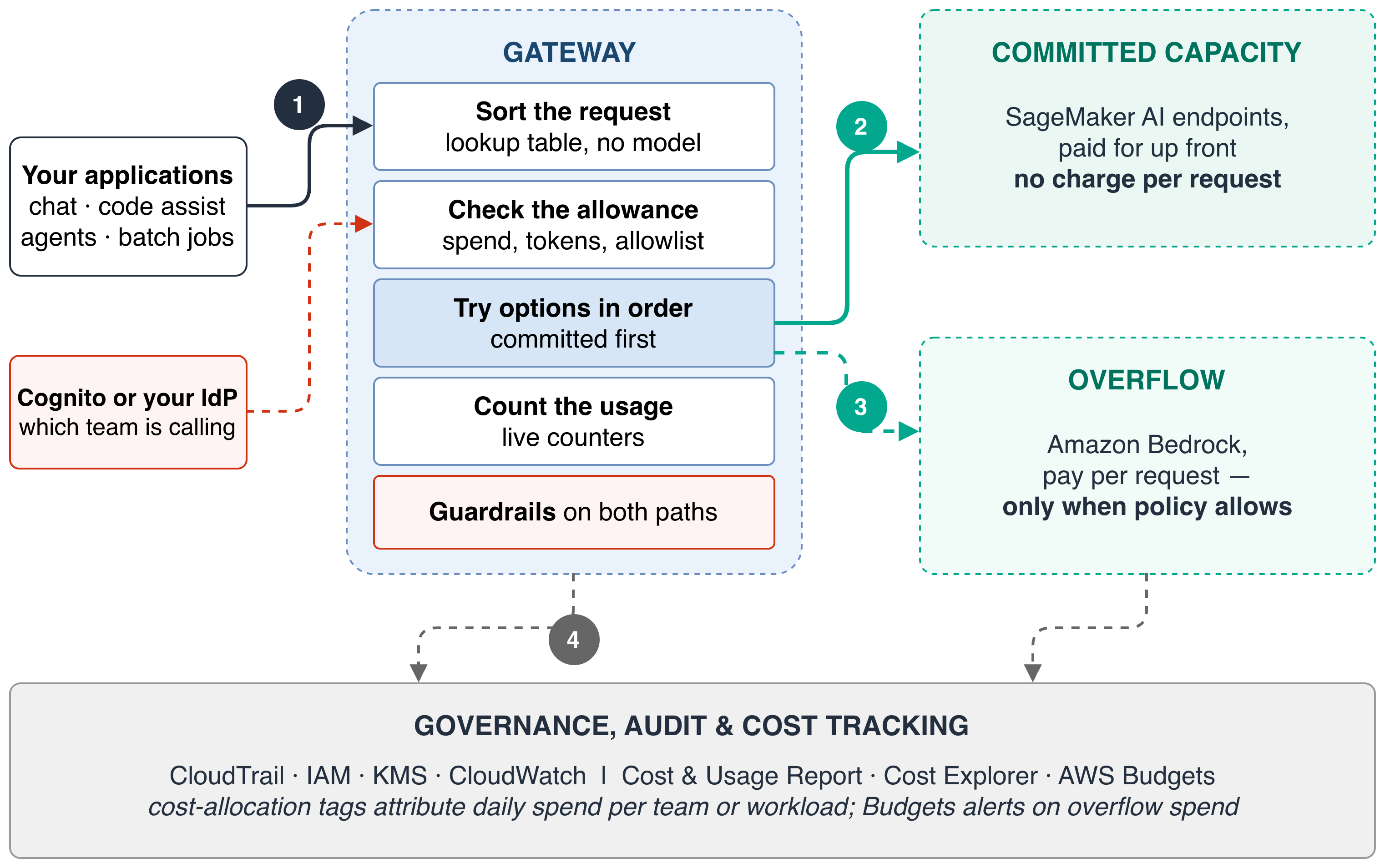
Figure 1: How a single request flows through the system
The gateway tries committed capacity first, because one more request there costs nothing extra. Only if committed capacity can’t serve the request does it overflow to Amazon Bedrock, where the request carries a per-token price.
This should be the unusual case. Usage on both paths is recorded to the governance layer beneath: AWS CloudTrail for API audit, AWS Identity and Access Management (IAM) for access control, AWS Key Management Service (AWS KMS) for encryption keys, Amazon CloudWatch for observability, and AWS Cost and Usage Reports with AWS Cost Explorer and AWS Budgets for financial attribution and alerting.
Cost allocation tags attribute daily spend to the team or workload that generated it, turning a single opaque AI line item into something you can manage. AWS CloudTrail records control plane activity by default. Capturing individual inference calls means enabling AWS CloudTrail data events for the Amazon SageMaker AI endpoint and Amazon Bedrock model invocation logging.
If you must overflow, overflow cheaply
Rather than treating overflow as a single full-price fallback, you can configure the gateway to try cheaper tiers first. Batch inference is the cheapest rate at 50 percent below on-demand for select models, and the right destination for large jobs where nobody is waiting on the answer. If any meaningful share of your workload is asynchronous, routing it to batch is the single lowest-effort saving in the design.
Flex pricing offers a discount in exchange for slower, best-effort service, with the discount varying by model. Standard on-demand is full price and belongs last in the order. Two additional tiers exist for cases where overflow becomes steady. Reserved pricing buys a fixed price per 1,000 tokens per minute on a 1- or 3-month term. It’s the Amazon Bedrock form of commitment, and worth comparing against self-hosting before purchasing a GPU.
Figure 2 highlights the various capacity options inside the committed and overflow paths:
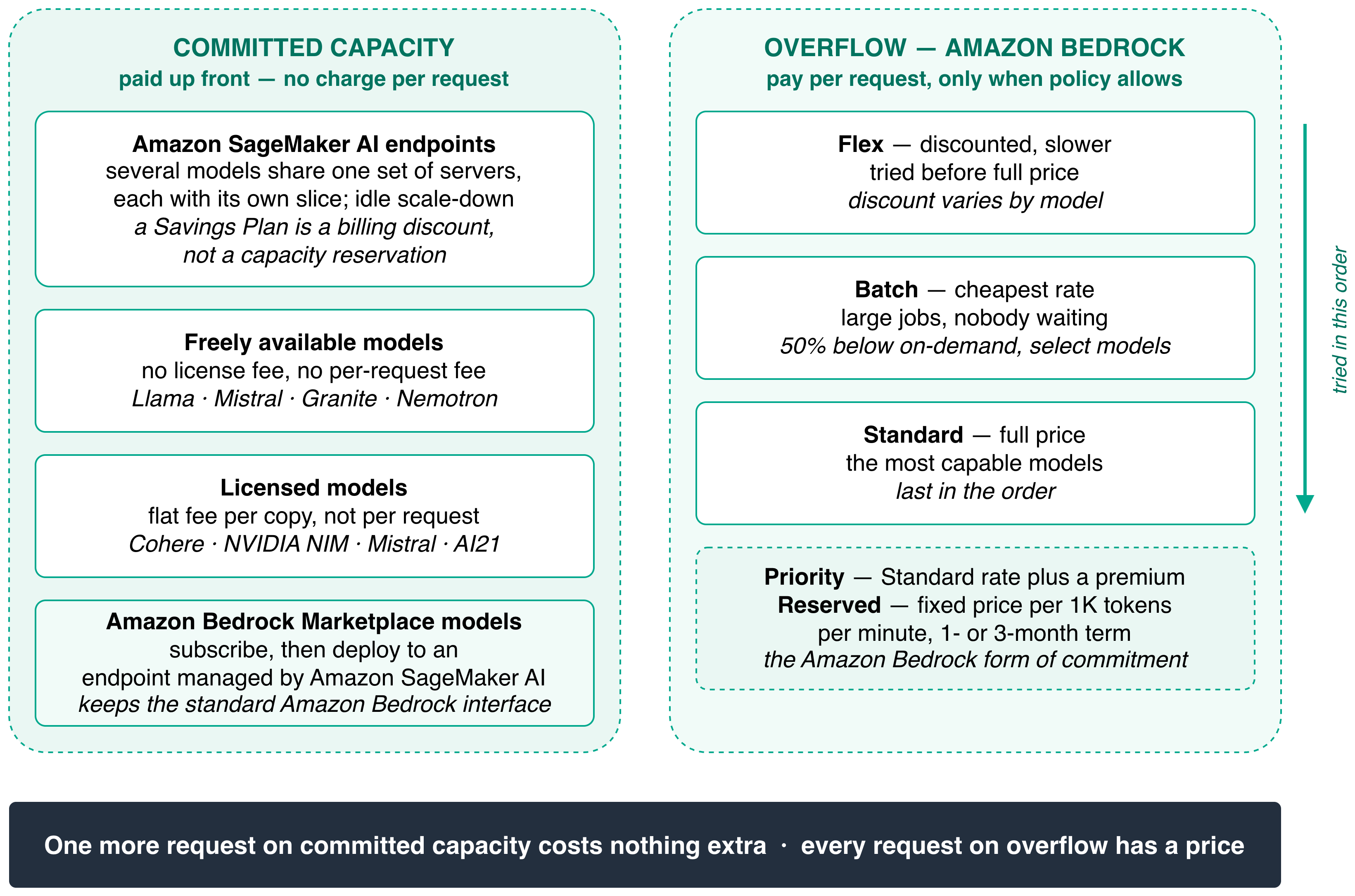
Figure 2: Capacity options inside the committed and overflow paths
What we observed in testing
To validate this pattern, we deployed an 8 billion-parameter open-weight model in bf16 on a single L40S GPU instance with continuous batching, and compared it against Amazon Bedrock on-demand serving a comparable model.
We found that dedicated capacity is much faster to first token. Measuring time-to-first-token (TTFT) on a single request, the committed endpoint delivered the first token in 0.105 seconds, which is roughly 7 times faster than the pay-per-use path. The model weights are already resident in GPU memory, the CUDA (Compute Unified Device Architecture, a proprietary parallel computing API created by NVIDIA) graphs are already captured, and there’s no queue ahead of your request. Anywhere you stream responses into a chat window, whether it’s an internal assistant, a support tool, or a citizen-facing feature, this is the difference between something that feels instant and something that feels like it’s thinking.
However, dedicated capacity doesn’t scale like a managed API, and that’s the central tradeoff. When concurrent requests increased from one to eight, first-token latency on the committed endpoint jumped by roughly 15 times. By 16 concurrent requests, TTFT had nearly converged with total response time, meaning requests spent almost their entire life waiting in a queue. The pay-per-use path barely moved because elastic capacity absorbs concurrency, which is what you’re paying the premium for.
The practical implication is that we recommend you size committed capacity not by total token volume but by the concurrency at which latency leaves your acceptable band. Find that number empirically through load testing, and treat it as your unit of capacity. Throughput degrades far more gracefully than latency, so the endpoint can still do the work. What breaks is the time your user spends waiting for their turn.
When this pattern makes sense, and when it doesn’t
This design isn’t universally cheaper. Self-hosting a model on a dedicated endpoint only costs less per token than pay-per-use when the endpoint stays busy enough to amortize the fixed hourly cost. The crossover utilization depends on the model, instance type, and the Amazon Bedrock pricing tier you compare against.
The pattern is a strong fit when you need budget predictability more than the absolute lowest cost per token, when usage has grown past the experimental stage and multiple teams share common models, when your agency requires fixed cost commitments for obligation and appropriation compliance, or when an open-weight model at 8 billion parameters or above meets your quality bar for the majority of requests.
Conversely, staying with pure pay-per-use is the better choice when usage is low or unpredictable, when you require frontier-class models for every request, or when workload patterns haven’t yet stabilized because you’re still in the experimentation phase.
Governance and cost tracking
The governance layer beneath the architecture is what makes the fixed cost hold in practice. Cost allocation tags attribute spend to individual teams or workloads daily. On the pay-per-use leg, it’s by routing each team through its own tagged application inference profile, set up in advance because tagging isn’t retroactive.
AWS Budgets alerts you when overflow spend approaches a threshold you set, and can act when it crosses one. Amazon CloudWatch alarms watch the operational signals that predict cost, such as overflow rate, endpoint saturation, and errors. AWS CloudTrail records API activity for audit. If you need a record of individual inference calls, enable AWS CloudTrail data events for the Amazon SageMaker AI endpoint and Amazon Bedrock model invocation logging, which are both opt-in features. AWS KMS manages the keys that encrypt data at rest, and TLS (Transport Layer Security) protects it in transit.
Getting started
Start by measuring your current usage. Pull your Amazon Bedrock token volume by model and by team using AWS Cost and Usage Reports, and identify which models and workloads account for the majority of spend. Then run a committed endpoint alongside pay-per-use: Deploy an open-weight model on Amazon SageMaker AI and route a single team’s traffic through the gateway while everyone else stays on Amazon Bedrock. Compare the economics at actual utilization. Finally, expand or contract based on the numbers. If committed capacity is cheaper at your utilization, add more teams. If not, you’ve learned something valuable about your workload shape at low cost.
To learn more about Amazon SageMaker AI real-time inference, visit the Amazon SageMaker AI documentation. To learn about Amazon Bedrock pricing tiers, explore the Amazon Bedrock pricing page. To discuss this pattern with an AWS solutions architect in your Region, contact your AWS account team or visit the AWS Public Sector page.


