AI agents and applications that answer questions about recent events, product releases, prices, or regulations need information newer than their model’s training data. Until now, Web Search on Amazon Bedrock AgentCore delivered that information to agents through AgentCore Gateway, a capability of Amazon Bedrock AgentCore. That means creating a gateway and a web search target and calling the tool from an MCP client. The setup fits platform teams that share one search policy across many agents, but it’s more than you need when your own code only requires search results.
Today, we’re announcing the Web Search API on Amazon Bedrock AgentCore. With it, your own code can search the web with a single API call. It returns ranked results from a web index that Amazon operates, each with a text extract and, when available, the page title, URL, and publication time. You call it from the AWS SDKs or the AWS Command Line Interface (AWS CLI), signed with the same AWS Identity and Access Management (IAM) credentials you use for your other AWS services. There are no resources to create first. Authenticate, call, and get results. Use it in an application, an agent loop you write yourself, or a data pipeline.
Why a standalone API?
The AgentCore Gateway is the recommended path for most agentic workloads. It gives agents one secure Model Context Protocol (MCP) endpoint that combines web search with your other tools. It also handles inbound and outbound authentication, semantic tool selection, and optional MCP sessions. But developers told us they also need a lower-level integration point for scenarios where the gateway is not the right fit:
- Custom orchestration frameworks – Developers building their own agent loops, or using frameworks like LangChain or LlamaIndex, want to call web search directly as a tool within their orchestration logic rather than routing through a gateway.
- Non-agent use cases – Not every application that needs web grounding is an agent. Search-powered dashboards, fact-checking pipelines, content enrichment workflows, and monitoring systems all benefit from real-time web results without requiring agent infrastructure.
- Tighter control over the request lifecycle – Some developers want to manage retries, caching, and error handling themselves rather than delegating to the gateway.
- Simpler integration for existing applications – Applications that already have their own API layer can call the Web Search API directly, adding web grounding without adopting the full AgentCore Gateway stack.
The Web Search API complements the gateway. It runs on the same search infrastructure that powers Alexa+, Kiro, Quick, and other Amazon products, with the same quality and compliance posture, exposed as a direct API operation.
How it works
The Web Search API is the InvokeWebSearch operation on the bedrock-agentcore data plane, the same endpoint that other AgentCore tools such as AgentCore Browser, a capability of Amazon Bedrock AgentCore, use. Requests are signed with AWS Signature Version 4 (SigV4) from your standard AWS credentials, so there’s no API key or secret to manage.
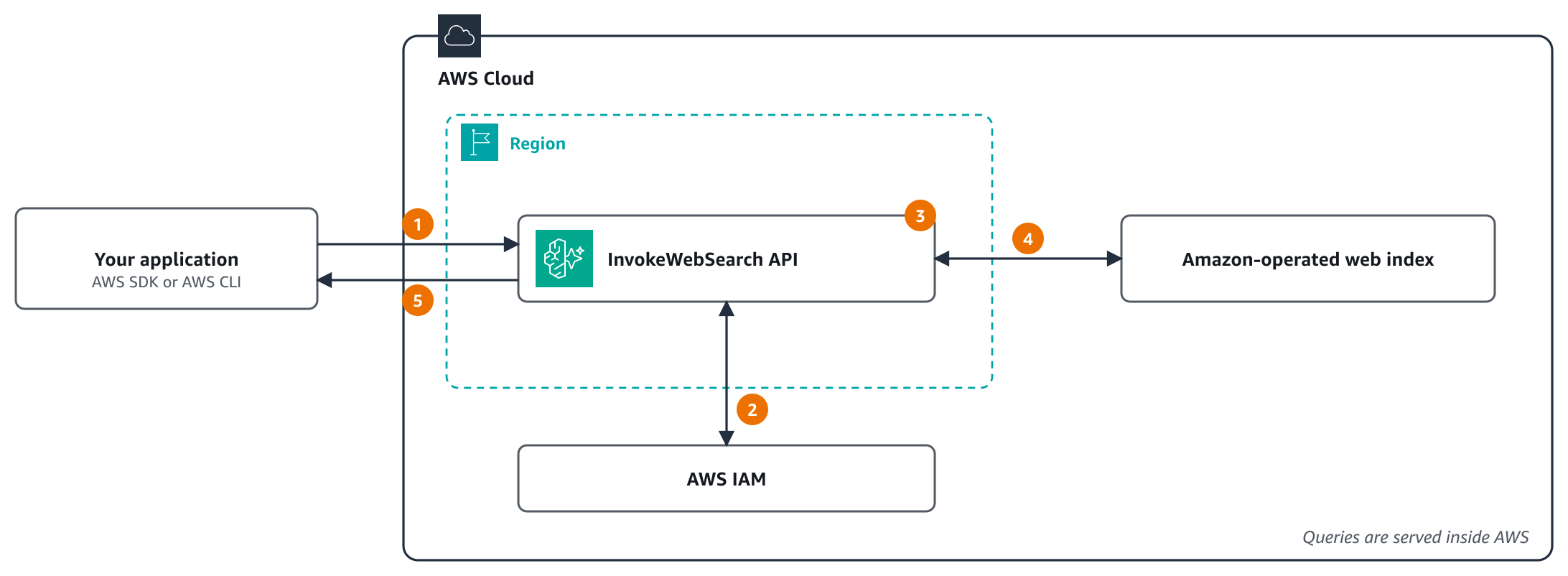
Figure 1: How a Web Search API request flows
The numbered steps are:
- Your application calls
InvokeWebSearchwith the AWS SDKs or the AWS CLI, which sign the request with SigV4 using its AWS credentials. From a virtual private cloud (VPC), the call can go through an interface VPC endpoint. - The API checks with AWS Identity and Access Management (IAM) that the caller has
bedrock-agentcore:InvokeWebSearchon the AWS managed web search tool. - The API applies the filters in the request: the domains to include or exclude and the publication time range.
- The API searches a web index that Amazon operates. Queries are served inside AWS and aren’t sent to a third-party search engine.
- The API returns up to
maxResultsranked results, each with a text extract and, when available, the page title, URL, and publication time.
The calling identity needs one IAM permission on an AWS managed resource. It’s the same action and resource that a gateway’s service role uses for web search, so one policy covers both routes. For details, see Grant permission to call the API.
A first search request
The following example searches two trusted domains for pages published in 2026, in the US West (Oregon) Region (us-west-2), with the AWS SDK for Python (Boto3):
Every result has a text extract. The title, URL, and publication date come back when the index has them, so read them with get. One result from a live call, shortened:
That’s the full integration. If your code runs on AWS Lambda, Amazon Elastic Container Service (Amazon ECS), Amazon Elastic Compute Cloud (Amazon EC2), or Amazon Elastic Kubernetes Service (Amazon EKS), the execution role provides credentials automatically. Add the permission to that role, and the same code runs unchanged.
Key API features
- Domain filtering – Include or exclude specific domains to scope search results to trusted sources (for example, only aws.amazon.com and kubernetes.io for an assistant focused on AWS). Each list holds up to 100 domain names, and a root domain also matches its subdomains.
- Date filtering – Restrict results to a publication time range with
publishedAfterandpublishedBefore, given as RFC 3339 date-times in UTC such as 2026-01-01T00:00:00Z. Both bounds are inclusive. - Configurable result count – Request between 1 and 25 results per query. If you don’t set
maxResults, the API returns up to 25. The search text,searchQuery, can be up to 200 characters. - Results with text extracts – Each result includes a text extract and, when available, the page title, URL, and publication time, ready to feed into your model’s context window.
Getting started in under 5 minutes
Here are two ways to get a first result:
Option 1: AWS CloudShell (no local setup)
- Open AWS CloudShell in your browser. It uses the credentials of your console session.
- Your role will have the
bedrock-agentcore:InvokeWebSearchpermission, from the preceding policy or from the broader AWS managed policy BedrockAgentCoreFullAccess. - Run:
Option 2: Local development
- Install the AWS CLI, or the AWS SDK for your language. For Python, use Boto3 1.43.127 or later.
- Create an IAM role with the preceding policy.
- Get credentials for that role: assume it from your application or an AWS CLI profile, or sign in with it through your identity provider.
- Run the preceding Python example, or call the API from any AWS SDK.
There’s no resource to create and no API key to manage. Authenticate, call, and get results.
Using the Web Search API with agent frameworks
The Web Search API fits naturally into popular agent frameworks. LangChain agents get it through the AgentCore web search tool in langchain-aws 1.9.3 and later:
The tool can also hold rules that the model can’t change, such as domains to exclude, a date floor, and a search budget. It returns its results as data that your code can check. For a complete example, see the daily dependency watch sample. It researches three package ecosystems in parallel with LangGraph, and checks every finding against its sources before it reports anything.
If you prefer to wrap the call yourself, a plain LangChain tool works too:
Without a framework, the WebSearchClient in the AgentCore Python SDK wraps the same call and returns results with parsed dates. langchain-aws 1.9.3 and the AgentCore Python SDK 1.26.0 add Web Search API support, so install those versions or later.
Enterprise controls, built in
Because the Web Search API uses standard IAM authentication, you get enterprise controls from the first call:
- IAM policies. Grant or deny
bedrock-agentcore:InvokeWebSearchper user, group, or role. Use service control policies (SCPs) to enforce guardrails across accounts. - AWS CloudTrail logging. CloudTrail records
InvokeWebSearchrequests as data events. Data events aren’t logged by default, so add an event selector for theAWS::BedrockAgentCore::WebSearchresource type to a trail or event data store. Events record the web search tool andmaxResults, not the search text or filters. For details, see Log AgentCore Web Search API calls with AWS CloudTrail. - VPC support. Use AWS PrivateLink to route API calls over your private network rather than the public internet. For setup and endpoint policies, see Private connectivity with AWS PrivateLink later in this post.
- Compliance. For a list of compliance programs that cover AgentCore, see Compliance validation for Amazon Bedrock AgentCore.
- Searches stay in AWS. Queries are served from a web index that Amazon operates and aren’t sent to a third-party search engine.
- Acceptable use. The Web Search Tool terms also apply to API results, including the requirement to retain and display the source citations and links that come with each result. For details, see the Web Search API Acceptable Use documentation.
Quotas apply per account. For the defaults and how to request an increase, see Quotas for Amazon Bedrock AgentCore.
By default, each account can send up to 10 requests per second in each Region, and you can request an increase. For details, see AgentCore Web Search Service Quotas.
Private connectivity with AWS PrivateLink
Agents and pipelines that handle sensitive data often run in private subnets with no route to the internet. With AWS PrivateLink, that code can call the Web Search API through an interface VPC endpoint in your VPC. Traffic between your VPC and the API stays on the AWS network, and you don’t need an internet gateway, a NAT gateway, or a proxy to reach it.
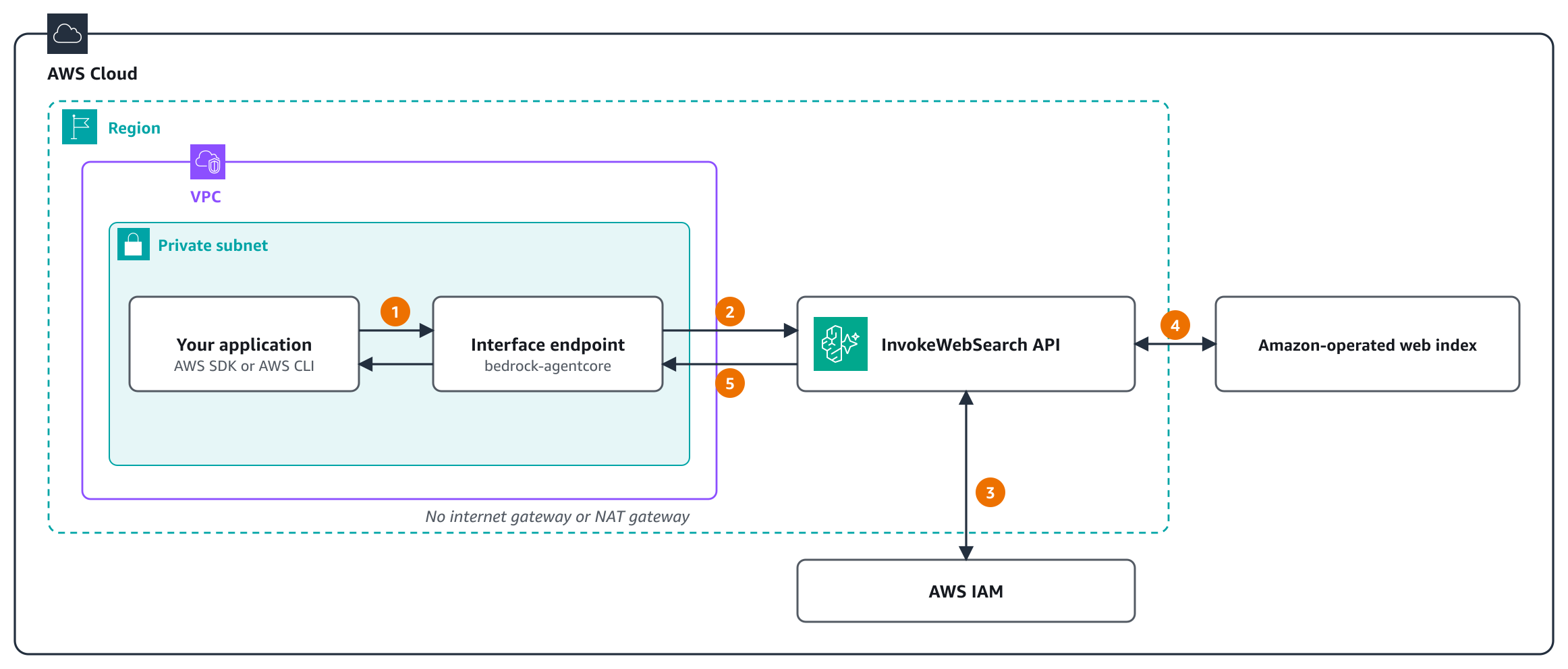
Figure 2: Calling the Web Search API through AWS PrivateLink
The numbered steps are:
- Your application calls
InvokeWebSearchat the API’s standard Regional name. With private DNS, that name resolves to the interface endpoint in your subnet. - The endpoint policy applies, and the request reaches the API over the AWS network.
- The API checks with IAM that the caller has
bedrock-agentcore:InvokeWebSearch, including anyaws:SourceVpcecondition. - The API applies the request’s filters and searches the Amazon-operated web index.
- The results return through the endpoint to your application.
To set it up, create an interface endpoint for the AgentCore data plane service, com.amazonaws.<Region>.bedrock-agentcore, in each VPC and Region that calls the API, and turn on private DNS:
With private DNS turned on, the API’s standard Regional name, bedrock-agentcore.us-west-2.amazonaws.com, resolves to the endpoint’s private IP addresses inside your VPC. The Boto3 and AWS CLI examples in this post run unchanged, with no endpoint URL to set. The endpoint’s security group must allow inbound HTTPS (port 443) from the resources that call the API.
PrivateLink also gives you controls on top of IAM:
- Endpoint policies – A VPC endpoint policy applies to
InvokeWebSearchrequests in addition to your IAM policies, so you decide which principals can search through the endpoint. The same endpoint also carries the other AgentCore data plane APIs, such as AgentCore runtime, a capability of Amazon Bedrock AgentCore, Memory, Identity, Browser, and Code Interpreter. If workloads in the VPC call them too, add statements that allow those calls. The following policy lets only one role call the API through the endpoint: - Require the private path – Add an
aws:SourceVpcecondition to the IAM policy that grants the permission. The role can then search only through your endpoint, and the same call from outside the VPC is denied: - Network-level control – Security groups and subnet placement decide which instances, containers, and functions can reach the endpoint at all.
PrivateLink works the same way in every Region where the Web Search API is available. Interface endpoints are billed at standard AWS PrivateLink pricing. For details, see Call AgentCore Web Search through AWS PrivateLink.
Try it in the console
You can try the Web Search API in the Amazon Bedrock AgentCore console before you write any code. In the navigation pane, under Connections, choose Web Search.
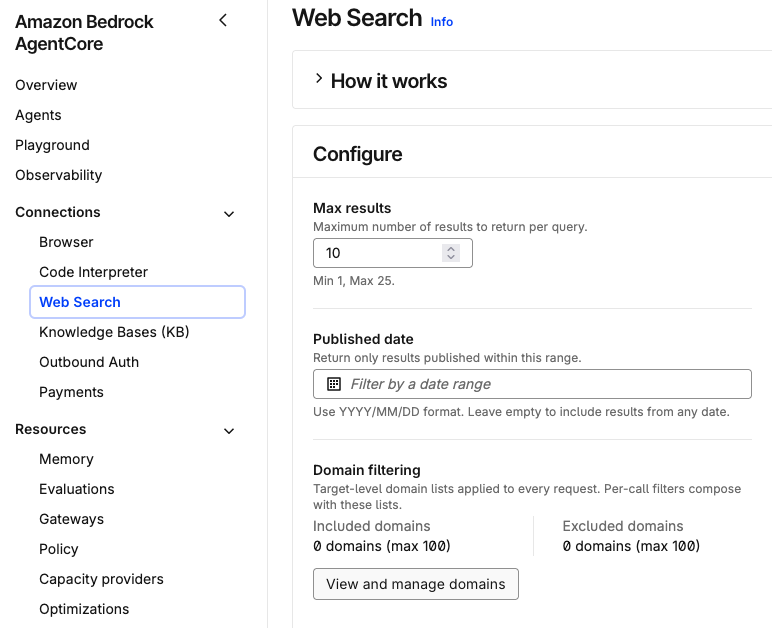
Figure 3: Web Search in the Amazon Bedrock AgentCore console
- Configure. In the Configure panel, set:
- Max results: how many results each query returns, from 1–25. The console starts at 10.
- Published date: a date range in
YYYY/MM/DDformat. Only results published inside it come back. Leave it empty to include results from any date. - Domain filtering: up to 100 domains to include and up to 100 to exclude. Choose View and manage domains to edit the lists.
- Test. Enter a query of up to 200 characters in the Test Web Search API panel. Each query calls the Web Search API with your settings. The panel shows how many results came back and how long the call took. For each result it shows the title, a text snippet, the publication date and the source URL. Figure 4 shows a search for “How do I set up Amazon S3 lifecycle rules?” with results limited to
aws.amazon.comanddocs.aws.amazon.com.
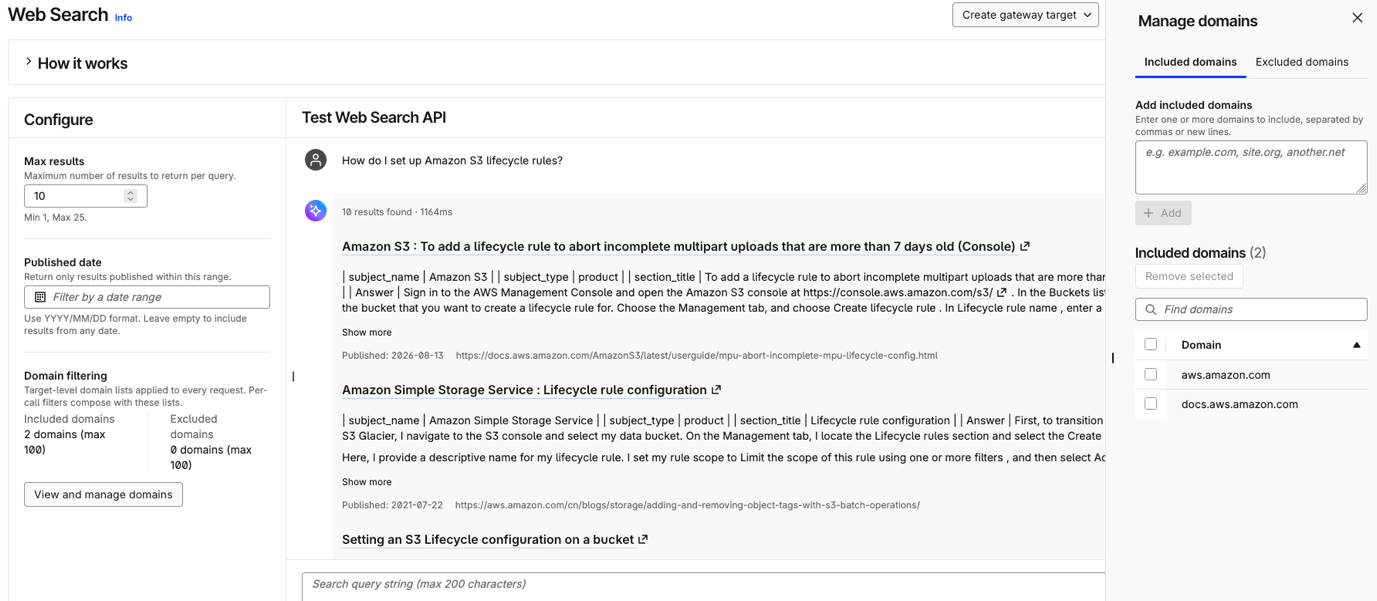
Figure 4: A test search with included domains
- Integrate. When the results look right, you have two options:
- Generate code snippet: get code that calls the API with the same settings, ready to paste into your agent or application.
- Create gateway target: add Web Search as a tool on an AgentCore Gateway, so agents can call it through MCP.
The console signs each call with your own IAM identity, so your role needs the bedrock-agentcore:InvokeWebSearch permission.
When to use the API compared to the gateway
| Scenario | Recommended path |
| Building agents with MCP-compatible tools | AgentCore Gateway |
| Several tools behind one MCP endpoint, with optional MCP sessions | AgentCore Gateway |
| One administrator source policy for many agents and teams | AgentCore Gateway |
| MCP clients that need search, such as Claude with the AWS Web Search connector | AgentCore Gateway |
| Custom orchestration | Web Search API |
| Non-agent use cases (dashboards, pipelines) | Web Search API |
| Want direct control over retries and caching | Web Search API |
| Adding web search to an existing application | Web Search API |
Both paths search the same index. They differ in a few ways. A gateway can also authorize callers with a JSON Web Token (JWT), while the API authorizes with IAM only. On a gateway, an administrator can set domain lists on the target that apply to every request without the calling agent seeing them. With the API, each request carries its own filters. The field names differ too: the API takes searchQuery, publishedAfter, and publishedBefore, and the gateway’s MCP tool takes query, from, and to. For more guidance, see Choose between the API and the Gateway connector.
Pricing
The Web Search API meters to the same usage type as the gateway connector, so it’s billed at the Web Search rate of $7 per 1,000 queries. Because no gateway is involved, there are no gateway charges. For details, see Amazon Bedrock AgentCore pricing.
Availability
The Web Search API is available in the US East (N. Virginia), US East (Ohio), US West (Oregon), Europe (Ireland), Asia Pacific (Tokyo), and Asia Pacific (Sydney) Regions. For the current list, see Supported AWS Regions.
Get started
Use the following resources to help you get started.


