If you protect a large Amazon Elastic Compute Cloud (Amazon EC2) fleet with AWS Elastic Disaster Recovery (AWS DRS), you manage the AWS Replication Agent across its whole lifecycle. You install it, keep it healthy and registered, and remove it cleanly when a server leaves disaster recovery (DR) scope. An enterprise IT customer with more than 300 Linux and Windows instances in DR scope ran into two of these problems while planning and validating a scheduled DR drill. Some agents had stalled after a network change, and some descoped servers were still replicating and adding to the bill. A server with a stalled agent can’t meet your recovery point objective (RPO), the maximum data loss you can accept after a disruption. The customer’s team checked replication status in the AWS DRS console before each drill, so a problem that started between drills could go unnoticed until the next one.
Working with that customer, we automated the install, heal, and offboard phases of the lifecycle. Most of the design choices in this post came from fixing those two problems. Each phase runs as an AWS Systems Manager (SSM) Automation document, started by Amazon EventBridge or on a schedule. A single EC2 tag decides which phase applies to an instance. Because the logic lives in the Automation documents, there are no AWS Lambda functions to maintain. When you take an instance out of scope, the automation records whether replication billing actually stopped.
You can find the SSM Automation documents, AWS Identity and Access Management (IAM) policies, and deployment scripts in the aws-samples/sample-drs-agent-lifecycle-automation GitHub repository.
Solution overview
You apply a DR tag to each EC2 instance, and its value (yes, pause, or no) tells the automation what to do. Three SSM Automation documents divide the work. Onboarding installs and repairs the agent and keeps registration healthy. Healing responds when replication stalls, and offboarding runs teardown when you descope an instance.
AWS Systems Manager State Manager runs onboarding on a 30-minute schedule against tagged instances. Amazon EventBridge triggers healing when AWS DRS reports a stalled server, and offboarding when the DR tag changes. The automation runs primarily in your source AWS Region and calls the DR Region only where AWS DRS requires it.
Prerequisites
To deploy this solution, you need:
- An AWS account with administrative access.
- Two AWS Regions configured: a source Region (where your EC2 instances run) and a DR Region (where AWS DRS replicates to).
- AWS Elastic Disaster Recovery initialized in both the source Region (for failback) and the DR Region (for replication).
- Network connectivity between Regions with TCP 443 (AWS DRS API and Amazon Simple Storage Service (Amazon S3)) and TCP 1500 (replication data) open. For private connectivity, use AWS Transit Gateway or VPC peering. Public endpoints are also supported.
- (Optional) Amazon Virtual Private Cloud (Amazon VPC) endpoints for AWS DRS and Amazon S3 in the DR Region, if using private connectivity.
- IAM permissions to deploy AWS CloudFormation stacks that create named IAM roles (
CAPABILITY_NAMED_IAM), Amazon EventBridge rules, and a State Manager association, and to register SSM Automation documents. You also neediam:PassRoleonDRS-Automation-Role, because the Amazon EventBridge rules and the State Manager association use that role. - AWS Command Line Interface (AWS CLI) installed and configured.
- An instance profile on each source EC2 instance with the
AWSElasticDisasterRecoveryAgentInstallationPolicyandAmazonSSMManagedInstanceCoremanaged policies, so that each instance is managed by Systems Manager. If your instances already have an instance profile, attach both policies to its role. - An existing Amazon Simple Notification Service (Amazon SNS) topic for notifications.
- (Optional) An existing Amazon S3 bucket for audit reports.
- Git, Bash 4 or later, and yq. The deployment scripts use
yqto readconfig.yaml. macOS includes Bash 3.2, so install a newer version, for example with Homebrew.
You don’t need to create the automation’s IAM roles yourself. The CloudFormation templates create DRS-Automation-Role (which runs every lifecycle action) and DRS-EventBridge-Forward-Role (deployed with the DR Region stack), along with the Amazon EventBridge rules in both Regions and the State Manager association. Amazon CloudWatch metrics are published automatically.
One tag controls the entire lifecycle
After you deploy the solution, the value of the DR tag on each EC2 instance determines what the automation does:
| DR value | State | What happens |
| yes | Protected | Agent is installed, failback tag applied, health maintained every 30 minutes |
| pause | Quiesced | Agent stays installed, stalled alerts suppressed, offboarding blocked |
| no or deleted | Descoped | Replication stopped, source server deleted, agent uninstalled |
Anything else (for example, DR=maybe, DR=true) | Misconfigured | Fail-safe: automation skips the instance and logs a SKIPPED_MISCONFIGURED status. No install, no heal, no teardown, preventing an unrecognized value from triggering the wrong action |
The tag value is normalized (trimmed and lowercased) before evaluation. A value like DR=Yes normalizes to DR=yes and matches correctly.
Three SSM Automation documents divide the lifecycle:
DRS-Agent-Onboardruns every 30 minutes through State Manager againsttag:DR=yesinstances. It installs or repairs the agent, applies theAWSDRS:AllowLaunchingIntoThisInstancetag, and validates AWS DRS registration. The tag tells AWS DRS to launch recovery onto the original instance during failback and acts as the drift-correction backstop. State Manager re-evaluates tagged instances every 30 minutes. Each run catches instances that lost the Replication Agent, newly tagged instances that aren’t onboarded yet, and earlier runs that failed silently.DRS-Agent-Healfires when Amazon EventBridge receives a replication-stalled event (cross-Region forwarded from the DR Region). The rule filters on theSTALLEDstate, so recovery transitions don’t trigger unnecessary runs. It inspects the replication error to distinguish agent-side failures from infrastructure issues. For agent problems, it restarts the service first, then reinstalls in place only if the restart doesn’t fix it. For infrastructure-caused stalls, it escalates to operators through Amazon SNS.DRS-Agent-Offboardfires when Amazon EventBridge detects a DR tag change or deletion. The offboarding document first verifies safeguards: a tag re-check, a terminated-instance guard, and an optional approval gate. After those pass, it records replication state and stops replication. It then disconnects the source server, deletes it, uninstalls the Replication Agent, and removes the tags.
How the components connect
The solution operates primarily in the source Region. Cross-Region calls happen only where AWS DRS requires them (registration checks and teardown API calls target the DR Region).
The following diagram shows how the automation components connect across the source and DR Regions. State Manager and Amazon EventBridge operate in the source Region; AWS DRS replication and the stall-forwarding rule run in the DR Region.
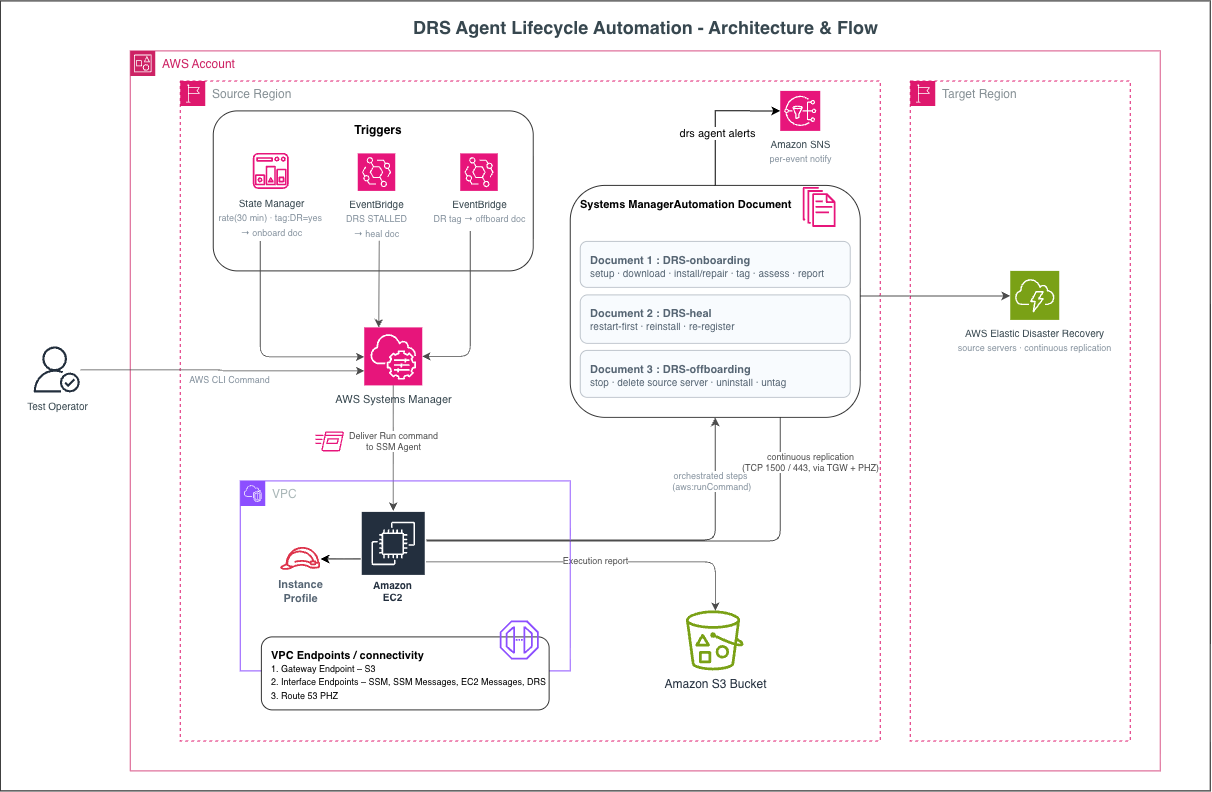
Figure 1: AWS DRS agent lifecycle automation architecture across the source and DR Regions
In the source Region, State Manager runs the onboarding document every 30 minutes, and Amazon EventBridge rules start the heal and offboarding documents when their events arrive. AWS Systems Manager Parameter Store holds the DR-event stand-down flag (/drs/control/event-in-progress). The DRS-Automation-Role IAM role runs every automation step. Amazon SNS delivers alerts, Amazon S3 stores per-event audit reports, and Amazon CloudWatch captures outcome metrics.
In the DR Region, AWS DRS manages source server registration and ongoing replication. AWS DRS emits replication events only in the DR Region, where the source servers are registered. An Amazon EventBridge forwarding rule filters replication-stalled events by the STALLED state. It then sends them to the source Region for healing. Staging subnets and Amazon Elastic Block Store (Amazon EBS) volumes, managed by AWS DRS, support the replication infrastructure.
For networking, AWS Transit Gateway (which connects VPCs across Regions) carries TCP 443 (AWS DRS API and S3) and TCP 1500 (replication data) between Regions. Amazon VPC endpoints for AWS DRS and S3 keep traffic on the AWS backbone without internet exposure. An Amazon Route 53 Private Hosted Zone (for DNS resolution within your VPC) resolves endpoint names to private IPs. This removes the need for --endpoint installer flags and protects failback compatibility.
Tag and rule examples
Run these commands after you deploy the solution. Tag an instance for protection:
Descope an instance (triggers offboarding):
Or remove the tag entirely (also triggers offboarding):
The Amazon EventBridge rule that triggers offboarding matches this pattern:
The Amazon EventBridge rule that triggers healing filters on the STALLED state so recovery transitions are ignored:
Three layers protecting the RPO
The 15-minute RPO referenced throughout this post is a customer-configured target, not an AWS service guarantee. The architecture helps protect it with three complementary layers, each covering a different failure mode.
Layer 1: OS service auto-restart (seconds). The agent service uses systemd Restart=always on Linux and Windows Service Recovery. When the process stops, the OS brings it back automatically. On Linux, systemd restarts the service almost instantly. On Windows, the first recovery action fires after a configurable delay (30 seconds by default). This layer handles agent process crashes without any automation running.
Layer 2: Amazon EventBridge heal (minutes, not seconds). If the agent disappears or can’t maintain registration, AWS DRS detects the stall and emits a replication-stalled event in the DR Region. A forwarding rule filters on the STALLED state and sends it cross-Region to the source Region’s event bus. A matching receive rule triggers the heal document.
The heal document restarts the agent first (most stalls are transient). If restart fails, it re-runs the installer in place, preserving driver state to avoid a full-disk rescan. The restart path is the faster of the two, and total time depends on your environment and on AWS DRS stall-detection latency. The reinstall path takes longer because the agent must re-establish block-level tracking. Stall-detection latency also counts against the window, because lag must accumulate before the service marks a server as stalled.
Layer 3: State Manager backstop (up to 30 minutes). The onboarding document re-evaluates DR=yes instances every 30 minutes, catching drift and edge cases that faster layers miss. This exceeds the 15-minute RPO target, so it functions as a safety net rather than the primary defense.
Layer 2 requires the Amazon EventBridge data plane in both Regions to be operational, while Layers 1 and 3 run entirely in the source Region.
Onboarding: How ongoing convergence works
State Manager targets tag:DR=yes. Instances that already have the tag and instances you tag later are included automatically, without manual registration.
The onboarding document is idempotent. It skips healthy, registered instances. For instances that need work, it checks the stand-down flag and instance state, validates the operating system (Linux or Windows), and flags unsupported architectures as TAGGED_UNSUPPORTED. If AutoInstallEnabled is false, the run is audit-only.
For actual installs, a concurrency lock (flock on Linux, a named mutex on Windows) prevents races when multiple automation runs overlap on the same instance. This lock is built into the documents and needs no configuration. The State Manager association sets MaxConcurrency to 10 and MaxErrors to 100% in templates/state-manager-association.yaml. MaxConcurrency limits how many instances are processed at once. With MaxErrors at 100%, a failure on one instance doesn’t stop the run for the rest of the fleet. For larger fleets, raise MaxConcurrency gradually and watch for AWS DRS API throttling.
The failback tag (AWSDRS:AllowLaunchingIntoThisInstance) is applied only when the agent is confirmed present. Registration is assessed cross-Region, and if an instance stays in PENDING_REGISTRATION beyond a configurable threshold (default: 3 runs), the document escalates through Amazon SNS. Each execution writes an S3 audit record and emits a CloudWatch metric.
Healing agent issues within RPO
The heal document reads the source server ARN from the event and looks up the matching EC2 instance ID with drs:DescribeSourceServers in the DR Region. It then checks the stand-down flag and the tag state. Values other than yes suppress the heal with no action and no alert.
If restart doesn’t resolve the issue, the automation re-runs the installer in place as a fallback. It doesn’t uninstall first, so the existing replication driver stays intact where possible. Reinstallation can trigger a block-level rescan whose duration scales with total disk size. On large volumes, this might temporarily exceed the RPO window while the rescan completes.
Not every stall is an agent problem. Bandwidth throttling, undersized replication servers, or staging-area disk issues can also cause stalls. The automation escalates these non-agent stalls to your operators through Amazon SNS rather than attempting agent remediation. If the Replication Agent is still not functioning after reinstall, you receive a HEAL_FAILED notification with diagnostic details.
Only the AWS DRS agent service is restarted, not the EC2 instance itself. Your workloads keep running without interruption.
Offboarding with honest billing status
When you set DR=no or delete the tag, Amazon EventBridge fires a Tag Change on Resource event. The offboarding document applies several safeguards before teardown.
Terminated-instance guard: EC2 termination strips tags, generating the same event as a deliberate descope. The document sends an alert and stops. It doesn’t delete the source server, which contains the recovery point.
Tag re-check: If the tag has been restored, the document exits.
Approval gate: If AutoOffboardEnabled is false, the document sends a notification and stops.
State recording: Before modifying resources, it captures replication state, lag duration, and last snapshot time.
Recovery-instance check: Before completing teardown, the offboarding document checks for active recovery instances. If found, it flags them in the audit report and sends an SNS alert. Recovery instances incur separate EC2 billing that persists after source server deletion.
Adaptive retry: A maximum of 10 attempts with exponential backoff handles API throttling during bulk descope.
After teardown, the document checks what actually succeeded:
| Outcome | Meaning |
COMPLETED | Source server deleted, billing halted |
BILLING_STOPPED_ORPHAN | Replication stopped but delete didn’t succeed. Operator must manually delete. |
FAILED | stop_replication didn’t succeed. Billing might still be active. Operator review recommended. |
NO_SERVER | Instance was not registered as an AWS DRS source server. Clean no-op. |
Because each outcome reflects what actually succeeded, you know whether replication billing has stopped or whether a source server needs manual follow-up.
Security: Least-privilege IAM roles
The solution creates two IAM roles and relies on one that you provide. SSM Automation and Amazon EventBridge assume the DRS-Automation-Role to run all lifecycle actions. Its permissions cover SSM, EC2 tags, cross-Region AWS DRS calls, SNS, S3, Parameter Store, and iam:PassRole on itself. The iam:PassRole permission only allows passing this role to Systems Manager. Run Command is limited to instances tagged DR=yes. In the DR Region, the DRS-EventBridge-Forward-Role can only put events on the source Region’s default event bus.
On each EC2 instance, the instance profile from the prerequisites lets the Replication Agent and SSM Agent reach their services. The automation stores no long-lived credentials. Each role receives temporary credentials when it’s assumed. When you use private connectivity, cross-Region traffic stays on Transit Gateway and VPC endpoints.
Deploy the solution
Start in audit mode, where the onboarding document reports what it would install without changing any instance and offboarding sends a notification instead of running teardown. Review the audit reports, then turn on installation for a small set of instances before you scale to the full fleet.
To configure config.yaml
Clone the repository and change to its directory:
The deployment scripts read your settings from config.yaml in the root of the repository. Set the values in the following sample before you deploy. The file in the repository also sets document names and stack names. Keep those at their defaults, because the commands in this post use the default names.
The following table describes the values you’re most likely to change.
| Parameter | Required | Description |
source_region | Yes | Region that hosts your EC2 instances and the automation |
dr_region | Yes | Region where AWS DRS replicates to |
account_id | Yes | AWS account that hosts the automation |
sns_topic_name | Yes | Name of an existing SNS topic in the source Region |
amzn-s3-demo-audit_bucket | No | Existing S3 bucket for JSON audit reports. Leave empty to skip them |
auto_install_enabled | No | Set to false to report only, or true to install and repair agents |
auto_offboard_enabled | No | Set to false to notify only, or true to run teardown when you descope an instance |
dr_tag_key | No | EC2 tag key that controls the lifecycle (default DR) |
To deploy the solution
The following steps deploy each component separately so you can see what each one creates. Run the commands from the root of the cloned repository. Replace the example account ID (111122223333) and Regions (us-west-1 and us-east-2) with your own values.
To deploy everything in one command instead, run ./scripts/deploy.sh after you edit config.yaml, and then go to the confirmation commands after step 6. The script prints the status of every stack when it finishes. Without yq, it falls back to built-in defaults, including a placeholder account ID. Use either the script or the individual steps, not both.
- Deploy the IAM role stack. The template creates a role with an explicit name (
DRS-Automation-Role), soCAPABILITY_NAMED_IAMis required. - Register the three SSM Automation documents. The script reads
source_regionfromconfig.yamland creates the documents from thedocuments/folder on the first run. On later runs, it publishes a new default version of any document that changed. - Deploy the Amazon EventBridge rules in the source Region. This stack creates the tag-change rule that starts offboarding and the rule that starts healing. It uses the existing
DRS-Automation-Role, so it doesn’t needCAPABILITY_NAMED_IAM. - Deploy the forwarding rule in the DR Region. This stack creates
DRS-EventBridge-Forward-Role, which lets the rule send stalled events to the source Region’s event bus, soCAPABILITY_NAMED_IAMis required. - Create the stand-down flag in Parameter Store with a value of false. The script reads the parameter name and Region from
config.yamland doesn’t overwrite an existing value.If you prefer not to use the script, run the following command instead:
- Deploy the State Manager association in audit mode. The association runs once as soon as it’s created and then every 30 minutes.
To confirm the deployment, run the following commands:
A successful deployment shows the following results:
- All four stacks show
CREATE_COMPLETE, orUPDATE_COMPLETEafter a re-run. - The source Region lists the
DRS-Tag-Change-OffboardandDRS-Stalled-Heal-Receiverules. - The DR Region lists the
DRS-Stalled-Forwardrule. - The source Region lists the
DRS-Agent-Onboard,DRS-Agent-Heal, andDRS-Agent-Offboarddocuments. - The stand-down flag returns
false. - In the AWS Systems Manager console, State Manager lists
DRS-Agent-Onboard-Association.
When you’re ready to turn on installation, set auto_install_enabled: "true" in config.yaml and deploy the State Manager stack again with AutoInstallEnabled=true:
To turn on teardown, set auto_offboard_enabled: "true" and deploy the source Region Amazon EventBridge stack again with AutoOffboardEnabled=true:
Safety guards prevent unintended actions
The following table lists the safety guards across the three automation documents. The stand-down flag and the tag value allow-list apply to every document. The terminated-instance guard and honest billing status protect offboarding, and the remaining guards protect onboarding and healing.
| Guard | Prevents |
| DR-event stand-down | Acting during failover/failback |
| Terminated-instance guard | Deleting a recovery point on instance termination |
| Reverse-direction detect | Overwriting an AWS DRS-managed failback agent |
| Concurrency lock | Race conditions from overlapping runs |
| AutoInstallEnabled gate | Unintended installs in audit-first deployments |
| OS pre-check | Running installer on incompatible operating system |
| Honest billing status | Reporting “billing stopped” when teardown partially completed |
| Tag value allow-list | A typo triggering the wrong lifecycle action |
| Agent-presence-gated tagging | Applying failback tag to an agent-less instance |
To pause the automation during a declared DR event:
To resume after the event:
Monitoring and observability
The three SSM Automation documents produce telemetry across three channels, each tuned for a different audience.
Amazon SNS notifications go to the on-call team. Onboarding stays quiet unless an instance needs intervention. Heal notifies on both success and intervention-needed, because a successful auto-heal still tells you a real issue occurred and was resolved. Offboarding sends a notification at each stage: start, complete, orphan, incomplete, and approval-needed.
Amazon S3 audit reports serve compliance and troubleshooting. One JSON object per lifecycle event at s3://<amzn-s3-demo-audit_bucket>/drs/<account>/<instance>/<event>-<timestamp>.json captures instance ID, host name, platform, source server ID, status, and pre-teardown replication state. To control storage costs, add a lifecycle rule to the bucket (for example, expire objects under drs/ after 90 days).
Amazon CloudWatch metrics power fleet dashboards. An Outcome metric (1=handled, 0=needs attention) dimensioned by event type provides at-a-glance fleet health.
Clean up
Removing the automation doesn’t stop replication. Instances tagged DR=yes keep replicating until you stop replication through the AWS DRS console or API. To remove the automation infrastructure, run the following commands:
- Delete the State Manager association and the source Region Amazon EventBridge stacks.
- Delete the Amazon EventBridge forwarding stack in the DR Region.
- Delete the SSM Automation documents and the stand-down parameter.
- After the other stacks are deleted, delete the IAM role stack.
- (Optional) If you created the SNS topic and S3 bucket only for this solution, delete them.
Conclusion
With a DR=yes tag in place, onboarding keeps the agent installed and registered, and healing restarts or reinstalls it when replication stalls. When you descope an instance, offboarding stops replication, removes the source server, and writes a JSON audit record to Amazon S3. That record tells you whether billing stopped or whether a partial teardown needs an operator’s follow-up. The whole lifecycle runs from one tag, without function code for your team to maintain.
The June 2023 post Deploying AWS Elastic Disaster Recovery at scale with AWS Systems Manager covered the initial install. This solution builds on it with ongoing health checks and offboarding.
Next steps
Start by cloning the repository and deploying it in audit mode in a test account. Tag a few instances with DR=yes and let onboarding run for a day. The audit reports in Amazon S3 show what the automation would install or repair on each instance, without changing anything. When the reports match what you expect, turn on installation for those instances. Then set DR=no on one of them to check the offboarding notification before you turn on teardown. If you have questions or improvements, open an issue in the GitHub repository.
Additional resources
- AWS Elastic Disaster Recovery User Guide
- AWS Systems Manager Automation
- Amazon EventBridge cross-Region routing