Therapy progress notes are written records of what happened during a therapy session. They may include what a client said, what the therapist observed, the topics discussed, and plans for the next session. Over time, these notes can add up to a large amount of text.
Reading one note helps us understand one session. But what if we want to look at several notes? Can we use text analysis to see how the language changes from one session to another?
Natural Language Processing (NLP) is a way of using computers to work with human language. With Python, you can break text into sentences, pick out language features, and use models to classify sentiment and emotion. In this tutorial, you’ll use spaCy’s language-processing pipeline for text processing and Hugging Face Transformers to run pretrained classification models.
You'll build a small NLP pipeline using fictional therapy notes. You’ll use spaCy to process the text, two ready-made Hugging Face models to classify sentiment and emotion, pandas to organize results by session, and Matplotlib to create charts.
You can find the complete project code in the GitHub repository.
We are not trying to decide whether therapy is working. The goal is to learn how to turn written text into data that we can review, question, and display in charts.
At the end, you'll have a practical Python project using spaCy, Hugging Face Transformers, pandas, and Matplotlib to explore sentiment, emotion, and language patterns in fictional therapy notes.
Note: This tutorial is for learning only and uses fictional text. The models have not been tested for clinical use. They cannot tell us whether therapy is working, identify problems in the therapist-client relationship, or replace a trained professional.
Table of Contents
- What NLP Can and Cannot Tell Us
- What We Are Building
- Tools and Models
- Set Up the Python Project
- Create a Synthetic Dataset
- Preprocess Notes with spaCy
- Run Sentiment Analysis with DistilBERT
- Classify Emotions with DistilRoBERTa
- Explore Linguistic Features
- Compare Results Across Sessions
- Visualize the Outputs
- Connect the Pipeline
- Test the Project
- Limitations and Ethical Considerations
- Conclusion and Further Learning
- References
What NLP Can and Cannot Tell Us
Natural Language Processing (NLP) is a part of artificial intelligence that helps computers work with human language. Common NLP tasks include breaking text into words and sentences, identifying grammar, finding names and places, and classifying sentiment and emotion.
Each task does something different. Tokenization breaks text into smaller pieces, such as words. Part-of-speech tagging identifies how a word is used in a sentence, such as a noun or verb. Lemmatization maps a word to its base form, while named-entity recognition identifies items such as people, organizations, and places. These are examples of the components available in spaCy’s processing pipelines. Sentiment analysis estimates whether text sounds positive or negative based on examples the model learned from. Emotion classification gives scores for emotion categories the model learned during training.
These results do not tell us what a person is really feeling. A therapy note may contain the therapist’s own observations, a client’s exact words, or the therapist’s summary of what the client said. A model may not know who said something or understand the full situation. In this tutorial, we’ll talk about model predictions and language patterns, not a person’s emotions or progress in therapy.
What We Are Building
Our project will analyze a small collection of fictional session notes and produce four types of results:
- A sentiment prediction for each sentence
- Emotion predictions for each sentence, along with average scores
- Simple language features, such as counts of selected pronouns and phrases like “maybe” or “I think”
- A timeline and dashboard to compare the results across sessions
The workflow is:
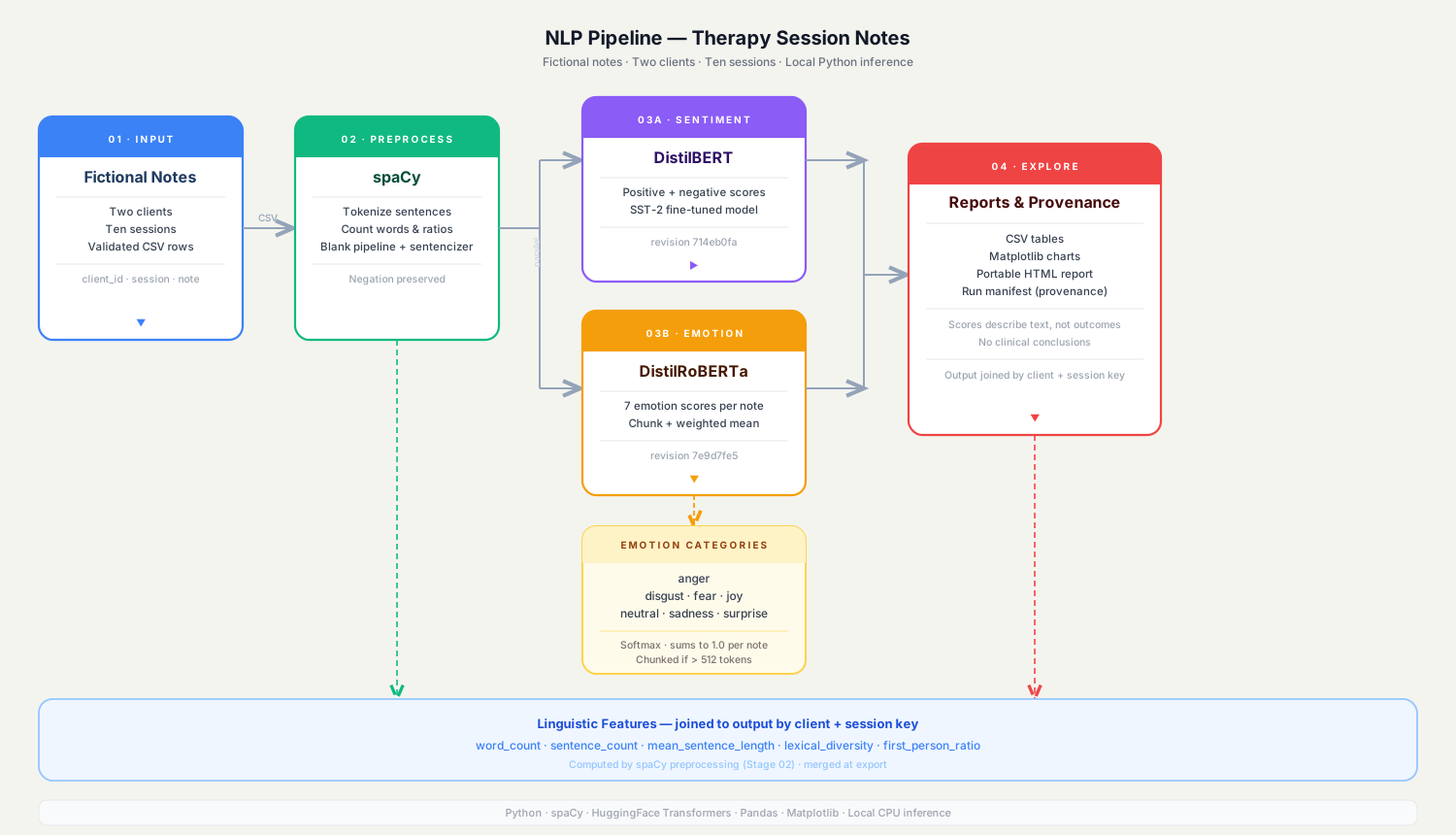
Figure 1. High-level view of the NLP workflow. The diagram also shows possible extensions, such as CSV and HTML reports, that are not implemented in every step of this tutorial.
We’ll keep the code in separate files so each part has one clear job. The project will not calculate a relationship-rupture score or label a clinical outcome.
Tools and Models
Python
Python will connect each part of the project. It also has many libraries for working with data and language.
spaCy is a Python library that helps us process text. Its processing pipeline can split text into tokens, assign part-of-speech tags, find base forms of words, and identify possible names or places. We’ll use its small English model, en_core_web_sm. This model works with general English, not specifically with therapy notes.
Hugging Face Transformers
We’ll use two pretrained classification models:
The first model, distilbert/distilbert-base-uncased-finetuned-sst-2-english, classifies text as positive or negative. Its model card identifies it as a DistilBERT checkpoint fine-tuned on the Stanford Sentiment Treebank (SST-2), a dataset of general English sentences. DistilBERT itself is described in the research paper “DistilBERT, a distilled version of BERT: Smaller, faster, cheaper and lighter”. Neither the checkpoint nor the original DistilBERT paper establishes that this model is suitable for therapy notes.
The second model, j-hartmann/emotion-english-distilroberta-base, predicts seven categories: anger, disgust, fear, joy, neutral, sadness, and surprise. According to Jochen Hartmann’s model card, it was trained on a balanced collection drawn from six datasets, including social media posts, student self-reports, and dialogue. It has not been validated for analysing therapy progress notes.
These models help us learn how text classification works. But because they were trained on general text, we cannot assume they will work well on therapy notes.
pandas and Matplotlib
pandas will help us organize the results in a table called a DataFrame. Matplotlib will help us turn the results into charts.
pytest
pytest is a tool for checking that our code works as expected. We’ll use sample model results in some tests, so we can test the code without downloading the large model files.
Set Up the Python Project
Create a folder for the project, then move into it:
mkdir therapy_notes_nlp cd therapy_notes_nlp mkdir data src tests images Your project folders and files should look like this:
therapy_notes_nlp/ ├── data/ │ └── synthetic_notes.json ├── images/ ├── src/ │ ├── __init__.py │ ├── preprocessor.py │ ├── sentiment.py │ ├── emotions.py │ ├── tracker.py │ └── visualizer.py ├── tests/ │ ├── conftest.py │ ├── test_analyzer.py │ ├── test_emotions.py │ ├── test_preprocessor.py │ ├── test_sentiment.py │ └── test_tracker.py ├── analyzer.py ├── main.py ├── pytest.ini └── requirements.txt Create a virtual environment and activate it. A virtual environment keeps this project’s Python packages separate from packages used by your other projects:
python -m venv .venv # Windows .venv\Scripts\activate # macOS or Linux source .venv/bin/activate Add the following packages to requirements.txt:
spacy>=3.8,<4.0 transformers>=4.45,<6.0 torch>=2.2 pandas>=2.2,<3.0 matplotlib>=3.8,<4.0 pytest>=8.0,<10.0 Install the packages and download spaCy’s English language model:
pip install -r requirements.txt python -m spacy download en_core_web_sm The first time you run the project, Hugging Face will download the model files. You can run the models on a CPU, but they may take longer than they would on a GPU.
Create a Synthetic Dataset
Therapy notes can contain private information. To protect people’s privacy, we’ll use made-up examples throughout this tutorial. This also means anyone can follow the project without the need to access real patient records.
Keep using fictional data for this tutorial. Do not replace it with real therapy notes unless you have the proper permission and safeguards, and have checked the laws and rules that apply to you.
spaCy can sometimes find names and other details in text, but it can also miss them. Removing a person’s name does not make a therapy note anonymous. For this tutorial, use only the fictional examples. Any real research project would need the right approval and privacy protections.
If you haven't already, create a file named synthetic_notes.json in the data folder:
[ { "session": 1, "client_id": "SYNTHETIC_001", "note": "The fictional client described feeling overwhelmed by work demands. They said sleep had been difficult and they were unsure where to begin." }, { "session": 2, "client_id": "SYNTHETIC_001", "note": "The fictional client discussed trying a new evening routine. They described one helpful moment but also mentioned ongoing worry." }, { "session": 3, "client_id": "SYNTHETIC_001", "note": "The fictional client reported a stressful week and said they felt frustrated. They also identified one situation they handled differently." }, { "session": 4, "client_id": "SYNTHETIC_001", "note": "The fictional client described feeling more hopeful about a work conversation. They remained concerned about maintaining the changes." }, { "session": 5, "client_id": "SYNTHETIC_001", "note": "The fictional client questioned whether the current approach was useful and said they had expected a different pace. They wanted to discuss this concern." }, { "session": 6, "client_id": "SYNTHETIC_001", "note": "The fictional client and therapist discussed the concern raised previously. The client described feeling heard, while noting that some questions remained unresolved." }, { "session": 7, "client_id": "SYNTHETIC_001", "note": "The fictional client reflected on using a coping strategy during a difficult conversation. They described both relief and lingering nervousness." }, { "session": 8, "client_id": "SYNTHETIC_001", "note": "The fictional client reviewed topics from the earlier sessions. They described changes they had noticed and identified challenges they still wanted to work on." } ] Each item contains a session number, a made-up client ID, and a note. The examples include both positive and difficult experiences. We have not written them to force the models to give certain answers. We’ll run the models and examine the results they produce.
Preprocess Notes with spaCy
Before we classify the text, we’ll use spaCy to split each note into sentences and collect some basic information about the words.
In src/preprocessor.py:
from __future__ import annotations from typing import Any import spacy MODEL_NAME = "en_core_web_sm" def load_nlp(model_name: str = MODEL_NAME): return spacy.load(model_name) _nlp = None def get_nlp(): global _nlp if _nlp is None: _nlp = load_nlp() return _nlp def preprocess_note(text: str, nlp=None) -> dict[str, Any]: if not isinstance(text, str): raise TypeError("text must be a string") if not text.strip(): return { "tokens": [], "lemmas": [], "sentences": [], "pos_tags": [], "entities": [], "token_count": 0, "sentence_count": 0 } doc = (nlp or get_nlp())(text) tokens = [t.text.lower() for t in doc if not t.is_punct and not t.is_space] lemmas = [ t.lemma_.lower() for t in doc if not t.is_stop and not t.is_punct and not t.is_space and t.is_alpha ] sentences = [s.text.strip() for s in doc.sents if s.text.strip()] pos_tags = [ {"text": t.text, "pos": t.pos_, "tag": t.tag_} for t in doc if not t.is_punct and not t.is_space ] entities = [{"text": e.text, "label": e.label_} for e in doc.ents] return { "tokens": tokens, "lemmas": lemmas, "sentences": sentences, "pos_tags": pos_tags, "entities": entities, "token_count": len(tokens), "sentence_count": len(sentences) } The _nlp = None / get_nlp() pattern is worth pausing on. Loading a spaCy model takes a second or two, and you do not want that cost on every function call. By keeping _nlp as a module-level variable, the model loads once, and every call after that reuses it. The (nlp or get_nlp())(text) line might look odd at first, but it just means: use the model I was handed, or fall back to the default. This also makes the function easier to test later, since you can pass in a lightweight fake model instead of the real one.
One thing to notice: we pass the original sentences to the classifiers, not the cleaned tokens or lemmas. That is intentional. Words like "not" change a sentence's meaning, and stripping them before classification could quietly change what the model sees.
The entities field stores possible names, places, and other named items found by spaCy. It does not remove personal information or make the text anonymous.
Run Sentiment Analysis with DistilBERT
Sentiment analysis is a way to estimate whether text is more positive or negative based on examples a model learned from. The DistilBERT model we selected was trained further on SST-2, a general dataset of English sentences. It returns a positive score and a negative score for each sentence.
In src/sentiment.py:
MODEL_ID = "distilbert/distilbert-base-uncased-finetuned-sst-2-english" _pipeline = None def get_pipeline(): global _pipeline if _pipeline is None: from transformers import pipeline _pipeline = pipeline( "text-classification", model=MODEL_ID, top_k=None ) return _pipeline def _normalise_prediction(prediction): if isinstance(prediction, dict): return [prediction] if prediction and isinstance(prediction[0], list): return prediction[0] return prediction def analyze_sentiment(sentences: list[str], classifier=None) -> dict: clean = [s.strip() for s in sentences if isinstance(s, str) and s.strip()] if not clean: return { "sentence_results": [], "aggregate_score": None, "aggregate_label": None, "positive_ratio": 0.0, "negative_ratio": 0.0 } model = classifier or get_pipeline() predictions = model(clean, truncation=True, batch_size=8) results = [] for sentence, prediction in zip(clean, predictions): scores = _normalise_prediction(prediction) by_label = { item["label"].upper(): float(item["score"]) for item in scores } positive = by_label.get("POSITIVE", 0.0) negative = by_label.get("NEGATIVE", 0.0) signed_score = positive - negative label = ( "POSITIVE" if signed_score > 0 else "NEGATIVE" if signed_score < 0 else "BALANCED" ) results.append({ "sentence": sentence, "label": label, "positive_score": positive, "negative_score": negative, "signed_score": round(signed_score, 4) }) values = [item["signed_score"] for item in results] aggregate = sum(values) / len(values) return { "sentence_results": results, "aggregate_score": round(aggregate, 4), "aggregate_label": ( "POSITIVE" if aggregate > 0 else "NEGATIVE" if aggregate < 0 else "BALANCED" ), "positive_ratio": round( sum(item["label"] == "POSITIVE" for item in results) / len(results), 3 ), "negative_ratio": round( sum(item["label"] == "NEGATIVE" for item in results) / len(results), 3 ) } get_pipeline() follows the same lazy-loading pattern as get_nlp(): the model loads once and is reused on every subsequent call. Setting top_k=None tells the Hugging Face pipeline to return scores for every label, not just the highest one. Without it, we would only get the winning label and could not compare both scores. truncation=True cuts any input longer than 512 tokens, which is the maximum the model can process. batch_size=8 sends up to eight sentences to the model at once, which is faster than sending them one at a time.
_normalise_prediction() exists because the pipeline can return results in different shapes depending on the version and configuration. It converts every shape into a consistent list of {"label": ..., "score": ...} dictionaries so the rest of the function always has the same format to work with.
For each sentence, by_label is a dictionary built from a comprehension that maps each uppercase label to its score. signed_score subtracts the negative score from the positive score, giving a value between -1 and +1. At the end, the function averages all signed scores to produce one aggregate_score for the session.
This index is simply a summary we created from the model's scores. It is not a medically approved measurement, a recovery score, or a measure of wellbeing. A score close to zero may also mean that positive and negative results balance each other out.
Classify Emotions with DistilRoBERTa
Sentiment and emotion classification are not the same. Sentiment gives a broad positive or negative result. Emotion classification looks at categories such as joy, sadness, anger, and fear.
In src/emotions.py:
MODEL_ID = "j-hartmann/emotion-english-distilroberta-base" _pipeline = None def get_pipeline(): global _pipeline if _pipeline is None: from transformers import pipeline _pipeline = pipeline( "text-classification", model=MODEL_ID, top_k=None ) return _pipeline def _normalise_prediction(prediction): if isinstance(prediction, dict): return [prediction] if prediction and isinstance(prediction[0], list): return prediction[0] return prediction def detect_emotions(sentences: list[str], classifier=None) -> dict: clean = [s.strip() for s in sentences if isinstance(s, str) and s.strip()] if not clean: return { "per_sentence": [], "emotion_distribution": {}, "session_dominant_emotion": None } model = classifier or get_pipeline() predictions = model(clean, truncation=True, batch_size=8) per_sentence = [] totals = {} for sentence, prediction in zip(clean, predictions): scores = _normalise_prediction(prediction) score_map = { item["label"].lower(): float(item["score"]) for item in scores } for label, score in score_map.items(): totals[label] = totals.get(label, 0.0) + score dominant = max(score_map, key=score_map.get) per_sentence.append({ "sentence": sentence, "dominant_emotion": dominant, "scores": score_map }) distribution = { label: round(score / len(clean), 4) for label, score in totals.items() } dominant_session = max(distribution, key=distribution.get) return { "per_sentence": per_sentence, "emotion_distribution": distribution, "session_dominant_emotion": dominant_session } The totals dictionary accumulates scores across sentences. For each sentence, the loop adds the score for every emotion label to the running total. Using totals.get(label, 0.0) safely handles the first time a label appears, starting it at zero rather than causing a key error.
max(score_map, key=score_map.get) finds the label with the highest score in score_map for that sentence. The key argument tells max() to compare values in the dictionary rather than the keys themselves.
After processing all sentences, distribution divides each accumulated total by the number of sentences, giving a mean score per emotion across the whole session. max(distribution, key=distribution.get) applies the same pattern to find the session-level dominant emotion.
These results are the model's predictions. They do not confirm how anyone feels. The model was trained on general English text, while therapy notes are written for a different purpose and may use different language. We should not assume that the model will work reliably on them.
Explore Linguistic Features
We can also count simple language features. For example, we can count how often first-person pronouns appear and look for phrases such as “maybe”, “perhaps”, and “I guess”. These are examples of hedging phrases, which people sometimes use when they are unsure or speaking cautiously.
Add this function to src/preprocessor.py:
def extract_linguistic_features(text: str) -> dict: doc = get_nlp()(text) first_person = { "i", "me", "my", "mine", "myself", "we", "us", "our", "ours", "ourselves" } third_person = { "he", "him", "his", "himself", "she", "her", "hers", "herself", "they", "them", "their", "theirs", "themselves", "it", "its", "itself" } second_person = {"you", "your", "yours", "yourself", "yourselves"} pronouns = [token.text.lower() for token in doc if token.pos_ == "PRON"] first = sum(word in first_person for word in pronouns) third = sum(word in third_person for word in pronouns) second = sum(word in second_person for word in pronouns) total = first + third + second hedging_phrases = ( "maybe", "perhaps", "possibly", "i guess", "not sure", "sort of", "kind of", "i think", "might" ) lower = text.lower() hedging_count = sum(lower.count(phrase) for phrase in hedging_phrases) return { "first_person_count": first, "third_person_count": third, "second_person_count": second, "pronoun_count": total, "first_person_ratio": round(first / total, 3) if total else 0.0, "hedging_phrase_count": hedging_count } token.pos_ == "PRON" filters tokens by their part-of-speech tag. spaCy assigns this tag to words it identifies as pronouns. The three sets first_person, third_person, and second_person define which lowercase words belong to each group. The generator expression inside sum() checks whether each pronoun token's text belongs to that set and counts how many match.
first_person_ratio divides the first-person count by the total pronoun count. The if total else 0.0 guard prevents a division-by-zero error when no pronouns appear in the text.
For hedging phrases, text.lower() converts the whole note to lowercase before searching, so "Maybe" and "maybe" are treated the same. lower.count(phrase) returns the number of times that phrase appears as a substring. The result for each phrase is added to hedging_count.
These numbers are only counts. They do not explain why someone used a particular word or phrase. Their meaning depends on the context and the person who wrote the note. To understand whether these features are useful, we would need to compare them with carefully labelled examples. That is outside the scope of this tutorial.
Compare Results Across Sessions
Each session produces a set of results. We’ll use pandas to place the results in a table, with one row for each session. This makes it easier to compare the results over time.
In src/tracker.py:
import pandas as pd def build_session_timeline(session_results: list[dict]) -> pd.DataFrame: rows = [] for result in session_results: sentiment = result["sentiment"] emotions = result["emotions"] linguistic = result["linguistic_features"] rows.append({ "session": result["session"], "sentiment_index": sentiment["aggregate_score"], "sentiment_label": sentiment["aggregate_label"], "dominant_emotion": emotions["session_dominant_emotion"], "first_person_ratio": linguistic["first_person_ratio"], "hedging_phrase_count": linguistic["hedging_phrase_count"], "sentence_count": result["sentence_count"] }) columns = [ "session", "sentiment_index", "sentiment_label", "dominant_emotion", "first_person_ratio", "hedging_phrase_count", "sentence_count" ] if not rows: return pd.DataFrame(columns=columns) return pd.DataFrame(rows).sort_values("session").reset_index(drop=True) def describe_sentiment_shift(df: pd.DataFrame) -> dict: if df.empty: return { "session_count": 0, "first_half_mean": None, "second_half_mean": None, "difference": None, "description": "No sessions to compare" } midpoint = max(1, len(df) // 2) first = df.iloc[:midpoint]["sentiment_index"].dropna() second = df.iloc[midpoint:]["sentiment_index"].dropna() first_mean = float(first.mean()) if not first.empty else None second_mean = float(second.mean()) if not second.empty else None difference = ( second_mean - first_mean if first_mean is not None and second_mean is not None else None ) if difference is None: description = "Insufficient non-missing scores to compare halves" elif difference > 0.05: description = "Higher average model sentiment index in the second half" elif difference < -0.05: description = "Lower average model sentiment index in the second half" else: description = "Little difference between the two half-period averages" return { "session_count": len(df), "first_half_mean": first_mean, "second_half_mean": second_mean, "difference": round(difference, 4) if difference is not None else None, "description": description } build_session_timeline() loops through each session result, pulls the fields it needs from the nested dictionaries, and appends a flat dictionary as a row. pd.DataFrame(rows) turns the list of rows into a table. .sort_values("session") orders the rows by session number, and .reset_index(drop=True) replaces the index with a clean sequence starting at zero.
In describe_sentiment_shift(), df.iloc[:midpoint] selects the first half of rows by position. .dropna() removes any rows where sentiment_index is missing before calculating the mean, so a single missing value does not make the whole average NaN. The 0.05 threshold keeps the description from calling a very small numerical difference meaningful.
The description refers only to the model's sentiment index. We avoid labels such as "strong improvement" or "clinical deterioration" because a change in a model's score does not prove that someone's mental health or therapy progress has changed.
Visualize the Outputs
Charts can make results easier to understand than a table alone. We’ll create four charts: the sentiment index, the most likely emotion predicted for each session, the share of first-person pronouns, and the number of hedging phrases.
In src/visualizer.py:
import matplotlib.pyplot as plt import pandas as pd def plot_dashboard( df: pd.DataFrame, output_path: str = "images/session_dashboard.png" ): if df.empty: raise ValueError("Cannot plot an empty session timeline") fig, axes = plt.subplots(2, 2, figsize=(12, 8)) sessions = df["session"] axes[0, 0].plot(sessions, df["sentiment_index"], marker="o") axes[0, 0].axhline(0, linestyle="--", linewidth=1) axes[0, 0].set( title="Model sentiment index by session", xlabel="Session", ylabel="Positive score minus negative score" ) emotion_codes = { name: i for i, name in enumerate( sorted(df["dominant_emotion"].dropna().unique()) ) } emotion_values = [ emotion_codes.get(value, -1) for value in df["dominant_emotion"] ] axes[0, 1].scatter(sessions, emotion_values) axes[0, 1].set( title="Dominant predicted emotion", xlabel="Session", ylabel="Emotion category" ) axes[0, 1].set_yticks( list(emotion_codes.values()), list(emotion_codes.keys()) ) axes[1, 0].plot(sessions, df["first_person_ratio"], marker="o") axes[1, 0].set( title="First-person pronoun share", xlabel="Session", ylabel="Share of counted pronouns", ylim=(0, 1) ) axes[1, 1].bar(sessions, df["hedging_phrase_count"]) axes[1, 1].set( title="Selected hedging phrases", xlabel="Session", ylabel="Phrase count" ) fig.suptitle("Exploratory text-analysis outputs (synthetic data)") fig.tight_layout() fig.savefig(output_path, dpi=160, bbox_inches="tight") plt.close(fig) return output_path plt.subplots(2, 2, figsize=(12, 8)) creates a figure with a 2 by 2 grid of subplots. It returns the figure object fig and a 2D array axes where axes[row, col] gives each chart.
The sentiment chart uses axes[0, 0].axhline(0) to draw a horizontal reference line at zero. This makes it easy to see at a glance which sessions produced a net-positive or net-negative index.
The emotion chart needs an extra step because Matplotlib scatter plots require numbers, not strings. emotion_codes is a dictionary that maps each unique emotion label to an integer using enumerate. emotion_values converts the dominant emotion column to those integers for plotting. set_yticks() then restores the original label names on the y-axis, so the chart shows words instead of numbers.
fig.tight_layout() automatically adjusts spacing between the subplots so titles and labels do not overlap. fig.savefig() writes the finished figure to a file, and plt.close(fig) releases the memory the figure used.
[Figure 2: figure-2.png]
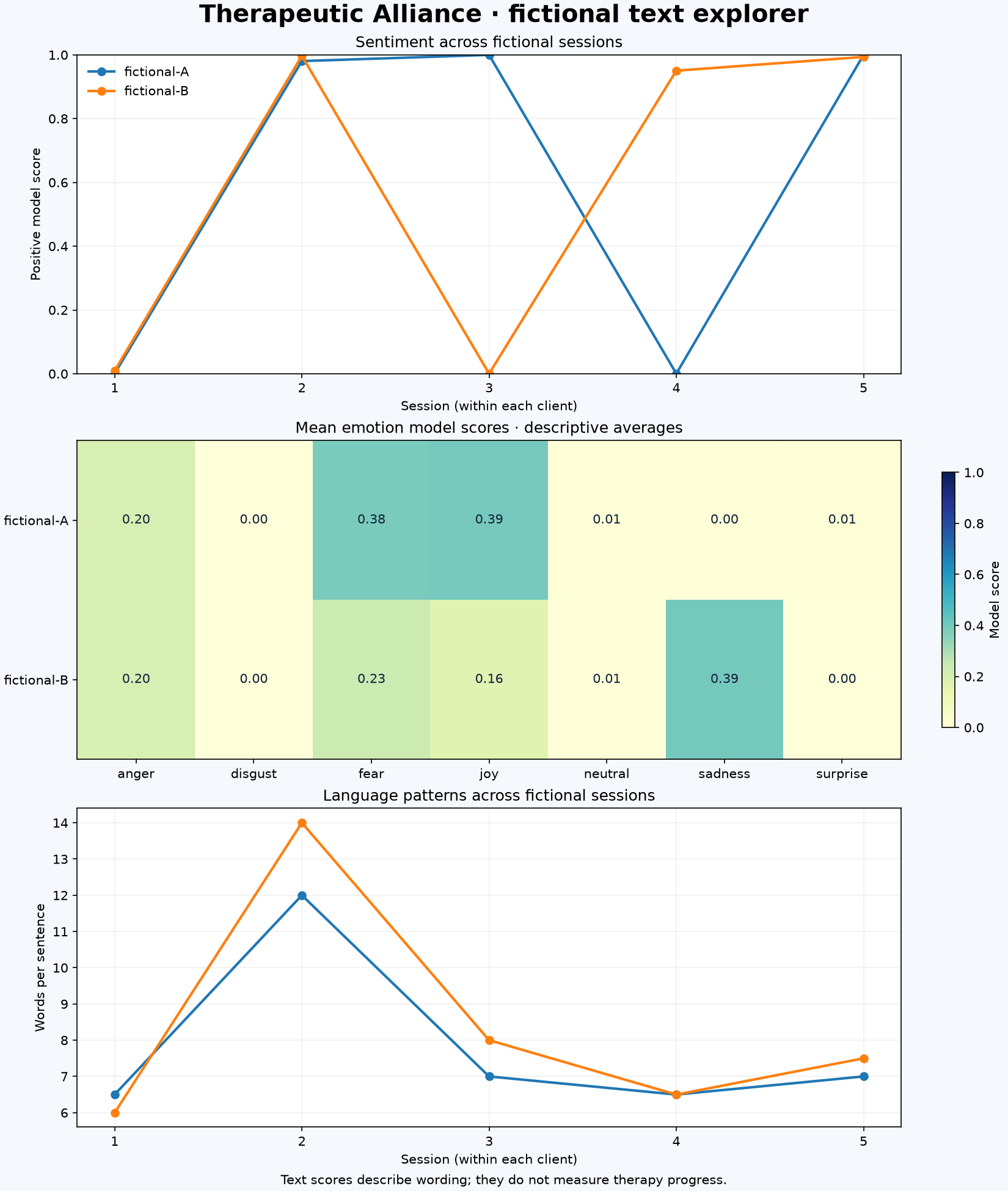
Figure 2. Example dashboard from fictional sessions. The scores and language counts are model outputs and text features, not measures of therapy progress.
Each chart shows a different result. The sentiment chart shows the index we calculated from the model scores. The emotion chart shows the category with the highest score in each session. The other two charts show counts or proportions taken directly from the text.
This dashboard is not a report on someone’s progress in therapy. It only displays the results produced by our code and the models we selected.
Connect the Pipeline
Next, we’ll connect the different parts of the project using a Python class. This gives us one place to start when we want to analyse a single note or several notes.
In analyzer.py:
from src.preprocessor import preprocess_note, extract_linguistic_features from src.sentiment import analyze_sentiment from src.emotions import detect_emotions from src.tracker import build_session_timeline, describe_sentiment_shift class TherapyNoteAnalyzer: def analyze_session(self, note_data: dict) -> dict: required = {"session", "client_id", "note"} missing = required - note_data.keys() if missing: raise ValueError(f"Missing required fields: {sorted(missing)}") processed = preprocess_note(note_data["note"]) sentiment = analyze_sentiment(processed["sentences"]) emotions = detect_emotions(processed["sentences"]) linguistic = extract_linguistic_features(note_data["note"]) return { "session": note_data["session"], "client_id": note_data["client_id"], "sentence_count": processed["sentence_count"], "sentiment": sentiment, "emotions": emotions, "linguistic_features": linguistic, "entity_candidates": processed["entities"] } def analyze_all(self, notes: list[dict]) -> dict: if not notes: timeline = build_session_timeline([]) return { "client_id": None, "session_results": [], "timeline": timeline, "sentiment_comparison": describe_sentiment_shift(timeline) } client_ids = {item.get("client_id") for item in notes} if len(client_ids) != 1: raise ValueError( "This example expects notes for one synthetic client at a time" ) results = [self.analyze_session(item) for item in notes] timeline = build_session_timeline(results) return { "client_id": next(iter(client_ids)), "session_results": results, "timeline": timeline, "sentiment_comparison": describe_sentiment_shift(timeline) } Finally, in main.py:
import json from pathlib import Path from analyzer import TherapyNoteAnalyzer from src.visualizer import plot_dashboard def main(): with Path("data/synthetic_notes.json").open(encoding="utf-8") as file: notes = json.load(file) results = TherapyNoteAnalyzer().analyze_all(notes) print(results["timeline"].to_string(index=False)) print("\nDescriptive comparison:", results["sentiment_comparison"]) output = plot_dashboard(results["timeline"]) print(f"\nSaved dashboard to {output}") print("Reminder: these model outputs are exploratory, not clinical assessments.") if __name__ == "__main__": main() Run the project from its root directory:
python main.py The first time you run the script, it will download both Hugging Face models. It will then print a table of the session results and save a dashboard image in the images folder.
The results may differ depending on the model version and how the code is run. Always check the results from your own run. Say what the model predicted, rather than saying what a session “showed” or “revealed”. A model prediction is not proof of what happened.
Test the Project
Testing helps us check whether our functions work with normal inputs and unusual cases, such as empty text. Passing these tests does not prove that a model is accurate or useful in a clinical setting.
For the sentiment and emotion tests, we’ll use fake classifiers that return results we choose in advance. This keeps the tests quick and means we do not need to download the model files.
A simplified sentiment test looks like this:
from src.sentiment import analyze_sentiment class FakeSentiment: def __call__(self, texts, **kwargs): return [ [ {"label": "POSITIVE", "score": 0.8}, {"label": "NEGATIVE", "score": 0.2} ], [ {"label": "POSITIVE", "score": 0.1}, {"label": "NEGATIVE", "score": 0.9} ] ][:len(texts)] def test_sentiment_score_is_positive_minus_negative(): result = analyze_sentiment( ["Good sentence.", "Bad sentence."], classifier=FakeSentiment() ) assert result["sentence_results"][0]["signed_score"] == 0.6 assert result["sentence_results"][1]["signed_score"] == -0.8 FakeSentiment works as a drop-in replacement for the real model because it defines __call__. When Python sees model(clean, ...), it calls model.__call__(clean, ...), so any object with that method behaves like a callable. FakeSentiment.__call__ returns a fixed list of scores regardless of the input text, which means the test checks the calculation logic without downloading the model.
[:len(texts)] slices the return value to match the number of input sentences. This prevents the fake classifier from returning more results than there are inputs, which would cause the zip() in analyze_sentiment to behave unexpectedly.
Passing classifier=FakeSentiment() to analyze_sentiment overrides get_pipeline() for that call. This pattern is called dependency injection: the function accepts its dependency from outside rather than creating it internally, which makes the function easier to test and reuse.
The full project includes tests for empty inputs, sentence splitting, word handling, sentiment score calculations, emotion score summaries, sorting sessions, empty timelines, and checking that required input fields are present.
Run the test suite from the project root:
python -m pytest -q The project archive contains 15 tests, and all 15 passed when the project was checked. Some tests use made-up model results, while others use a small spaCy setup to check selected text-processing steps. These tests do not measure model accuracy, confirm that the emotion labels are correct, or show how the models perform on real therapy notes.
Limitations and Ethical Considerations
Because this project uses therapy-related text, we need to think carefully about privacy, the limits of the models, and the difference between language patterns and a professional clinical assessment.
General-domain models are not clinical models
The DistilBERT model was trained on SST-2, not on therapy notes. The DistilRoBERTa model was trained on a mix of general English text. We do not know how well either model works on clinical notes unless it is tested separately using suitable data and clear labels. The models may also handle formal writing, writing by people who speak English as an additional language, and different cultural ways of expressing distress poorly. Their training data was not designed to cover all these situations.
Sentiment is not therapeutic progress
A positive sentence does not prove that a client is getting better. A negative sentence does not prove that therapy is failing. A note may contain the therapist’s view, the client’s own words, a difficult event, or a mix of these. The model may not be able to tell the difference.
Linguistic features are not psychological diagnoses
Pronoun counts and hedging phrases are simple features found in the text. A change in these counts does not prove that a client is withdrawing, avoiding a topic, losing trust, or having a problem with the therapist. We removed the rupture score from an earlier version of this project because its scoring rules and alert level had not been tested or approved for clinical use.
Privacy requirements depend on jurisdiction
In the United States, HIPAA applies to certain healthcare organisations and their business partners. Other countries have their own data protection and healthcare privacy laws. Before using real records, an organisation must check the laws that apply, its own policies, the legal reason for using the data, any required consent, the services and vendors involved, security measures, and how long the data will be kept. This tutorial is not a substitute for that review. Even if HIPAA does not apply where you live, that does not mean it is safe or ethical to process real therapy notes.
Human oversight and transparency
This project is not made for clinical decisions, and it should not be used as the basis for them. Any NLP tool considered for real healthcare work would need to be tested for that specific setting. It would also need privacy and bias reviews, clear documentation, and oversight from qualified professionals. People whose information is used should be told about it as required by the relevant rules.
Conclusion and Further Learning
In this project, we built an NLP workflow with spaCy, Hugging Face Transformers, pandas, and Matplotlib. Using fictional therapy notes, we showed how to split text into sentences, classify sentiment and emotion, count language features, compare sessions, create charts, and test the code.
NLP can help turn large amounts of written text into data that we can organise and explore. But the results have limits, especially when we use a general-purpose model on a sensitive type of text it was not trained or tested to understand.
If you want to build on this project, here are a few ideas:
Try different sentiment models and compare their predictions. Note where they agree and where they differ.
Before making claims about model performance, create a dataset with human-checked labels and get the proper ethical approval to use it.
If you have correct labels to compare against, use measures such as precision, recall, F1-score, and a confusion matrix to check the model’s results.
Explore clinical NLP tools such as scispaCy. Remember that tools designed for medical text still need to be tested for the task you want to use them for.
Build a Streamlit app that lets people try the project with fictional examples only.
To learn more, read the spaCy documentation, the DistilBERT sentiment model card, and the DistilRoBERTa emotion model card. You can also read Edward S. Bordin’s 1979 paper, “The Generalizability of the Psychoanalytic Concept of the Working Alliance”, for background on the working relationship between a therapist and client.
NLP can help us study large amounts of text. But using it responsibly means understanding the data, knowing what a model was trained to do, and being clear about what its results cannot tell us.
If you'd like to explore the project further, you can check out the GitHub repository. I've included the code and project structure there, so you can see how everything works. It's also a good starting point if you're curious about how Python and NLP apply to areas like healthcare, health tech, clinical NLP, and AI. There's still a lot to explore in this space, and I hope the project gives you a few ideas to build on.
References
- Bordin, E. S. (1979). The generalizability of the psychoanalytic concept of the working alliance. Psychotherapy: Theory, Research & Practice, 16(3), 252–260. https://doi.org/10.1037/h0085885
- Hartmann, J. (2022). Emotion English DistilRoBERTa-base. Hugging Face Model Hub.
- Hugging Face. (n.d.). DistilBERT base uncased fine-tuned on SST-2. Hugging Face Model Hub.
- Hugging Face. (n.d.). Transformers documentation. https://huggingface.co/docs/transformers.
- Matplotlib Development Team. (n.d.). Matplotlib documentation. https://matplotlib.org/stable/.
- pandas. (n.d.). pandas documentation. https://pandas.pydata.org/docs/.
- pytest Development Team. (n.d.). pytest documentation. https://docs.pytest.org/.
- Sanh, V., Debut, L., Chaumond, J., & Wolf, T. (2019). DistilBERT, a distilled version of BERT: Smaller, faster, cheaper and lighter. arXiv:1910.01108.
- spaCy. (n.d.). Usage documentation: Language processing pipelines. https://spacy.io/usage/processing-pipelines.


